

What if your next slide deck didn’t just relay information but actually secured the deal before you reached the final slide? In a high-stakes corporate environment, your visual narrative is often the difference between a project getting the green light or being lost in the noise. We’ve all felt the frustration of staring at a blank screen or wasting hours manually tweaking alignment and fonts. It’s exhausting to have world-class data trapped in a mediocre design. Using premium business presentation templates is no longer just a shortcut; it’s a strategic move to ensure your insights carry the weight they deserve.
This 2026 professional guide promises to transform you from a manual formatter into a high-impact visual storyteller. You’ll discover how to blend complex data with sophisticated design to drive results and earn positive stakeholder feedback every time you present. We’re going to dive into the essential elements of modern slide architecture, from seamless Excel integration to maintaining brand consistency across your entire team. Get ready to reclaim your time and step into your next meeting with the confidence of a global leader who knows how to shine.
Key Takeaways
- Learn how to leverage professional frameworks to bridge the gap between raw data and executive decision-making.
- Master the essential slide hierarchy and use infographics to transform complex business processes into clear, persuasive narratives.
- Discover why premium business presentation templates offer the superior data integration and lifetime updates required for high-stakes 2026 environments.
- Gain strategies for matching your template’s technical register to your audience to ensure your message resonates and drives action.
- Explore the transition from static charts to interactive dashboard snapshots using advanced Excel and Power BI integration.
The Strategic Role of Business Presentation Templates in 2026
Think of business presentation templates as more than just a decorative background for your bullet points. They are sophisticated, pre-designed frameworks built for professional storytelling. When we examine the history of presentation software, it becomes obvious that we’ve moved far beyond simple digital slides. In 2026, visual communication is a non-negotiable requirement for stakeholder engagement. Your audience expects more than just text; they want a narrative that bridges the gap between raw numbers and executive action. High-quality design has a profound psychological impact on how your message is received. It signals authority and competence, building immediate trust with your audience before you even finish your introduction.
Why “Free” Often Costs More in Business
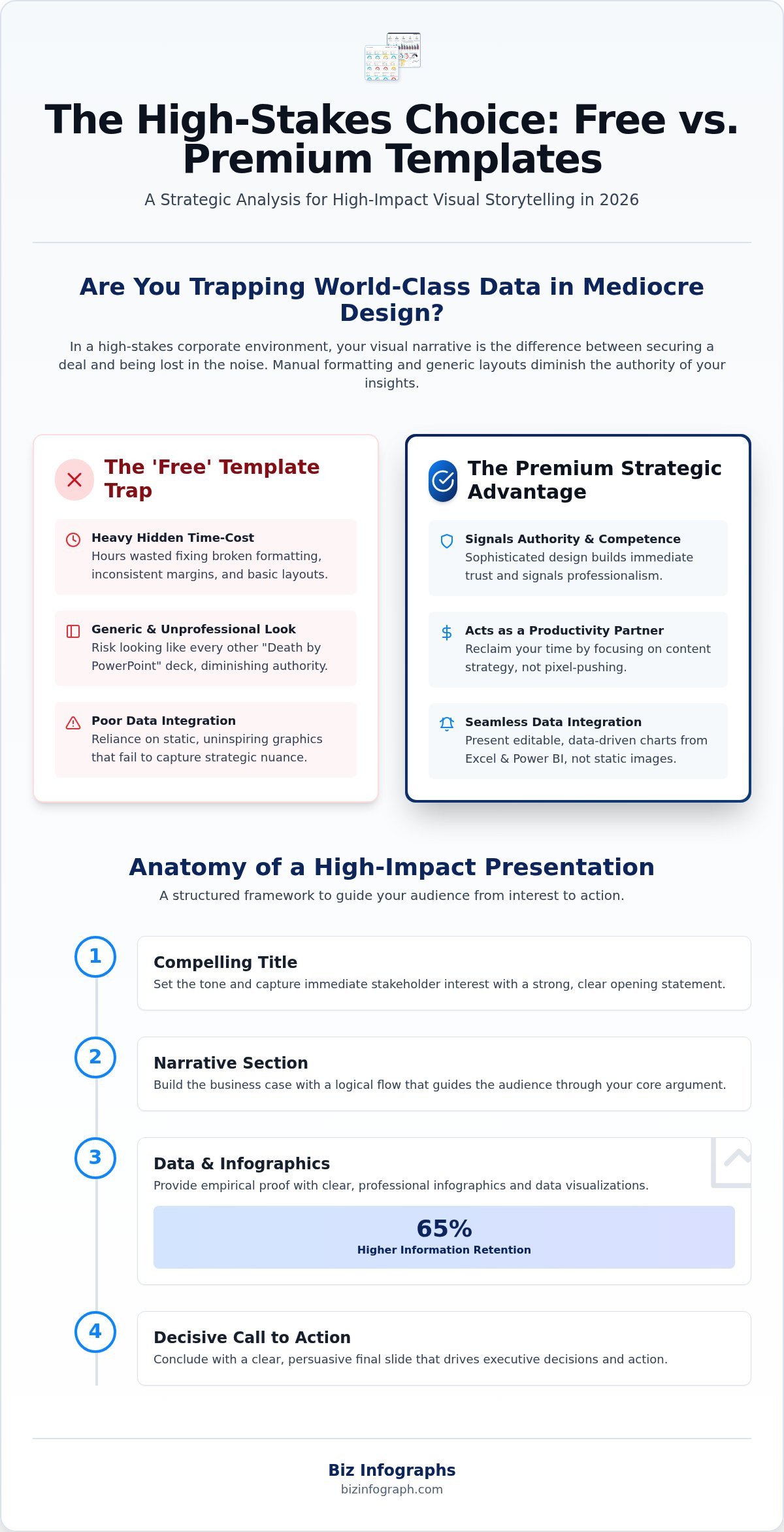
Is a free download actually saving you money? In a professional setting, “free” often carries a heavy hidden time-cost. You’ll likely spend hours fixing broken formatting, adjusting inconsistent margins, or trying to make a basic layout fit a complex data set. This manual effort is a drain on your most valuable resource: time. There is also the significant risk of looking generic. If your deck looks like every other “Death by PowerPoint” presentation, your authority takes a hit. Free assets rarely offer the deep data visualization capabilities required for modern business, often forcing you to rely on static, uninspiring graphics that fail to capture the nuance of your strategy.
Templates as Strategic Productivity Partners
The right business presentation templates act as your productivity partners. They eliminate the “blank slide syndrome” by providing a logical flow for your ideas. This structure allows you to focus your energy on content strategy rather than pixel-pushing. For teams, templates are essential for maintaining consistent branding across every department, ensuring a polished and unified corporate identity. We are seeing a massive shift from static slides to dynamic, data-driven visualization. By using professional frameworks, you can seamlessly integrate complex data into persuasive narratives that command attention. This transformation turns a common professional frustration into a source of personal pride, allowing you to shine in front of any audience with confidence and relief.
Anatomy of High-Impact Business Presentation Templates
High-performance business presentation templates aren’t just collections of pretty slides; they’re engineered frameworks designed to guide an audience through a logical journey. To command a room in 2026, your deck needs a clear structural hierarchy. This starts with a compelling Title slide that sets the tone, followed by a Narrative section that builds the business case. From there, you present the Data to provide empirical proof, and finally, you conclude with a decisive Call to Action. Without this skeletal structure, even the most beautiful designs fail to convert interest into executive decisions. Professional polish comes from the details. Using high-resolution icons and vector assets ensures your visuals stay crisp on large boardroom 4K displays, while thoughtful color theory and typography choices ensure your content remains readable even in challenging lighting conditions.
The Power of Professional Infographics
Infographics are the secret weapon of elite presenters. They allow you to transform dense, boring bullet points into engaging visual journeys that stakeholders can follow at a glance. An infographic is a cognitive tool that increases information retention by up to 65%. When you use PowerPoint infographic templates to explain complex workflows or supply chain logistics, you’re making it easier for your audience to say “yes.” Instead of forcing them to read through paragraphs of text, you provide a visual map that highlights the most critical path. For projects with a chronological component, a well-crafted timeline infographic template can transform complex project histories and roadmaps into a compelling visual narrative that stakeholders can follow at a glance. This efficiency is why top-tier professionals rely on specialized assets rather than generic, built-in software shapes.
Data Visualization vs. Decoration
A common mistake is treating charts as decoration rather than functional tools. In a professional setting, your charts must be editable and data-driven. Static images of graphs are a liability because they prevent you from making real-time adjustments if a stakeholder asks a “what if” question. Effective data visualization also relies heavily on the strategic use of white space. By leaving breathing room around your charts, you prevent audience cognitive overload and keep the focus on the primary insight. Every data-heavy slide should include a dedicated “Key Takeaway” box. This ensures your core message is never lost in the numbers. Mastering these killer presentation techniques helps you maintain control of the narrative. If you want to ensure your next deck meets these high standards, investing in professional infographic templates can provide the high-end finish your data deserves.
Free vs. Premium Business Presentation Templates: A Comparative Analysis
Choosing the right foundation for your deck depends entirely on your specific business objective. While the market is flooded with options, the distinction between community-driven freebies and professional assets often comes down to three pillars: customization depth, data integration, and ongoing support. Premium business presentation templates provide a significantly higher design floor, ensuring that even if you aren’t a graphic artist, your slides never dip below executive-grade quality. By reducing technical friction, these assets empower non-designers to produce results that previously required a dedicated creative department. You don’t have to worry about broken aspect ratios or non-standard fonts that don’t display correctly on a client’s machine. In a fast-evolving software environment, the value of free lifetime updates cannot be overstated. When software providers update their platforms, premium templates are refreshed to maintain compatibility, preventing your hard work from breaking overnight.
When to Use Free Templates
Free templates have their place in the modern office. They’re excellent for low-stakes internal updates or casual brainstorming sessions where the goal is simply to get ideas onto a screen. If you’re working on an educational project with no budget or strict brand requirements, a basic community template serves its purpose. These are best used for quick mockups where design polish is secondary to speed. However, once the audience shifts to external stakeholders or senior leadership, the limitations of free assets become a strategic liability that can undermine your authority.
The ROI of Premium Business Assets
Investing in professional assets is a calculated move to maximize your return on effort. When you’re trying to win an investor pitch, best-in-class visual standards aren’t optional; they’re expected. Premium assets reduce technical friction by providing pre-built modules for specialized business niches like HR, Finance, and Sales. You can save hours of manual labor by utilizing interactive Excel dashboard templates that sync perfectly with your slides. For revenue-focused teams, a dedicated sales dashboard template can eliminate hours of manual reporting and transform raw pipeline data into boardroom-ready insights. This synergy allows you to focus on high-level strategy while the template handles the heavy lifting of visualization. This isn’t just about aesthetics; it’s about reclaiming your time and ensuring every deck you produce reflects the high-performance nature of your brand. It’s the difference between a presentation that merely informs and one that truly commands the room.
How to Customize Your Presentation for Maximum Audience Engagement
Mastering your core message is the essential first step before you even open your chosen business presentation templates. Design should always serve the story, not the other way around. Once your narrative is solid, select a template style that matches your audience’s technical register. A room full of data scientists will appreciate detailed charts and technical layouts, while a creative board might respond better to high-impact imagery and minimalist text. Don’t forget to customize the colors and fonts to align strictly with your corporate branding guidelines. This consistency builds trust and reinforces professional authority. Finally, perform a visual hierarchy audit on every slide. Ask yourself: what is the single most important piece of information here? Ensure the design directs the eye to that point first, using scale and color to highlight key insights.
Tailoring the Narrative Arc
Your template should mirror your strategic approach, whether you’re using a “Problem-Solution” framework or an “Opportunity-Action” model. Use transition slides as intentional breathing room to reset audience attention before moving to a new topic. It’s a proven reality in the boardroom that the first 60 seconds of a presentation determine 80% of its success. If you don’t hook them with a clear value proposition immediately, the rest of your deck is uphill work. Rehearse with your transitions to ensure the flow feels natural and authoritative, allowing you to move through your points with the confidence of a seasoned specialist.
Optimizing for Different Delivery Formats
The environment dictates the design. If you’re presenting in a large conference hall, increase your font sizes and simplify your visuals to ensure clarity from the back row. Conversely, for virtual meetings, ensure your layouts are clean and mobile-friendly for those viewing on tablets or smartphones. Many high-stakes deals require a “Leave-Behind” PDF version of your deck. This version should include more detailed text and context that might be too dense for a live screen but is perfect for a stakeholder’s deep dive later. To ensure your next deck is perfectly tailored for impact, browse our collection of professional slide templates and start your journey toward effortless, high-quality results.
Beyond the Slide: Integrating Data Dashboards into Your Strategy
In the high-stakes environment of 2026, a slide deck should never be an isolated island of information. To truly command a room, you must leverage the powerful synergy between your business presentation templates and a broader live data reporting ecosystem. Static, non-editable charts are rapidly being replaced by interactive dashboard snapshots that provide a window into real-time performance. Why present yesterday’s numbers when you can showcase live insights? By using Biz Infographs as your primary source for these integrated tools, you ensure that your visual narrative is always backed by empirical, up-to-the-minute proof. You can seamlessly use Excel dashboard templates to feed your presentation slides, ensuring that your data remains the hero of the story without the need for constant manual updates.
The Power of Integrated Reporting
Imagine the relief of knowing your charts are always accurate. By linking your Excel data directly to your PowerPoint slides, you eliminate the risk of transcription errors and save hours of repetitive labor. This automation is a game-changer for recurring monthly reports or quarterly business reviews. For sales teams in particular, leveraging a purpose-built sales dashboard template means you can walk into any leadership meeting with live pipeline metrics and revenue forecasts that update automatically. For those moments that require an executive-level deep dive, incorporating Power BI dashboard templates allows you to pivot and filter data during the meeting itself. This level of technical sophistication transforms you from a standard presenter into an expert facilitator who can answer complex stakeholder questions on the fly. It’s about moving away from “telling” a story and toward “exploring” a strategy together with your audience.
Future-Proofing Your Professional Toolkit
Success in the modern corporate landscape requires a permanent “Visual-First” mindset. This isn’t just a temporary trend; it’s a fundamental shift in how business intelligence is consumed. Building your own personal library of high-impact assets is a strategic investment in your own career growth. When you consistently deliver polished, data-driven results, you establish yourself as a leader who values excellence and efficiency. Using professional business presentation templates as your foundation allows you to focus on high-level content strategy while the design handles the heavy lifting of engagement. You possess the authority to drive results; your tools should reflect that. Empower your next presentation with Biz Infographs and step into your next meeting with the confidence that only best-in-class design can provide.
Elevate Your Professional Narrative for 2026
Are you ready to transform your next high-stakes meeting into a decisive victory? You’ve learned that a presentation is more than just a deck; it’s a strategic asset that bridges the gap between raw data and executive action. By mastering the hierarchy of narrative and data, you can eliminate the struggle of manual formatting and focus on what truly matters: your strategy. Choosing the right business presentation templates ensures your visual story remains consistent, professional, and impactful across every platform.
Integrating live data dashboards and sophisticated infographics allows you to present with an authority that commands respect. Don’t settle for generic designs that dilute your message. Instead, adopt a visual-first mindset that positions you as a productivity leader in your field. Expert-designed for maximum data impact, our tools help you reclaim your time and your confidence while delivering outstanding results.
Browse Professional Business Presentation Templates at Biz Infographs and discover why we’ve been trusted by professionals worldwide for over a decade. All our purchases include free lifetime updates to ensure your reporting ecosystem stays ahead of the curve. It’s time to stop pixel-pushing and start shining. Your audience is waiting for a narrative they can believe in.
Frequently Asked Questions
What makes a business presentation template “professional”?
A professional business presentation template is defined by its data-driven hierarchy and high-resolution vector assets. It goes beyond simple aesthetics to provide a strategic framework for storytelling. These templates prioritize readability and executive-grade clarity, ensuring that complex information is accessible to stakeholders. Unlike basic community options, professional assets are engineered with specific business objectives in mind, such as winning investor pitches or delivering annual reports with authority.
Can I use these templates in both PowerPoint and Google Slides?
Yes, you can typically use these templates in both platforms. While our primary focus is on PowerPoint due to its advanced data visualization capabilities, the files are designed for high compatibility. You can easily import the PowerPoint files into Google Slides to collaborate with your team. However, to maintain the most sophisticated animations and interactive data features, we recommend using the native Microsoft 365 environment for high-stakes boardroom deliveries.
How do I choose between an infographic template and a dashboard?
Your choice depends on the specific goal of your communication. Use an infographic template when you need to explain a complex workflow, a supply chain process, or a narrative timeline. These are best for “telling a story.” Conversely, choose a dashboard template when your audience needs to monitor KPIs or analyze live financial performance. Dashboards are productivity partners designed for deep dives into raw data and executive-level decision-making.
Do I need advanced design skills to customize these templates?
You don’t need any advanced design skills to achieve a high-end look. Our business presentation templates are built for busy professionals who want to eliminate the struggle of manual pixel-pushing. Each slide is a pre-designed framework where you simply drop in your text and data. This allows you to focus your energy on content strategy and delivery rather than worrying about layout, alignment, or font choices.
Are these templates compatible with the latest versions of Microsoft 365?
Absolutely. All our digital assets are fully compatible with the latest versions of Microsoft 365, including PowerPoint, Excel, and Power BI. We ensure that our frameworks leverage the most modern software features to provide a seamless user experience. Additionally, our commitment to free lifetime updates means that as Microsoft rolls out new software improvements, your templates will continue to function perfectly without any extra cost or effort.
How do I ensure my presentation remains on-brand while using a template?
Maintaining brand consistency is straightforward when using professional frameworks. You can easily customize the master slide settings to align with your corporate branding guidelines. By updating the theme colors and selecting your official company fonts, the entire deck will reflect your brand identity instantly. This ensures a unified and polished look across all departments, which is essential for building trust and authority with internal and external stakeholders alike.
What is the best way to present complex financial data visually?
The most effective method is using editable, data-driven Excel charts that integrate directly into your slides. Avoid static images that can’t be adjusted. Instead, use a visual hierarchy that highlights the most critical numbers first. Every data-heavy slide should include a “Key Takeaway” box to summarize the primary insight for your audience. This prevents cognitive overload and ensures your core financial message remains clear during high-pressure reviews.
How often are the templates updated for new design trends?
We monitor global design and software trends constantly to keep our assets at the cutting edge. Our business presentation templates are refreshed regularly to incorporate the latest visualization techniques and technical requirements. Because we offer free lifetime updates on all purchases, you’ll always have access to the most modern versions of your tools. This future-proofs your professional toolkit, allowing you to consistently shine in front of your audience with best-in-class standards.
19 replies on “Mastering Business Presentation Templates: The 2026 Professional Guide”
[…] pre-aligned structures that guarantee a clean, premium look every time. By leveraging high-quality business presentation templates, you ensure that your brand remains consistent across different departments and projects. This […]
[…] functional design where every element serves a specific purpose in the story. Using high-quality business presentation templates allows you to meet these expectations effortlessly. These tools are designed to be […]
[…] This guides the viewer’s eye naturally from one milestone to the next. High-quality business presentation templates serve as the foundation for this modern reporting style, allowing you to shine without spending […]
[…] things to do than spend three hours trying to align arrows or find the right icon. Leveraging business presentation templates gives you a best-in-class shortcut to a polished result. It’s the ultimate productivity […]
[…] instantly. To maintain a sophisticated brand image, you should link these live data visuals to your business presentation templates. This ensures a unified, “best-in-class” look that makes you shine in every boardroom […]
[…] tools can’t always match. Perhaps most importantly, these timelines integrate seamlessly into business presentation templates, making it effortless to move from a working document to a high-stakes board meeting without losing […]
[…] with a story that guides the investor’s focus. It’s also the best choice for creating business presentation templates for internal alignment meetings. The primary advantage here is universal compatibility; it […]
[…] decks, and internal training sessions where a linear flow is essential. By utilizing professional business presentation templates, you maintain brand consistency while focusing on the impact of a “single-slide” […]
[…] happens when mixing multiple sources. If you want to dive deeper into the technical side, consider mastering business presentation templates to ensure your technical execution matches your strategic vision. Using professional executive […]
[…] and sophisticated font choices to improve readability and reduce cognitive strain. When you use business presentation templates designed by experts, you aren’t just making things look “pretty.” You’re […]
[…] graphic design. By using theme colors, you can instantly align your SWOT slides with your broader business presentation templates. This creates a cohesive look across your entire deck, which is vital for maintaining executive […]
[…] obvious. To maintain these high standards across every department, many organizations now integrate Business Presentation Templates into their daily workflows. This ensures that whether you’re presenting a quarterly review or […]
[…] while maintaining total data integrity. If you’re looking to elevate your entire deck, mastering business presentation templates is the next logical step in your professional development. It’s time to stop nudging shapes […]
[…] into a narrative arc that guides the viewer from a problem to a solution. By using high-quality business presentation templates, you can use infographics to simplify multi-layered concepts that would otherwise be overwhelming. […]
[…] meeting, the aesthetics of your report speak volumes before you even open your mouth. High-impact business presentation templates provide a level of polish that free, generic sheets simply can’t match. Research from […]
[…] and when teams expect measurable returns. You can streamline this storytelling process by mastering business presentation templates, which help maintain rigorous visual hierarchy and logical narrative pacing across […]
[…] around effects instead of shaping a useful story. A consistent starting layout can save setup time. Business presentation templates can help establish a structure you can adapt to your own message. Treat the layout as a framework, […]
[…] in a structured visual format. For broader criteria that apply across presentation types, the business presentation templates guide offers additional selection […]
[…] while each chart still needs to suit its data. If you’re building a wider business deck, business presentation templates can offer ideas for a consistent look beyond a single data slide. Keep the design system […]