

What if the right starting point for a sales deck isn’t a blank slide, but a template built for the conversation you’re about to have? Building a persuasive pitch from scratch takes time, and a generic layout can leave buyers unsure what matters. The best sales presentation templates give your story structure without making every sales conversation feel interchangeable.
Which slides belong in a pitch, product demo, or proposal depends on your audience and sales moment. Choose a template that helps you explain the buyer’s challenge, show relevant benefits and proof, and make the next step clear. The layout should leave room to tailor the message to the people in the room.
This guide compares template types by sales use, story flow, and ease of editing. You’ll learn how to select a fitting deck, organize slides into a logical narrative, and use visuals to clarify key points. With a ready-made structure, you can spend less time formatting and more time refining a focused sales message that feels distinctly yours.
Key Takeaways
- Choose sales presentation templates to match the buyer, sales moment, and message you need to deliver.
- Evaluate a deck by audience fit, story sequence, visual hierarchy, and adaptability, not by how many layouts it contains.
- Match your slide sequence to the conversation, whether you’re introducing an offer, explaining a solution, presenting a proposal, or sharing data.
- Customize placeholders with buyer-specific challenges, benefits, and evidence to make the story relevant and persuasive.
- Use a ready-made template to save setup time, while bringing the sales insight that makes the presentation your own.
What Sales Presentation Templates Do for Different Selling Moments
A sales presentation template is a reusable slide structure for explaining an offer, showing its value, and guiding an audience toward a decision. It provides a starting sequence and visual framework, so you can focus on the buyer’s situation instead of arranging every slide from scratch. Keep the structure consistent, but make the message specific to the person or team in front of you.
A sales presentation template gives you a clear structure for a specific buyer conversation without requiring you to build every slide from a blank page.
That buyer focus sets a sales deck apart from a general business presentation. A company update might share information with employees, while a sales deck addresses a particular audience, a decision they’re considering, and a next step you want them to take. The broader purpose of a Sales presentation can vary by format, so choose slides to serve the conversation rather than treating every deck as a one-size-fits-all pitch.
Fit-for-purpose sales presentation templates reduce setup work while leaving room to tailor examples, proof, and language. PowerPoint infographic templates can also make a comparison or data point easier to follow, provided the visual answers a question the buyer actually has.
Which sales presentation format fits the conversation?
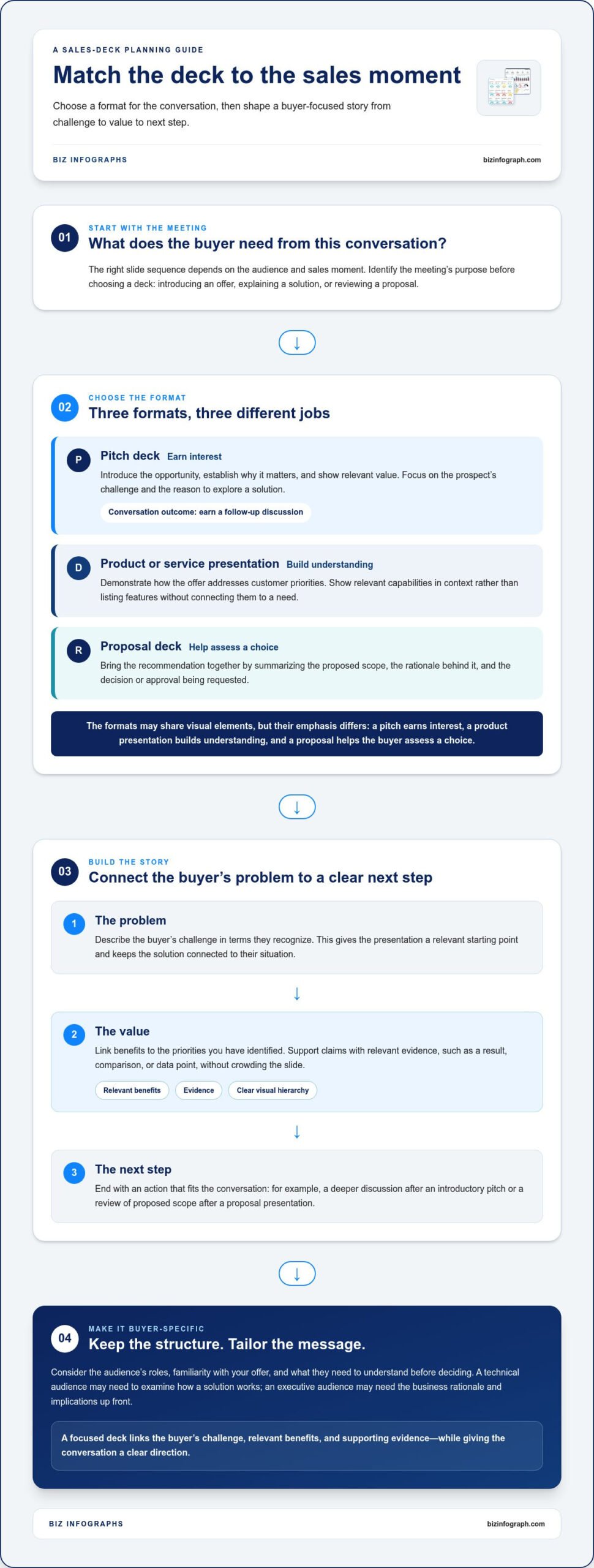
Start with what the buyer needs from the meeting. A first conversation calls for a different story than a product walkthrough or formal proposal. Match the deck’s purpose to the sales moment:
- Pitch deck: Introduce the opportunity, establish why it matters, and show enough relevant value to earn a follow-up conversation. Focus on the prospect’s challenge and the reason to explore a solution.
- Product or service presentation: Demonstrate how the offer addresses customer priorities. Show relevant capabilities in context instead of listing features without connecting them to a need.
- Proposal deck: Bring the recommendation together by summarizing the proposed scope, the rationale behind it, and the decision or approval you’re requesting.
These formats can share visual elements, but their emphasis differs. A pitch earns interest, a product presentation builds understanding, and a proposal helps the buyer assess a choice.
What should a sales deck help the audience understand?
Whatever the format, make the story easy to follow. A useful sequence connects the buyer’s problem to your recommendation, then shows why the offer deserves consideration. Before polishing individual slides, check that each one advances this logic.
- The problem: Describe the buyer’s challenge in terms they recognize. This gives the presentation a relevant starting point and keeps the solution from feeling disconnected.
- The value: Link benefits to the priorities you’ve identified. Support claims with relevant evidence, such as a result, comparison, or data point, without crowding the slide.
- The next step: End with an action that fits the conversation, such as scheduling a deeper discussion after an introductory pitch or reviewing a proposed scope after a proposal presentation.
When the audience can see the problem, understand the value, and identify what happens next, the deck becomes more than a polished set of slides. It gives the sales conversation a practical structure and a clear direction.
How to Evaluate Sales Presentation Templates Before You Choose
A template can look polished and still be the wrong fit for your sales conversation. Before choosing among sales presentation templates, test how well each one supports the buyer, the decision you’re working toward, and the evidence you need to present. A large library of layouts may look appealing, but relevant slide types matter more than sheer quantity. A focused set of layouts is easier to shape into a cohesive deck than a sprawling collection that doesn’t match your objective.
Choose a sales deck template for audience fit, a logical narrative, clear visual hierarchy, and the flexibility to present your message and evidence.
Does the template match your audience and sales objective?
Begin with the people in the room. Consider their roles, how familiar they are with your offer, and what they need to understand before making a decision. A technical audience may need a clear way to examine how a solution works, while an executive audience may need the business rationale and implications up front. The template should help you prioritize the information that matters to those buyers.
Next, match the layout to the meeting’s purpose: discovery, pitching, product explanation, or proposal review. Look for slide types that support that purpose, such as a place to frame a challenge, compare options, or explain a recommendation. Remove slides that don’t move the buyer toward the intended decision. More slides don’t automatically make a stronger case.
Use this compact checklist to compare options:
- Audience fit: Can the deck foreground the concerns and knowledge level of the people you’re presenting to?
- Narrative sequence: Can you arrange the story so the problem, recommendation, benefits, and evidence connect clearly?
- Visual hierarchy: Can the audience quickly distinguish the key message from supporting detail?
- Adaptability: Can you adjust content and emphasis without forcing your story into unsuitable layouts?
Can you adapt the slides to your brand and message?
Check whether you can tailor text, imagery, and visual emphasis to the specific customer, rather than simply swapping a logo into a generic deck. For example, a comparison slide should make relevant differences easy to scan. A proof slide should give a customer result or supporting data enough space to be understood. If evidence has to compete with decorative graphics, the layout may obscure the point you need to make.
Consider whether the template’s visual style can support a consistent, professional story across the deck. PowerPoint infographic templates can help present process steps, comparisons, or data-led points in a structured visual format. For broader criteria that apply across presentation types, the business presentation templates guide offers additional selection context.
Before settling on a template, place a real slide from your sales story into one of its layouts. Can a buyer grasp the key point quickly? Can you include the proof without overcrowding the slide? If so, the design is helping the message instead of competing with it. For a ready-made visual starting point, explore PowerPoint infographic templates and consider how their layouts could support your sales story.
Sales Presentation Template Formats Compared by Use Case
The right deck depends on what the buyer needs to understand at this stage, not on a universal “best” format. An introductory conversation may call for a short story that earns interest, while a later meeting may need product details or a recommendation the buyer can evaluate. Use the comparison below to match sales presentation templates to the situation and the takeaway you want the audience to leave with.
| Sales situation | Useful slide sequence | Primary audience takeaway |
|---|---|---|
| Introductory pitch | Buyer challenge, opportunity, relevant value, reason to continue | “This is worth exploring further.” |
| Product or service overview | Customer need, relevant capabilities, example or proof, practical fit | “I understand how this could help.” |
| Proposal | Buyer priorities, recommended approach, scope, rationale, requested decision | “I can assess this recommendation and what happens next.” |
| Data-led presentation | Business question, key metric, comparison or trend, implication, action | “The evidence supports this conclusion or next step.” |
Pitch, product overview, or proposal: how do they differ?
A pitch is opportunity-focused. It introduces a relevant problem and makes a concise case for a follow-up, without overwhelming a new audience with details they can’t yet place. A product overview goes further, explaining the parts of an offer that matter to the buyer and showing how they address a need. A proposal supports a decision by bringing the buyer’s priorities together with a recommended approach, its scope, and the next step. Add detail as familiarity and commitment grow, not just to fill slides.
For example, a first meeting might need a clear problem-and-opportunity story. If the buyer already understands that context, use the time to explain how the offer fits their needs. In a proposal review, give more space to the recommendation and its rationale. Remove background the audience already knows, and don’t force every conversation into the same sequence.
When does a data-led sales presentation make sense?
Choose a data-led format when a result, comparison, trend, or business case will help the audience assess your recommendation. A chart should answer a buyer-relevant question, such as how two options differ or what a change in performance means. If the point is easier to explain in one sentence, a chart may add clutter instead of clarity. For complex processes or comparisons, PowerPoint infographic templates can provide visual structures that make information easier to follow.
Keep labels readable and make the takeaway explicit. Don’t rely on color, decoration, or a title like “Results” to tell the story. Use a descriptive headline that states the insight, then show only the supporting data needed to understand it. If you’re preparing sales metrics for a wider business view, the sales dashboard template guide offers related context for presenting performance information.
How to Customize a Sales Presentation Template Without Losing the Story
A template gives your deck a visual framework, but the buyer-specific story comes from the choices you make inside it. Start with the conversation’s purpose and audience, then replace every placeholder with information that helps the audience understand the problem, the value of your offer, and the reason to take the next step.
Customize the details to fit the buyer while keeping brand consistency and a clear sales story on every slide.
What content should you prepare before editing slides?
Gather the essentials first: your sales objective, audience context, offer details, and credible supporting evidence. Include data or examples only when they answer likely buyer questions or strengthen the case. Draft slide headlines as conclusions, not generic labels. “The current process creates avoidable delays” gives the audience a point to consider; “Process overview” merely names a topic.
How can you keep a customized deck clear and persuasive?
Follow this workflow to shape sales presentation templates into a focused deck:
- Define the audience. Note who will attend, what they already know, and which priorities should guide the discussion.
- Set the objective. Decide what the audience should understand or do by the end of the presentation.
- Gather the source material. Collect offer details, relevant customer evidence, examples, and data that support the objective.
- Map the story. Arrange the key points so the buyer can follow the connection between their problem, your solution, its benefits, and the evidence.
- Replace the placeholders. Use buyer-specific language and examples. Remove sample claims or visuals that don’t reflect the conversation.
- Refine each slide. Give every slide one principal message. Use consistent typography and restrained colors, and make sure charts or diagrams clarify rather than decorate.
- Review the close. Check that the final call to action suits the meeting, then rehearse transitions between the problem, solution, proof, and next step.
As you edit, treat each slide as part of the larger narrative. If a detail doesn’t answer a buyer question or reinforce the recommendation, cut it or move it to supporting material. If evidence feels cramped, simplify the slide or choose a layout that gives it room. Consistent fonts, color use, and spacing help the deck feel unified, while thoughtful emphasis directs attention to the point that matters.
Read the deck aloud from start to finish. A slide may look polished in isolation but interrupt the story when presented. Check that each transition explains why the next point follows, and that the close asks for a specific, appropriate action rather than ending on a vague “Questions?”
Ready to put a visual framework to work? Explore downloadable PowerPoint infographic templates as a starting point for a polished, buyer-focused deck.
Find Sales Presentation Templates That Help You Present with Confidence
A downloadable template is a practical starting point when your sales conversation follows a familiar structure, but you want to avoid rebuilding slide layouts each time. Pre-made visual elements can reduce repetitive formatting and give you a consistent foundation for organizing the story. That leaves more time to tailor the message, check the evidence, and prepare for the buyer’s questions.
Building from scratch can make sense when the story needs an unusual structure or available layouts don’t support the information you need to explain. Either way, design is only one part of a persuasive deck. A template can help you present the story clearly, but it can’t supply relevant sales insight, buyer context, or credible proof. Those come from understanding the audience and offer.
Why use a ready-made sales presentation template?
With sales presentation templates, you can start with a designed visual framework instead of arranging every title, diagram, and content area yourself. A consistent foundation can also make the deck feel more cohesive, helping buyers focus on your message rather than shifting styles. Keep expectations realistic: a ready-made layout is a starting point, not a finished pitch. Adapt the language, evidence, and emphasis to the audience and the decision at hand.
Biz Infographs offers downloadable digital presentation and infographic templates designed to reduce manual design effort and support professional visual materials. Use the layouts to organize information and give key points a clear visual form, while choosing the content that matters to the buyer. Customers also receive free lifetime updates, an ongoing benefit that doesn’t change the need to shape each presentation around its purpose.
What is the next step after choosing a template?
Start with the sales objective, then look for visual layouts that support its narrative. If your aim is to explain a process, find a way to show its stages clearly. If you need to make a data point easier to understand, choose a visual approach that clarifies the comparison or takeaway. Browse presentation and infographic templates with those needs in mind, and select only the layouts that help you make the case.
Before finalizing the deck, replace sample content, remove slides that don’t serve the conversation, and review the flow from opening to close. Ask whether the buyer can follow the point of each slide and understand the next action you’re proposing. That final review turns a polished design into a more useful sales tool.
Choose a visual starting point that fits your message, then make the story your own. Explore professional presentation templates and start building a sharper sales story.
Make Your Next Sales Conversation Count
Your next deck doesn’t need to say everything about your offer. It needs to help this buyer understand why a particular problem deserves attention and what a sensible next step could look like. Carry that focus into every choice, from the opening slide to the final ask. The strongest sales presentation templates give your thinking a clear frame, while your insight makes the message relevant.
Before you start editing, write down the one idea you want the audience to remember. Use it as a filter: keep the slides that support it, reshape the ones that need buyer context, and leave out anything that pulls attention elsewhere. This discipline can turn a polished presentation into a more confident, purposeful conversation.
Choose a visual foundation that gives your story room to stand out, then make it your own. Explore professional presentation templates and build a sales deck that helps your ideas stand out. You’re ready to present with clarity and confidence.
Frequently Asked Questions
What should a sales presentation include?
A sales presentation should include the information a buyer needs to judge whether your offer fits their situation. Alongside the customer challenge, recommendation, and supporting evidence, consider adding a brief agenda so attendees know what the discussion will cover. For example, a software vendor might show the workflow the buyer wants to improve before explaining its solution. Include a next step that fits the meeting, such as agreeing on a technical review.
How do I choose a sales presentation template?
Choose sales presentation templates by testing one against the actual conversation you need to lead. Sketch the key questions your audience is likely to ask, then see whether the template can accommodate the answers without forcing you to overload the slides. Consider how you’ll present the deck, too: a room presentation may need larger, simpler visuals than a document sent for independent review. A short sample deck can reveal these differences before you build the full presentation.
Are PowerPoint templates suitable for sales presentations?
Yes, PowerPoint templates can work well for sales presentations, whether you’re sharing slides in a meeting or preparing a deck for someone to review later. They provide a familiar slide-based format for combining headlines, visuals, and supporting detail. For instance, use a comparison layout to help a buyer assess two approaches, then add a brief explanation of the trade-offs. Keep text readable and check that the finished deck makes sense without your spoken explanation.
How many slides should a sales presentation have?
There’s no fixed slide count that suits every sales presentation. Let the meeting’s purpose and available time determine how much content to include. For a short introductory conversation, prioritize the essential points and leave deeper details for follow-up. For a proposal review, include enough information to explain the recommendation clearly. Ask whether each slide answers a buyer question or moves the decision forward. If it does neither, remove it or keep it as backup.
What is the difference between a sales pitch deck and a sales proposal?
A sales pitch deck introduces an opportunity and aims to build interest in continuing the conversation. A sales proposal is more specific: it presents a recommendation for a buyer to evaluate, often including the suggested approach, scope, and rationale. For example, a pitch might explain why a challenge matters, while a proposal lays out how you recommend addressing it. The distinction is practical, not just a matter of title: each deck should support a different buyer decision.
Can I customize a sales presentation template for my brand?
Usually, yes. Adapt a template’s visual identity by applying your brand colors, logo, and preferred typography where the layouts allow, then replace sample text and imagery with material suited to your offer. Keep contrast strong and avoid adding so many brand elements that they compete with the message. Before presenting, review charts, labels, and footers for consistency. A branded deck should feel recognizable while remaining easy for the buyer to read and understand.