

What if your technology roadmap clarified the next decision, not just the next deadline? A technology roadmap template can turn strategic priorities into sequenced initiatives, but it is useful only when it shows how each effort supports a goal, who owns it, and how progress will be measured. Without those connections, even a polished timeline can be hard to act on.
A roadmap may need to serve several audiences. Leaders want to see strategic outcomes and trade-offs; delivery teams need milestones, dependencies, and ownership. A well-structured roadmap brings those views together without overwhelming every reader with the same level of detail.
This guide will help you choose a format for planning and communication, then build a practical roadmap with priorities, owners, timelines, dependencies, and measurable outcomes. You’ll also learn how to keep it useful as business needs shift. Whether you need a concise leadership view or a detailed working plan, the goal is a clear roadmap your stakeholders can understand and your teams can use.
Key Takeaways
- A technology roadmap template works best when it separates strategic themes and outcomes from the initiatives and tasks that support them.
- Choose presentation slides, spreadsheets, or dashboard-style views based on the audience and how they will use the roadmap.
- Validate priorities with business stakeholders before adding detailed initiatives, then make ownership, dependencies, and measures visible.
- Review the roadmap regularly and adjust it as priorities change.
- PowerPoint, Excel, and Power BI templates can help present roadmap information clearly while reducing manual design effort.
What a Technology Roadmap Template Does for Strategic Planning
A technology roadmap template is a visual plan that links technology priorities to the initiatives intended to achieve them and the outcomes the business wants. It gives leaders and teams a shared view of why the work matters, how major efforts relate, and what decisions are coming next. Instead of presenting technology projects as isolated requests, a roadmap shows how they support a broader direction.
A roadmap connects business strategy to technical work without suggesting that every delivery date is certain. It can show near-term commitments alongside longer-range priorities, while making clear that sequencing may change as assumptions, resources, or risks evolve. The Technology roadmap overview describes roadmapping as a way to connect technology development with strategic planning. In practice, that connection helps teams discuss direction and trade-offs, not just deadlines.
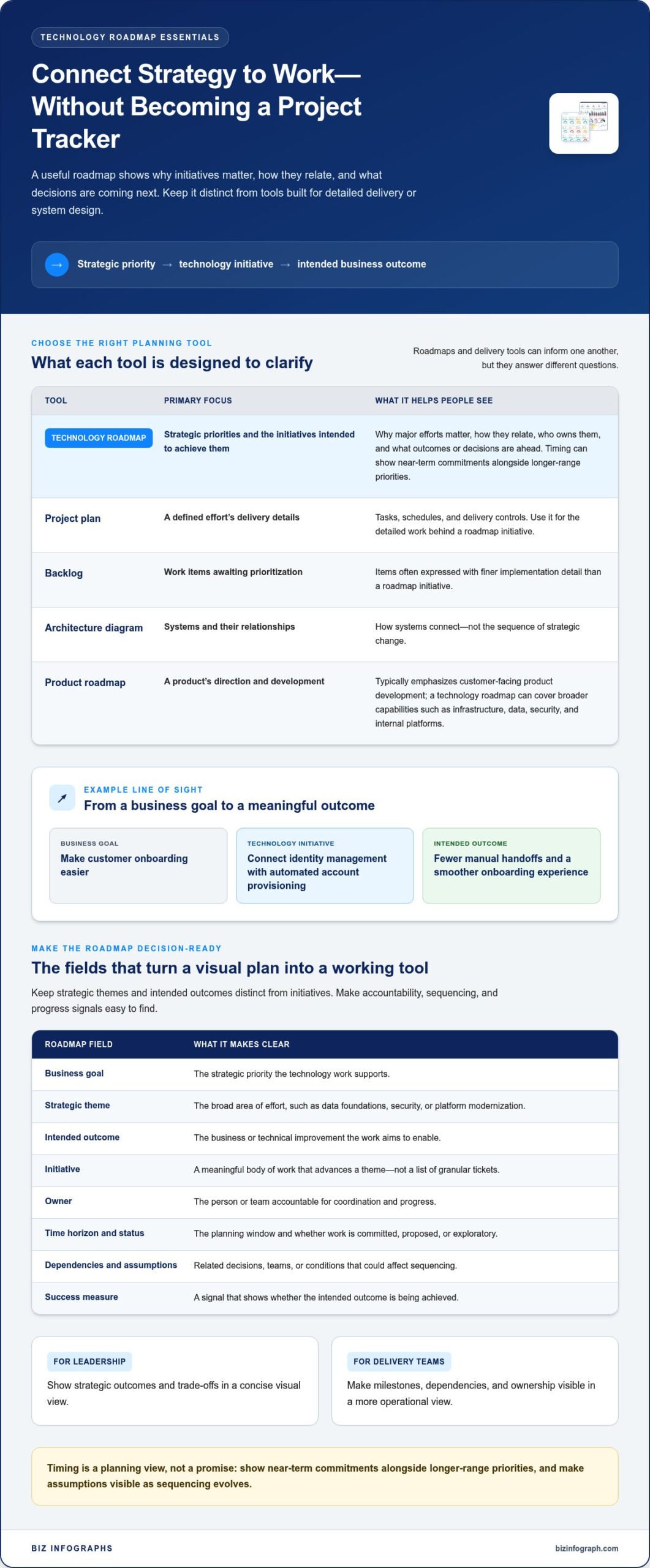
Keep the roadmap distinct from related planning tools. A project plan details tasks, schedules, and delivery controls for a defined effort. A backlog holds work items awaiting prioritization, often with finer implementation detail. An architecture diagram illustrates systems and their relationships, rather than the sequence of strategic change. A product roadmap typically focuses on a product’s direction and customer-facing development; a technology roadmap may cover broader capabilities such as infrastructure, data, security, and internal platforms. These tools can inform one another, but they answer different questions.
For example, if the business wants to make customer onboarding easier, a technology initiative might connect identity management with automated account provisioning. The intended outcome could be fewer manual handoffs and a smoother onboarding experience. The roadmap links the initiative to the goal, while the delivery team determines the detailed work and schedule.
Who uses a technology roadmap, and what decisions does it support?
Technology leaders use roadmaps to connect investment choices to strategic priorities. IT teams use them to understand sequencing, ownership, and dependencies. Executives can compare proposed initiatives against business goals, while cross-functional stakeholders can see where their decisions or resources are needed. The same plan can be presented at different levels of detail: a concise visual for leadership and a more operational view for delivery teams.
What makes a roadmap useful rather than merely attractive?
A strong visual helps, but readability and decision value come first. Make intended outcomes, accountable owners, dependencies, and decision points easy to find. Use clear status labels to distinguish committed work from proposed or exploratory initiatives; otherwise, viewers may mistake an idea for a promise. Choose timelines at a level of precision the team can support, and make assumptions visible so readers understand what could affect the sequence.
A decision-ready technology roadmap makes the purpose, ownership, status, and trade-offs of each major initiative clear enough for stakeholders to choose what happens next. That clarity turns a visual plan into a practical tool for alignment and action.
The Essential Building Blocks of a Technology Roadmap Template
A useful technology roadmap template captures enough context to guide decisions without becoming a project tracker. Each field should answer a practical question: why does this work matter, what will change, who is accountable, and how will the team recognize progress? Keep strategic themes and intended outcomes distinct from initiatives, then connect them clearly.
Use this checklist to shape the template:
- Business goal: The strategic priority the technology work supports.
- Strategic theme: A broad area of effort, such as data foundations, security, or platform modernization.
- Intended outcome: The business or technical improvement the work aims to enable.
- Initiative: A meaningful body of work that advances a theme, rather than a list of granular tickets.
- Owner: The person or team accountable for coordination and progress.
- Time horizon and status: The planning window and whether work is committed, proposed, or exploratory.
- Dependencies and assumptions: Related decisions, teams, or conditions that could affect sequencing.
- Success measure: A signal that shows whether the intended outcome is being achieved.
Translate strategic goals into roadmap themes and initiatives
Start with a business outcome, not a technology purchase. Group related initiatives under a small set of themes so stakeholders can understand the strategy before exploring specific work. Keep initiatives at a level that supports prioritization; detailed tasks belong in delivery plans and backlogs.
For example, a fictional company wants to improve the reliability of internal reporting. Its theme might be trusted data foundations. An initiative could connect key source systems to a shared reporting environment, with improved data freshness as a measurable signal. That line of sight helps stakeholders judge whether the initiative supports the goal, rather than simply adding another technical project.
Represent timing, dependencies, ownership, and measures
Choose time bands such as near term, next phase, and future horizon when precise dates would imply more certainty than the team has. A roadmap is a planning view, not an automatic delivery commitment. Show the accountable owner and cross-team dependencies alongside each initiative, and record assumptions that could change its order or scope. The NIST Cloud Computing Technology Roadmap offers a real-world example of roadmap work organized around high-priority technology requirements.
Measures should reflect outcomes, not just activity. “Complete three integrations” records output; “critical reports use refreshed source data” points toward a capability change. Choose a small number of useful signals, define what they mean, and identify who will review them. This keeps progress conversations focused and makes it easier to adjust the roadmap when assumptions shift.
For a clear presentation of themes, milestones, and decision points, visual planning templates can reduce manual formatting while leaving priorities and measures in your team’s hands.
Choose a Technology Roadmap Template Format for Your Audience
The best technology roadmap template is one people can use to make decisions and understand progress. A leadership meeting, a team planning session, and an ongoing portfolio review call for different views of the same work. Match the format to the audience and task instead of forcing every stakeholder into one level of detail.
Use this comparison to choose a practical starting point:
| Format | Audience | Best use | Strengths | Limitations |
|---|---|---|---|---|
| Presentation slides | Executives, leadership teams, and cross-functional groups | Strategy reviews, decision meetings, and concise roadmap communication | Highlights priorities and relationships in a focused visual story | Less suited to detailed tracking; information can become outdated if maintained manually |
| Spreadsheet | Technology leaders and delivery teams | Maintaining initiatives, owners, status, dependencies, and planning notes | Structured fields are easy to update, sort, and review in detail | Complex sheets can be harder to scan and present clearly |
| Dashboard-style view | Leaders and teams monitoring selected progress signals | Recurring reviews of status, measures, and trends | Surfaces key indicators in a consolidated visual view | Depends on reliable underlying data and may omit useful context |
These formats can work together. A team can maintain detailed planning information in a spreadsheet or another working source, then share a simplified slide or dashboard view with stakeholders. Keep definitions consistent across versions, especially initiative names, status labels, and time horizons. That lets an executive summary stay readable without creating a separate, conflicting version of the plan.
When a presentation roadmap is the strongest fit
Slides work well when the goal is to explain strategic direction, priority choices, and major milestones in a leadership discussion. Limit text, use consistent labels, and establish a clear visual hierarchy so the audience can see the story at a glance. PowerPoint infographic templates can help organize complex information visually, while business presentation templates provide a broader format for a polished presentation.
When a spreadsheet or dashboard view supports ongoing tracking
Choose a spreadsheet when teams need to update structured fields, compare initiatives, or follow ownership and status changes. A dashboard is useful when reviewers need selected progress indicators or trends without scanning every planning detail. Excel dashboard templates and Power BI dashboard templates can support clear reporting views. Select measures that help the audience decide what needs attention, and retain enough context to explain what those signals mean.
Build a Technology Roadmap with This Practical Template Workflow
Turn strategic intent into a roadmap your team can review and act on by moving from outcomes to decisions. A technology roadmap template is most useful when priorities are validated before detailed initiatives are added, and when the plan makes uncertainty visible instead of hiding it behind firm-looking dates.
Populate the template from outcomes to prioritized initiatives
- Define the business outcome. State what the organization wants to improve, such as faster customer onboarding or more reliable reporting. Note the current challenge and choose an outcome measure that can show whether progress is real.
- Validate priorities with stakeholders. Review the goal and its importance with business leaders and affected teams before proposing technical solutions. Confirm that the outcome supports current priorities, and surface competing needs or constraints early.
- Group work into strategic themes. Organize related efforts under clear themes, then describe initiatives as meaningful bodies of work. Keep detailed tasks and tickets in delivery plans, not in the roadmap’s strategic view.
- Make ownership and dependencies visible. Assign an accountable owner to each initiative and record the teams, decisions, or capabilities it relies on. A dependency can affect sequencing even when the initiative itself is a high priority.
- Sequence by value, capacity, and uncertainty. Compare each initiative’s expected contribution to the business outcome with available team capacity and prerequisite work. Mark assumptions and confidence levels so early estimates don’t read as confirmed commitments. Use planning windows when exact dates would imply false precision.
Review, communicate, and adapt the roadmap
- Set a review rhythm. Choose a cadence that fits the organization’s planning cycle, such as aligning reviews with budget discussions or portfolio planning. Revisit assumptions, ownership, dependencies, and measures, not just status labels.
- Record meaningful changes. Note what changed, why it changed, and how the decision affects priorities or sequencing. If a dependency is delayed or capacity shifts, show which initiatives move and what outcome may be affected. This gives stakeholders context instead of leaving them to interpret a changed timeline.
- Share the right level of detail. Create an executive summary that highlights outcomes, priority shifts, major dependencies, and decisions needed. Keep the fuller working version for teams managing initiative details; the summary should simplify the view without removing information needed to maintain it.
Before each review, ask whether the highest-priority initiatives still connect to the outcomes stakeholders agreed matter. This keeps the roadmap decision-ready as business needs and assumptions evolve. Visual template resources can help present the plan with less manual formatting.
Turn Your Roadmap into a Polished, Shareable Technology Plan
A well-chosen template can reduce the effort of arranging information, applying consistent visual styles, and preparing a roadmap for different audiences. It won’t decide which initiatives matter, how work should be sequenced, or what outcomes to measure. Those decisions stay with your team. The right format helps you communicate them clearly.
Match the tool to the task. PowerPoint infographic templates can present priorities and milestones as a focused visual story. Excel templates can support structured planning and ongoing updates, while Power BI templates can display selected progress measures and trends. Biz Infographs offers downloadable templates in these categories, with free lifetime updates for customers.
Assess template quality before adopting a roadmap format
Before using a template, check whether its layout makes the most important information easy to scan. Strategic themes should look distinct from initiatives, and status markers and time horizons should be understandable without lengthy explanation. Review the labels, visual hierarchy, and space available for ownership, dependencies, and notes. A clean design should support the decisions your roadmap needs to communicate, not crowd them out.
Consider how the file will be edited and shared. Can the people maintaining the roadmap update it in the intended format? Can stakeholders understand the summary without losing essential context? A template should make routine updates practical as well as help the first presentation look polished. Treat it as a flexible structure to adapt, not a substitute for defining priorities or a promise that every initiative will be delivered on a fixed date.
Make the roadmap easy to present and maintain
Give the roadmap a consistent visual language. Use the same labels for time horizons, the same treatment for status, and a clear distinction between strategic themes and individual initiatives. If you use color, give it a consistent meaning and include text labels so status remains clear in different viewing and sharing settings. Keep the working version and stakeholder summary aligned: when an owner, dependency, or priority changes, update the source and then refresh the communication view.
Choose detail based on what readers need to do. An executive summary might emphasize outcomes, priority changes, and decisions required. A working view can retain the owners, assumptions, and dependencies needed to coordinate the effort. This layered approach keeps a technology roadmap template useful beyond its first presentation: teams can maintain the detail while stakeholders get a clear view of direction.
Ready to create a polished roadmap presentation or reporting view? Explore Biz Infographs templates for downloadable PowerPoint, Excel, and Power BI formats that can help communicate your plan with less manual design effort.
Put Your Roadmap to Work
Your roadmap can be more than a planning artifact. Use it to start the next strategic conversation: which decision would help the organization move closer to its goals? As priorities shift, revisit the intended outcomes behind major initiatives and consider whether the next investment still supports them. This keeps a technology roadmap template connected to real choices instead of letting it sit untouched between planning cycles.
Clear communication can make those conversations more productive. Biz Infographs offers PowerPoint infographic, Excel dashboard, and Power BI template categories to support polished presentations and reporting with less manual design effort. Customers also receive free lifetime updates.
Explore professional templates to communicate your roadmap with confidence, and choose a visual format that helps stakeholders focus on what matters. Your team owns the strategy; the right presentation can help everyone see the path ahead.
Frequently Asked Questions
How long should a technology roadmap cover?
Choose a time horizon that matches how far your organization can make useful planning decisions. For example, a team with annual investment planning might show the coming budget cycle in greater detail and later years as broad direction. Keep near-term work more specific, and treat distant initiatives as possibilities that may change. The horizon should be long enough to show strategic direction without suggesting more certainty than the team has.
What is the difference between a technology roadmap and an IT strategy?
An IT strategy sets the overall direction: the capabilities, principles, and outcomes technology should support. A roadmap translates that direction into a view of the major changes and decisions expected over time. For example, a strategy might prioritize stronger data governance, while the roadmap identifies enabling initiatives and the order in which they could be considered. The strategy guides choices; the roadmap helps make them actionable.
Who should own a technology roadmap?
A technology leader or designated strategy owner should be accountable for keeping the roadmap coherent and bringing it forward for decisions. That doesn’t mean the owner makes every choice alone. Initiative leads contribute updates, finance partners clarify investment constraints, and business stakeholders confirm that priorities still matter. For a cross-functional roadmap, name one accountable owner for the overall view and identify contributors for each major initiative.
How often should a technology roadmap be updated?
Review it at a cadence that matches your planning and decision cycle, with a quarterly review as a practical starting point for many teams. Update it sooner if a major assumption changes, a dependency slips, funding shifts, or a new risk alters priorities. A review doesn’t require a change to the plan each time. It gives owners a regular opportunity to confirm what remains relevant and note what needs attention.
Can a technology roadmap change after stakeholders approve it?
Yes. Approval confirms the current direction and decision context, not an unchangeable promise that every initiative will proceed exactly as planned. If circumstances shift, explain what changed, which priorities or dependencies are affected, and whether stakeholders need to make a new decision. For example, a delayed platform prerequisite may require resequencing dependent work. Recording the reason for a change helps preserve trust and makes the revised plan easier to understand.
What is the difference between a technology roadmap and an architecture roadmap?
A technology roadmap connects technology initiatives to organizational priorities and intended outcomes. An architecture roadmap focuses more narrowly on how systems, platforms, or technical components may evolve from their current state toward a target design. The two can inform each other: an architecture transition may be a key initiative on the broader technology roadmap. Use the architecture view to explore technical change, and the broader roadmap to show why it matters.
How do you present a technology roadmap to executives?
Lead with the business outcomes and the decisions executives need to make, such as choosing between competing priorities or confirming an investment direction. Show only the initiatives that affect those choices, with clear status and major dependencies. Explain uncertainty plainly, and keep technical detail available for follow-up rather than placing it all on the main view. Close by stating the specific decision, resource, or alignment needed from the group.