
Introduction to HR Analytics Dashboard Power BI
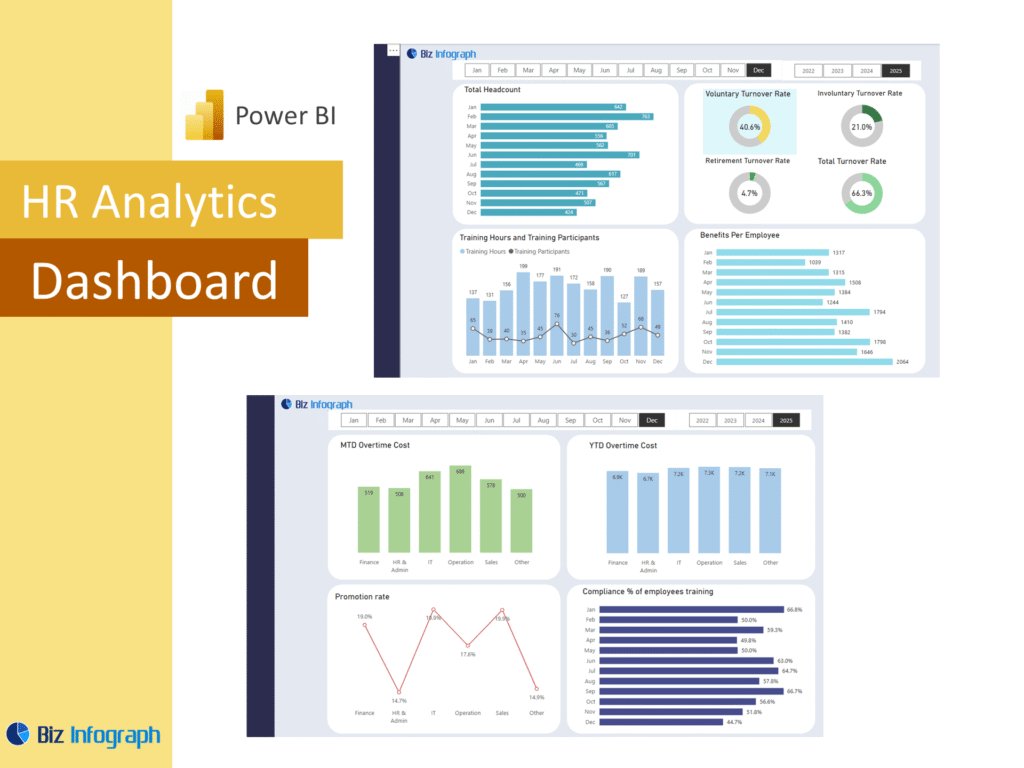
What Is an HR Analytics Dashboard Power BI and Why It Matters
An HR Analytics Dashboard Power BI is a reporting solution that helps organizations monitor workforce trends, employee changes, and operational performance in one place. A strong power bi HR dashboard turns raw data into clear visuals that support better decisions. Since power bi is Microsoft’s business intelligence platform, it is widely used for turning complex data into practical insight. In modern human resources management, leaders need fast visibility into hiring, turnover, payroll, and workforce structure. A good HR Dashboard makes this easier by organizing data into a usable format that helps teams move from information to action.
How an HR Dashboard Supports Employee Reporting and Trend Analysis
A well-designed HR Dashboard improves reporting by helping HR teams review trends in headcount, hiring, exits, and workforce structure over time. An hr dashboard in power bi can summarize employee data in a way that is much easier to understand than spreadsheets alone. It can also support data analysis by showing trends through charts, comparisons, and filters. This matters because hr leaders need to understand what is changing inside the workforce. With better visibility, they can monitor workforce stability, evaluate resource needs, and gain actionable insights into workforce performance that support stronger planning and oversight.
Why Businesses Use an HR Analytics Dashboard Power BI Template
Many organizations use an HR Analytics Dashboard Power BI template because it saves time and gives them a structured starting point for reporting. A good template can include workforce summaries, hiring trends, payroll indicators, and attrition analysis without requiring full redesign every reporting cycle. This makes dashboard creation faster and more consistent. It is especially helpful for hr departments that need regular reporting but want a professional and scalable format. A reusable template also helps standardize definitions and layouts, which improves communication. This makes it easier to support reporting across the full human resources department with less manual effort.
Core Benefits of HR Analytics Dashboard Power BI
Improving Workforce Visibility with a Power BI HR Dashboard
A power bi hr dashboard improves visibility by bringing together hiring, payroll, attrition, and workforce structure into one report. This gives HR teams a single source of truth instead of relying on separate spreadsheets and disconnected files. Better visibility is essential for workforce management, because leaders need to see what is happening across roles, departments, and time periods. A well-built dashboard supports stronger review of workforce data and helps uncover trends that might otherwise be missed. When HR has a more complete picture of the organization, it can respond faster and manage change more effectively.
How HR Analytics Supports Better HR Decisions
Hr analytics improves decision-making by helping teams understand patterns rather than only reviewing totals. It allows HR to assess workforce movement, compensation patterns, diversity balance, and recruitment effectiveness in a more structured way. This supports stronger decisions in hiring, retention, and policy development. Instead of relying on intuition alone, teams can use data to identify issues and compare outcomes across groups. This is one reason organizations are increasingly leveraging power bi for workforce reporting. Better analytics help leaders turn data into decisions and provide a more reliable foundation for managing people, cost, and organizational change.
Using Microsoft Power BI for Interactive HR Reporting
Microsoft Power BI is especially useful for HR because it supports dynamic reporting, visual summaries, and interactive filtering. Users can drill into departments, job roles, employee groups, or time periods without asking for new reports each time. Since bi is microsoft’s business intelligence environment, it is designed to help users explore trends and communicate findings clearly. An HR Analytics Dashboard Power BI report can make it much easier for HR teams to review changing workforce patterns and explain them in meetings. This interactivity improves both reporting efficiency and the quality of business discussions.
Key Metrics in an HR Analytics Dashboard Power BI
Essential HR Metrics Every Business Should Monitor
Every HR Analytics Dashboard Power BI solution should include the key hr metrics that matter most to leadership. These may include headcount, turnover, time to hire, absenteeism, employee mix, compensation, and retention. These key metrics help HR leaders understand both workforce size and workforce quality. A good dashboard should also align the metrics with business priorities, not just show numbers for reporting’s sake. When the right measures are selected, the dashboard becomes a stronger management tool. It helps HR focus attention on the trends that truly affect cost, culture, and long-term workforce performance.
Using HR Data to Measure Employee Trends and Workforce Performance
A strong dashboard should use hr data to show changes in hiring, exits, tenure, internal movement, and productivity-related indicators. This helps HR teams review the health of the workforce over time rather than reacting only to isolated events. Because organizations generate large amounts of employee data, dashboards play an important role in simplifying interpretation. They help users compare current activity with historical data and identify patterns that affect planning. When teams can review workforce trends visually, they gain stronger insight into workforce performance and can manage growth, retention, and staffing needs with more confidence.
Tracking Key HR Reporting Indicators in a Power BI HR Dashboard
A power bi hr dashboard should track indicators that give leadership a practical view of workforce condition and HR activity. These may include new hires, attrition, payroll cost per employee, average tenure, and role distribution. A good dashboard may also include gender distribution, diversity metrics, and salary-related measures to support compliance and fairness discussions. This kind of reporting helps HR understand not only how many employees are in the workforce, but also how workforce structure is changing. Strong indicator tracking makes the dashboard more relevant for both operational review and strategic workforce planning.
HR Analytics Dashboard Power BI Features
How HR Analytics Dashboard Power BI Simplifies Reporting
An HR Analytics Dashboard Power BI solution simplifies reporting by bringing multiple workforce topics into one visual environment. Instead of preparing separate files for headcount, recruitment, payroll, and turnover, teams can manage these views together in one report. This improves consistency and reduces manual effort. The dashboard also makes it easier to review trends quickly, which is especially useful for busy HR teams. Since dashboard helps users move from reporting to insight, it becomes more than a reporting tool. It becomes a practical system for managing workforce information more clearly and efficiently.
Connecting Data Sources for Better HR Analysis
Good HR reporting depends on integrating data from multiple systems. Many organizations use payroll tools, HR software, recruitment platforms, and spreadsheets at the same time, so data sources must be brought together carefully. Seamless data integration improves reporting accuracy and helps avoid conflicting numbers. A strong data model supports this by connecting employee, payroll, and hiring data in a reliable structure. This makes it easier to analyze trends across the workforce. By consolidating data from different hr systems, organizations create a stronger basis for analysis and a more dependable single source of truth.
Why an HR Analytics Dashboard Power BI Template Saves Time and Improves Accuracy
A reusable HR Analytics Dashboard Power BI template saves time because teams do not need to rebuild visuals and layouts every reporting cycle. They can update the latest data and review the results immediately. This also improves consistency because the same metrics, formulas, and report sections are used each time. A template reduces the chance of errors and makes it easier to compare periods. For many organizations, this is especially valuable because HR reports are often repeated monthly or quarterly. A structured template gives teams a faster and more reliable way to manage workforce reporting.
Employee Reporting and Trend Analysis
Using an HR Dashboard to Monitor Workforce Trends
An HR Dashboard is highly effective for monitoring long-term workforce trends such as hiring pace, turnover changes, promotions, and compensation growth. By comparing current and prior periods, HR can identify whether the workforce is becoming more stable, more expensive, or more diverse. A good dashboard makes this analysis easier because it shows trend movement clearly instead of burying information in tables. This is valuable for workforce analytics because it helps leaders understand not just what is happening now, but how the workforce is evolving. Trend visibility supports stronger planning and better policy decisions.
Tracking Employee Reporting Insights with HR Analytics
Hr analytics helps teams look deeper into employee movement, structure, and cost. For example, a dashboard can show how many new hires joined, where they were hired into the business, and how hiring compares with exits. It can also show distribution across roles, changes in workforce structure, and shifts in human capital investment over time. This kind of reporting adds value because it connects staffing activity to broader organizational needs. With stronger employee insight, the HR team can improve planning, support leadership with evidence, and make better use of workforce data throughout the year.
How a Power BI HR Dashboard Improves Performance Visibility
A power bi HR dashboard improves visibility by summarizing workforce movement, payroll, recruitment, and employee structure in one report that is easy to review. It can highlight emerging problems such as rising attrition, low hiring conversion, or uneven workforce distribution. This helps HR leaders respond more effectively and explain workforce changes to management. Because the dashboard combines multiple areas of HR in one place, it creates a more comprehensive view of people operations. Better visibility supports stronger accountability, faster review, and better connection between day-to-day reporting and broader strategic workforce goals.
Dashboard Examples and Practical Use Cases
Learning from Power BI HR Dashboard Examples
Reviewing power bi HR dashboard examples helps teams understand how effective workforce reporting can be structured. Examples show how to organize hiring, headcount, payroll, and turnover views into a single report without making it feel cluttered. This is useful for organizations beginning dashboard development because examples reduce guesswork and show practical layouts that already work. They also help teams decide which charts, tables, and summaries are most useful. By learning from examples, HR teams can create reports that are easier to read, easier to maintain, and more useful in leadership discussions.
How to Use Power BI for HR Reporting Needs
To use power bi for HR effectively, organizations need to think beyond simple charts and focus on the questions HR leaders need answered. This may include turnover analysis, hiring progress, payroll review, or diversity tracking. A good report should connect those needs with well-organized data and clear visuals. Many teams use Microsoft power tools to improve reporting access and make dashboards easier to share. As more users learn to make power bi work for workforce reporting, HR becomes better equipped to review trends, support decisions, and communicate workforce insights with clarity and confidence.
Building an HR Analytics Dashboard Power BI for Different Business Goals
Every organization has different priorities, so an HR Analytics Dashboard Power BI setup should be designed around actual business goals. Some companies may focus on retention, while others care more about hiring speed, pay equity, or payroll cost control. Others may need stronger reporting for succession, internal mobility, or diversity goals. This is why customization matters. A dashboard that reflects business-specific goals becomes more useful to leadership and easier to act on. It also helps ensure that the HR team spends time analyzing the workforce issues that have the greatest strategic importance.
Data and Reporting Design
Organizing HR Data for Better Dashboard Reporting
Good reporting begins with organized HR data. Workforce records, employee compensation data, payroll summaries, and hiring activity should be structured in a way that supports accurate analysis. Without this foundation, dashboards become harder to trust. A strong reporting model should connect employee records, payroll detail, and recruitment activity logically. This is especially important when working with complex data across several functions. Clear organization helps both analysts and decision-makers. It supports stronger visuals, reduces errors, and gives data analysts a better foundation for building reliable and useful HR dashboards.
Creating Clear Visuals in an HR Analytics Dashboard
Strong visuals are essential because the dashboard should help people understand workforce information quickly. Headcount and attrition may work well in trend charts, while diversity or compensation may need comparisons and breakdowns. A dashboard works best when it is clean, simple, and built around business questions. For example, an HR attrition dashboard may show exits by period, function, or tenure. An HR payroll dashboard may show full payroll costs, payroll trends, and cost per employee. A visual report becomes more effective when it is built to explain change and not just display numbers.
Using a Structured HR Dashboard Layout for Better Decision-Making
A structured layout improves decision-making because it guides the user from summary to detail. The best HR Dashboard designs start with overall workforce summaries and then move into sections such as hiring, payroll, and turnover. A strong layout also supports focused use cases. For example, an HR employee dashboard is designed to review workforce structure, while an HR recruitment dashboard is designed to show hiring pipeline and talent acquisition progress. A structured report ensures clarity, improves usability, and helps leadership focus on the right workforce questions in the right order.
Conclusion
Why an HR Analytics Dashboard Power BI Template Is a Practical Reporting Tool
An HR Analytics Dashboard Power BI template is practical because it gives organizations a repeatable, reliable way to review workforce information. It helps standardize reporting, improve consistency, and reduce manual work across the HR team. A template also makes it easier to support different use cases such as payroll, recruitment, and attrition without redesigning the dashboard each time. Whether the business needs an HR attrition dashboard helps type of view or broader workforce analysis, a template gives teams a stronger reporting foundation and a faster path to useful workforce insight.
Final Thoughts on Using an HR Dashboard for Employee Reporting and Performance Insights
A well-designed HR Dashboard helps organizations turn workforce information into useful insight. It improves visibility into hiring, payroll, diversity, turnover, and employee structure, making it easier for HR leaders to act with confidence. Whether the dashboard focuses on HR operations, recruitment, or compensation, the real value comes from turning information into action. For example, an HR diversity dashboard analyses representation, while another dashboard is designed to analyse compensation or workforce movement. In all cases, the goal is the same: convert data into better workforce decisions and stronger organizational performance.
For ready-to-use Dashboard Templates: