
What is a Risk, Compliance And Back-Office Operations Dashboard?
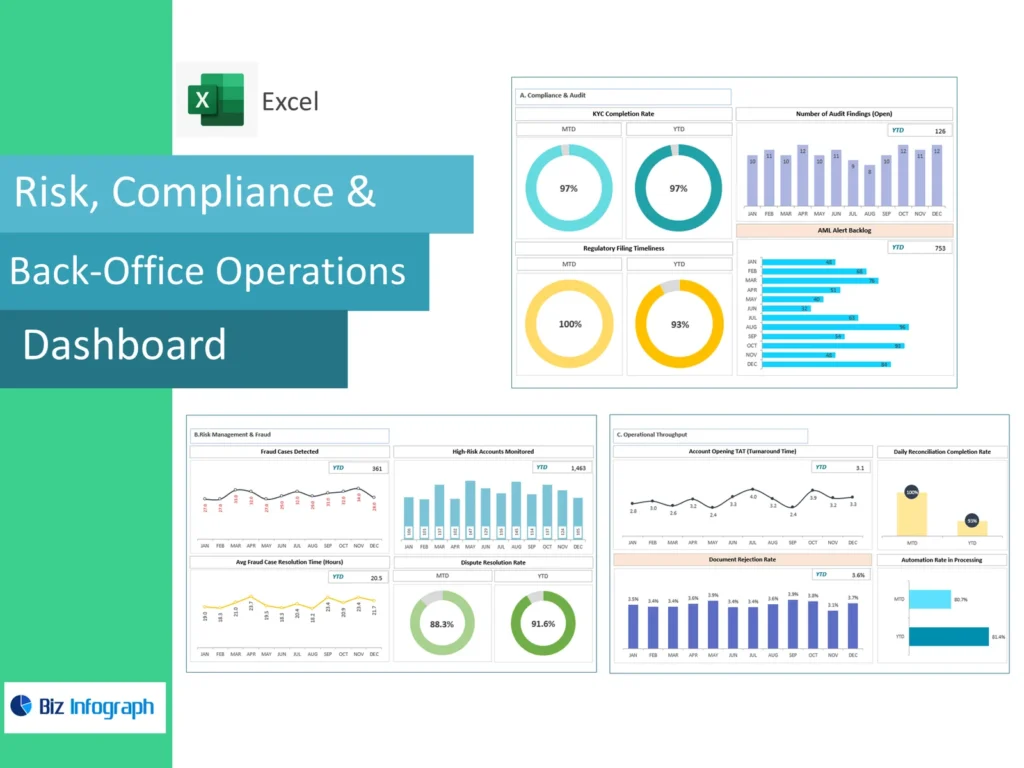
How a compliance dashboard supports risk and compliance across back-office operations
A compliance dashboard is a centralized view of an organization’s compliance status, bringing together compliance data, risk indicators, and back-office activity in one place. Within a Risk, Compliance and Back-Office Operations Dashboard, compliance teams can see compliance metrics, risk exposure, and operational data side by side, rather than chasing compliance information across spreadsheets and email threads. This consolidated approach gives compliance teams and decision-makers a clearer line of sight into risk and compliance issues as they emerge, supporting faster, better-informed responses across the organization.
Key features of compliance management dashboards that organizational leaders rely on
The key features of compliance management dashboards include real-time monitoring of compliance activities, automated tracking of regulatory requirements, and visual summaries of risk ratings by department. A well-designed compliance dashboard also surfaces compliance evidence and training completion rates in an easily digestible format, so organizational leaders don’t need to interpret raw compliance data manually. These management tools typically include policy management modules and dashboard updates that reflect regulatory changes as they happen, helping teams identify gaps before they become critical compliance failures.
Different types of compliance dashboards within the Risk, Compliance And Back-Office Operations Dashboard
Regulatory compliance dashboards: tracking adherence to regulatory requirements by department
Among the different types of compliance dashboards, regulatory compliance dashboards focus specifically on tracking adherence to relevant regulations and standards across departments. They map compliance regulations such as SOC 2 and ISO 27001 against actual organizational practice, showing where compliance efforts are on track and where gaps remain. For teams managing a shifting regulatory environment, these dashboards make it easier to monitor regulatory changes and adjust internal policies quickly, keeping the organization’s compliance status aligned with current legal and industry obligations.
Operational risk dashboards: monitoring back-office processes for risk and compliance gaps
Operational risk dashboards within the Risk, Compliance And Back-Office Operations Dashboard focus on day-to-day back-office processes, flagging risk areas such as transaction errors, vendor compliance lapses, and process exceptions. These dashboards provide detailed monitoring of risk exposure across departments, using risk ratings to prioritize which areas of risk need immediate attention. By using compliance dashboards in this targeted way, organizations gain real-time data on operational weak points and can direct risk mitigation resources where they will have the greatest impact on overall compliance posture.
Benefits of a compliance dashboard for effective compliance across the organization
How effective compliance reduces organizational exposure to fines and penalties
One of the clearest benefits of a compliance dashboard is its ability to reduce organizational exposure to fines linked to compliance issues. By surfacing compliance metrics and risk indicators continuously, the dashboard helps compliance teams catch compliance-related problems before regulators or auditors do. Effective compliance, supported by real-time data rather than periodic manual reviews, allows organizations to demonstrate a strong compliance posture during audits, particularly when working toward frameworks like SOC 2 and ISO 27001 that demand consistent, documented compliance evidence.
Strengthening risk and compliance culture through shared organizational visibility
When compliance status and risks are visible to everyone who needs them, risk and compliance becomes a shared organizational responsibility rather than the burden of a single team. A Risk, Compliance & Back-Office Operations Dashboard gives every decision-maker access to the same compliance information, reducing miscommunication around internal policies and compliance strategy. This shared visibility helps improve compliance behaviour at every level, as managers can see how their team’s actions affect the organization’s compliance status in near real time.
Risk, Compliance And Back-Office Operations Dashboard template: how to get started
Choosing a dashboard template suited to your organizational compliance management needs
Selecting the right Risk, Compliance And Back-Office Operations Dashboard template starts with understanding which compliance management dashboard layout fits your organization’s compliance status reporting needs. Smaller compliance teams may need a simple template tracking key performance indicators and compliance activities, while larger organizations managing multiple regulatory regimes need templates that separate risk areas by business unit. The right template should reflect the different types of compliance dashboards your organization actually uses, rather than forcing every compliance-related process into one generic view.
Steps to build a compliance dashboard template aligned to regulatory requirements
To build a compliance dashboard template that holds up under audit, start by listing the regulatory requirements your organization must meet, then map each requirement to a measurable compliance metric. Include sections for vendor compliance, internal policies, and training completion rates, since these are common sources of compliance issues. As you build a compliance dashboard, prioritize fields that update automatically from source systems, since manual data entry is one of the most frequent causes of inaccurate compliance status and risks reporting.
Risk, Compliance And Back-Office Operations Dashboard Excel: building it in a spreadsheet
Setting up a compliance management dashboard Excel file with key compliance columns
A Risk, Compliance & Back-Office Operations Dashboard Excel file gives smaller compliance teams a low-cost compliance dashboard to manage day-to-day compliance activities. Set up columns for regulatory requirements, risk ratings, compliance evidence, and review dates, then use conditional formatting to highlight overdue items or rising risk exposure. This spreadsheet-based approach can track compliance metrics tied to SOC 2 and ISO 27001 controls reasonably well for organizations with a narrow regulatory environment, though it requires consistent manual dashboard updates to stay current.
Limitations of Excel-based compliance tracking versus a dedicated compliance dashboard
Excel cannot offer the real-time monitoring or real-time data that a dedicated compliance dashboard provides, which becomes a serious limitation as organizational compliance activities scale. Manual updates mean compliance status and risks shown in a spreadsheet are often outdated by the time anyone reviews them, increasing the chance of missed compliance issues. A well-designed compliance dashboard built on dedicated management tools instead delivers live risk indicators and automated alerts, helping compliance teams identify gaps and maintain a strong compliance posture without constant manual reconciliation.
Best practices to build a compliance dashboard that drives effective compliance
Aligning compliance dashboard data with evolving regulatory requirements
Regulatory requirements rarely stay static, so a Risk, Compliance And Back-Office Operations Dashboard needs a process for incorporating regulatory changes as soon as they’re published. Compliance teams should review relevant regulations and standards on a set schedule and update dashboard fields to reflect new obligations, whether they relate to SOC 2 and ISO 27001 or industry-specific compliance regulations. Keeping compliance data current in this way ensures the dashboard continues to reflect an accurate, up-to-date picture of organizational compliance rather than a snapshot from months earlier.
Scaling compliance management dashboard capabilities across multiple organizational units
As organizations grow, a single compliance management dashboard often needs to scale across multiple business units, each with its own risk areas and vendor compliance relationships. Expanding dashboard capabilities to include unit-level compliance metrics and centralized policy management allows leadership to compare compliance posture across the organization while still giving local compliance teams the detailed monitoring they need. This scaled approach to using compliance dashboards helps maintain a strong compliance culture even as regulatory complexity and organizational size increase together. Compliance officers strengthen regulatory compliance and governance by meeting compliance requirements, ensuring adherence to the compliance framework, taking proactive alert-driven mitigate actions, using GRC visualization for stakeholders, ISO completion rates, GDPR tracking, and progress.
For ready-to-use Dashboard Templates: