

What if the mortgage tool you used this morning is hiding the smartest repayment paths from you? Most buyers rely on static online widgets, yet the moment you refresh your browser, your custom numbers, notes, and payoff goals vanish. You know that planning a long-term property investment requires far more than a rough monthly estimate, especially with the 30-year fixed rate hovering around 6.99%. That is why adopting a dedicated mortgage calculator excel template is the fastest way to gain real clarity over your debt structure.
You don’t need to spend hours wrestling with complex financial formulas or settle for fragile spreadsheets that break the moment you enter an extra payment. In this 2026 guide, you will discover how a professional mortgage calculator Excel template delivers complete financial control, scenario modeling, and long-term repayment clarity. We’ll examine how to evaluate multi-scenario amortization schedules, keep your sensitive financial data private, and turn raw loan balances into executive-grade visual dashboards without any design headaches.
Key Takeaways
- Maintain complete ownership of your sensitive financial data with private, persistent loan models that web tools cannot store.
- Discover how a professional mortgage calculator excel template unlocks dynamic scenario modeling for lump-sum principal payments and faster debt payoff.
- Master the core financial mechanics behind PMT, IPMT, and PPMT functions to audit your borrowing expenses with complete confidence.
- Identify the essential evaluation features needed to integrate property taxes, insurance premiums, and escrow reserves into a single schedule.
- Transform complex amortization tables into executive-grade visual dashboards that highlight payoff milestones without any design stress.
What Is a Mortgage Calculator Excel Template and Why Offline Modeling Wins
A mortgage template is an automated financial model designed to project debt payoff timelines, breakdown periodic financing costs, and provide total transparency over borrowing liabilities. Rather than offering a single ballpark number, a dynamic workbook calculates precise interest accruals, periodic principal deductions, and cumulative equity development across every installment. At its core, it generates a complete amortization schedule that adapts instantly as your lending terms change.
Choosing an offline spreadsheet over an ephemeral browser tool transforms how you manage debt. Moving your calculations into a desktop workbook gives you an ad-free environment, persistent documentation, and the freedom to test multiple lending terms side by side without losing your historical adjustments. You gain full mathematical control inside an interface built around productivity.
The Core Limitations of Web-Based Loan Calculators
Web calculators are built for quick clicks, not strategic long-term planning. The moment you refresh your browser tab, lose an internet connection, or navigate away, every custom variable you entered disappears. Most online widgets run on black-box algorithms that hide intermediate calculations, preventing you from auditing how fees or compounding frequencies affect your payment. They also rarely support side-by-side comparisons of competing 15-year and 30-year offers, forcing you to re-type variables repeatedly while jotting results down on scratch paper.
Data Privacy and Financial Security Advantages
Working locally inside a mortgage calculator excel template protects your confidential figures from digital exposure. Browser-based tools frequently run tracking scripts and advertising pixels that capture user financial intent, potentially exposing your planned property budget to lead-generation brokers.
- Protect personal balance sheets: Homeowners keep household income, down payment reserves, and debt ratios safely off public servers.
- Safeguard investment underwriting: Real estate investors can model prospective acquisition targets, cash flows, and debt structures without tipping off competitors or aggregators; for investors focused on fix-and-flip strategies, tools like FlipScale Pro provide specialized workflow support alongside custom financial models.
- Enterprise repository alignment: Offline workbooks archive neatly into private company servers or encrypted cloud drives with full version control.
Offline spreadsheet models empower you to evaluate critical financing decisions on your own schedule, in complete privacy, and with verifiable mathematical precision.
Core Mathematical Architecture: How Excel Calculates Principal and Interest
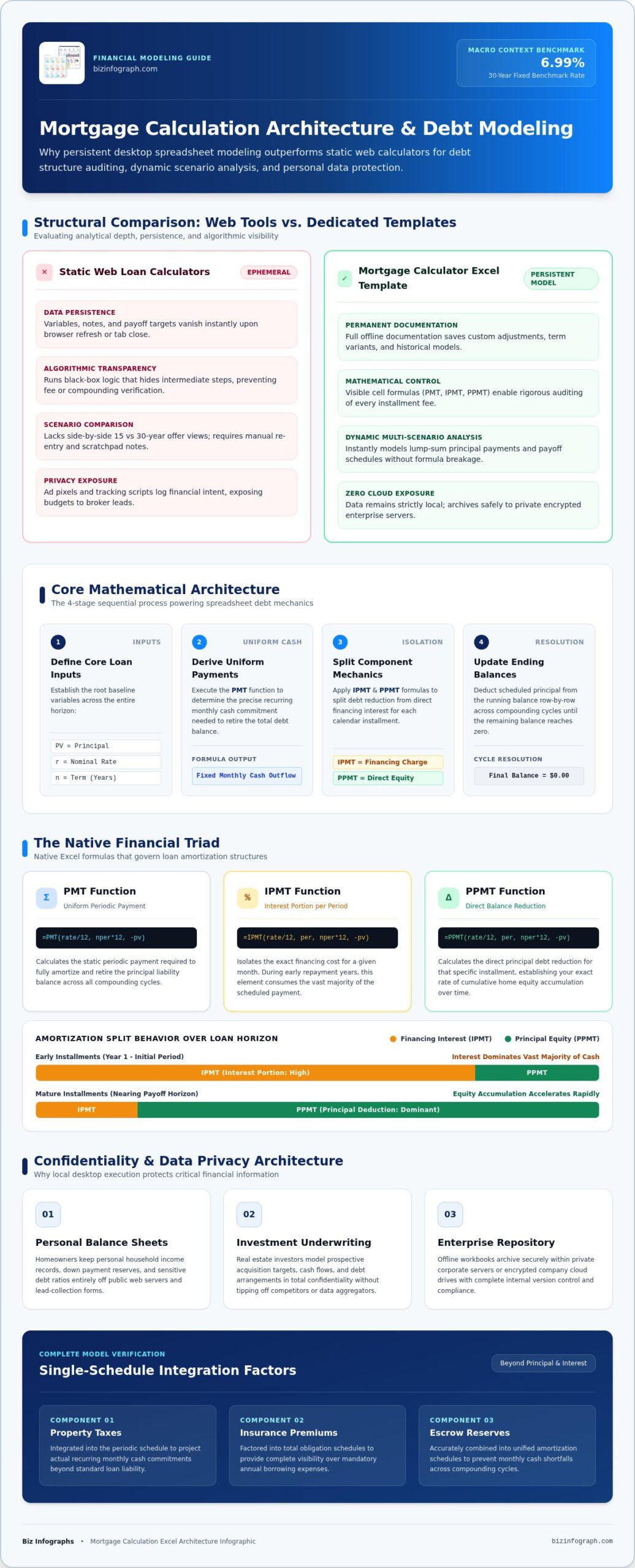
Understanding the calculations powering a robust mortgage calculator excel template gives you the confidence to audit any lender quote with precision. Instead of relying on guesswork, a properly configured workbook processes loan obligations through four clear steps:
- Define core inputs: Establish the base variables, including loan principal ($PV$), annual nominal interest rate ($r$), and total term length in years ($n$).
- Derive uniform payments: Execute the
PMTfunction to solve for the recurring monthly cash commitment required over the loan horizon. - Split payment components: Apply
IPMTandPPMTto isolate financing charges from genuine debt reduction for each calendar month. - Update ending balances: Deduct the scheduled principal payment from the running balance, linking row after row until the balance settles at zero.
Mastering the Essential Excel Financial Functions
Three native formulas drive the analytical power of your spreadsheet:
- PMT (Payment): Structured as
=PMT(rate/12, nper*12, -pv), this formula returns the fixed periodic payment needed to retire the balance across all compounding cycles. - IPMT (Interest Payment): Isolates the exact interest portion for a specific period. During the initial years of a loan, this number consumes the vast majority of your payment.
- PPMT (Principal Payment): Calculates the direct balance reduction for that same installment, showing your pace of equity accumulation over time.
Automating Dynamic Amortization Schedules
Static calculation tables collapse into errors when shifting between loan terms. High-performance models use dynamic row indexing to seamlessly adjust schedules between 180 months for a 15-year term and 360 months for a 30-year horizon, eliminating messy #NUM! or #REF! errors. Clean cell dependencies allow you to audit formulas transparently without triggering circular references.
Adding conditional formatting turns these dense rows into intuitive visual indicators. You can immediately highlight the equity inflection point, the milestone where monthly PPMT finally surpasses IPMT, pinpointing the moment your dollars build more personal net worth than lender profit. If you want to skip manual formula construction entirely, starting with proven Excel dashboard templates gives you pre-formatted formulas and polished summary views right out of the box.
Comparing Mortgage Analysis Options: Online Tools vs. DIY Sheets vs. Pro Templates
How do you choose the right medium for analyzing a six-figure debt commitment? Borrowers and property investors generally evaluate three paths: browser widgets, homemade spreadsheets, or professionally engineered templates. Each option handles build time, scenario versatility, design quality, and financial accuracy differently:
- Web-based widgets: Instant zero-minute setup, but they offer zero customization, no data persistence, and no privacy controls.
- DIY scratch spreadsheets: Highly customizable, yet they require hours of complex formula troubleshooting and often lack visual clarity.
- Professional dashboard templates: Immediate deployment, auditable unlocked formulas, robust multi-scenario logic, and presentation-ready visual reporting.
Choosing an expertly built mortgage calculator excel template bridges the gap between fast answers and deep strategic modeling. To explore how pre-configured tools transform analytical workflows, check out The Ultimate 2026 Guide to Excel Dashboard Templates: Choosing Professional Efficiency.
The Hidden Time Cost of Building DIY Spreadsheets
Starting from a blank worksheet looks tempting until formula logic collides with reality. Crafting dynamic schedules requires hours spent writing nested IF statements, validating dates, and debugging broken cell references. Homemade models frequently fall apart when you introduce extra principal reductions; an ad-hoc extra payment in month twelve often fails to recalculate downstream interest correctly, creating cumulative balance errors that mislead your payoff goals.
Why Visual Dashboards Outperform Raw Numerical Tables
Staring at 360 rows of dense numbers causes decision fatigue. While traditional tables contain necessary transaction logs, they completely bury high-level insights. Visual dashboards change that dynamic entirely:
- Instant metric synthesis: KPI cards summarize total interest paid, loan payoff target years, and lifetime savings at a single glance.
- Clear equity progression: Stacked area or bar charts immediately demonstrate how extra principal contributions accelerate equity accumulation.
- Stakeholder alignment: Polished visualizations make presenting financing options to a spouse, business partner, or lender effortless.
Switching from raw data tables to structured visual layouts turns mechanical math into confident financial decisions.
Essential Evaluation Framework: Key Features to Demand in a Mortgage Dashboard Template
Selecting the right mortgage calculator excel template means looking beyond bare-bones amortization math. A truly valuable workbook gives you strategic visibility over your entire housing liability, letting you stress-test loan terms before signing closing paperwork. When auditing potential templates, insist on these four non-negotiable capabilities:
- Dynamic scenario modeling: The model must adapt to rate adjustments and allow both scheduled monthly prepayments and sporadic lump-sum contributions.
- Comprehensive property cost integration: True monthly obligations include property taxes, homeowner insurance premiums, and private mortgage insurance (PMI), not just loan principal and interest.
- High-impact dynamic charts: Payoff curves and visual breakdowns of cumulative interest reveal long-term cost trends far better than endless rows of numbers.
- Unlocked formula architecture: Avoid locked worksheets with hidden tabs. Your workbook should offer fully transparent formulas so you can audit calculations and tailor sheets to your specific workflow.
Advanced Extra Payment and Early Payoff Capabilities
Small extra contributions produce huge long-term savings. A high-caliber spreadsheet should effortlessly distinguish between recurring monthly additions and one-time windfalls like annual bonuses or tax refunds. It needs to dynamically recalculate your debt payoff trajectory, automatically showing how many years you shave off the term and tallying thousands of dollars saved in total interest charges. The schedule should adjust its maturity date on the fly without breaking downward formula chains.
Executive-Level Design and Interactive Visualization
Visual presentation directly influences decision clarity. Top-tier workbooks feature clean summary cards, refined typography, and purposeful data palettes that isolate key borrowing metrics at a glance. They take full advantage of modern Excel features like dynamic arrays, ensuring your visuals function smoothly without slow load times or broken macros. To learn how visual hierarchy accelerates data comprehension, explore Mastering Interactive Excel Dashboard Templates: The 2026 Professional Guide.
Stop settling for messy tables and fragile spreadsheets that restrict your analytical freedom. Take control of your debt strategy today and explore professional Excel dashboard templates built to provide instant clarity and executive-grade presentations.
Maximizing Financial Clarity with Biz Infographs Excel Dashboard Templates
Managing loan scenarios shouldn’t require you to moonlight as a graphic designer or spend weekends debugging formula syntax. Biz Infographs delivers pre-built Excel dashboard templates engineered to transform raw debt schedules into clean, compelling visual presentations with minimal manual effort. Instead of squinting at endless rows of digits, you receive instant clarity through structured summaries and dynamic charts. Every workbook features completely unlocked formulas, giving you transparent auditing while safeguarding full workflow integration. You also benefit from free lifetime updates that keep your tools continuously aligned with modern spreadsheet environments.
Empowering Decisions Through Best-in-Class Spreadsheet Design
A premium mortgage calculator excel template does more than run numbers; it frames your data so you can communicate key decisions with poise. Thoughtful visual hierarchy directs your focus straight to vital metrics, such as lifetime interest reduction, remaining loan balance, and payment split milestones. When presenting financing strategies to partners, family, or lenders, the polished aesthetic elevates your professional standing immediately. You harness the sophisticated analytical depth of enterprise software without encountering steep learning curves or clunky code.
Professional design removes the friction between raw data and decisive action:
- Executive-ready summaries: High-level KPI cards isolate vital data points so stakeholders grasp payoff timelines instantly.
- Intuitive data palettes: Refined color choices highlight equity inflection points without visual clutter.
- Zero formula friction: Audited cell logic works quietly in the background, keeping your focus strictly on analysis.
Streamlined Implementation for Immediate Results
Eliminating repetitive formula troubleshooting from your financial planning brings immense relief. With instant digital downloads, you can open your workbook and populate baseline financing parameters in just minutes. You skip the frustration of broken references and jump directly into high-impact scenario modeling. By leveraging expert layout architecture, you elevate user confidence and produce presentation-ready reports that inspire trust. Upgrade your overall analytical toolkit today with Biz Infographs Excel Dashboard Templates.
Take Full Command of Your Long-Term Financing Strategy
Securing a property loan is one of the largest financial commitments you will ever navigate. Relying on temporary browser widgets leaves you vulnerable to hidden assumptions and lost scenario data. By moving your calculations into an offline, robust mortgage calculator excel template, you gain persistent scenario modeling, complete privacy for personal balance sheets, and absolute mathematical transparency over every dollar paid toward principal and interest.
You don’t need to waste valuable hours debugging formula errors or settling for plain tables that obscure critical repayment milestones. With an instant digital download featuring fully customizable unlocked formulas and pre-built executive-ready data visualization layouts, you can immediately project accelerated paydown schedules with absolute ease. Backed by free lifetime updates, your analytical tools will adapt seamlessly as your portfolio grows. Explore professional Excel dashboard templates today and turn complex loan tracking into lasting financial confidence.
Frequently Asked Questions
How does an Excel mortgage calculator template handle irregular extra principal payments?
An Excel mortgage template handles irregular prepayments by linking an extra-payment column directly to each scheduled month. When you enter a one-time lump sum, the model subtracts that amount directly from the beginning principal balance before calculating future interest charges. Downstream formulas recalculate subsequent interest accruals automatically. This instantly shortens the loan term and visibly reduces cumulative financing costs without corrupting the amortization logic.
Can I customize the formulas inside a professional mortgage calculator Excel template?
Yes, professional templates from Biz Infographs feature completely unlocked formula architectures. You can inspect cell mechanics, append custom escrow calculations, adjust local tax brackets, or add secondary lender fee schedules. Unlike locked worksheets or restrictive online tools, a high-performance mortgage calculator excel template empowers you to integrate custom financial scenarios while maintaining structural integrity across every calculation row. You preserve complete freedom to tailor the workbook to your workflow.
Is an Excel mortgage template better than using a free online banking calculator?
An Excel template offers significant advantages over web tools by providing persistent scenario retention, complete data privacy, and multi-loan modeling. Online widgets lose your data when you close the browser tab and often collect personal financial inputs for marketing purposes. With a spreadsheet, your net worth and financing numbers stay securely on your computer, letting you compare competing 15-year and 30-year lender estimates side by side over time.
What is the difference between PMT, IPMT, and PPMT formulas in mortgage calculations?
The PMT function calculates your total constant monthly obligation, combining both debt reduction and lender interest. The IPMT formula isolates the exact interest charge for a specific month, which starts high and steadily decreases. Meanwhile, the PPMT function determines the exact amount of capital applied directly toward reducing your principal balance. Together, these formulas construct the mathematical foundation of an auditable loan schedule.
Will a mortgage calculator spreadsheet work across different versions of Microsoft Excel?
Professional workbooks are designed to work smoothly across recent desktop releases, including Office 2021, Office 2024, and Microsoft 365. Core mathematical functions like PMT operate identically across legacy and modern platforms. High-quality templates utilize clean formula logic that avoids fragile macros, ensuring full cross-platform compatibility across both Windows and Mac operating systems without formatting glitches or performance lag.
How does an amortization schedule show the impact of refinancing at lower rates?
An amortization schedule reveals refinancing impacts by recalculating future interest obligations against your remaining principal balance rather than the original loan amount. When you lower the interest rate in your scenario model, the schedule immediately projects your reduced monthly payment alongside total lifetime interest savings. This side-by-side comparison makes it easy to confirm whether interest reductions outweigh closing costs.
Can I use an Excel mortgage template to model commercial real estate financing?
Yes, you can easily adapt a mortgage calculator excel template for commercial acquisitions. Commercial debt often involves unique parameters such as balloon payments, shorter 5-year or 10-year loan terms, and extended 25-year amortization bases. Because the underlying spreadsheet formulas remain accessible, you can quickly input custom balloon milestones or incorporate commercial debt-service coverage ratios to satisfy underwriting requirements.