
What is an HR healthcare performance dashboard?
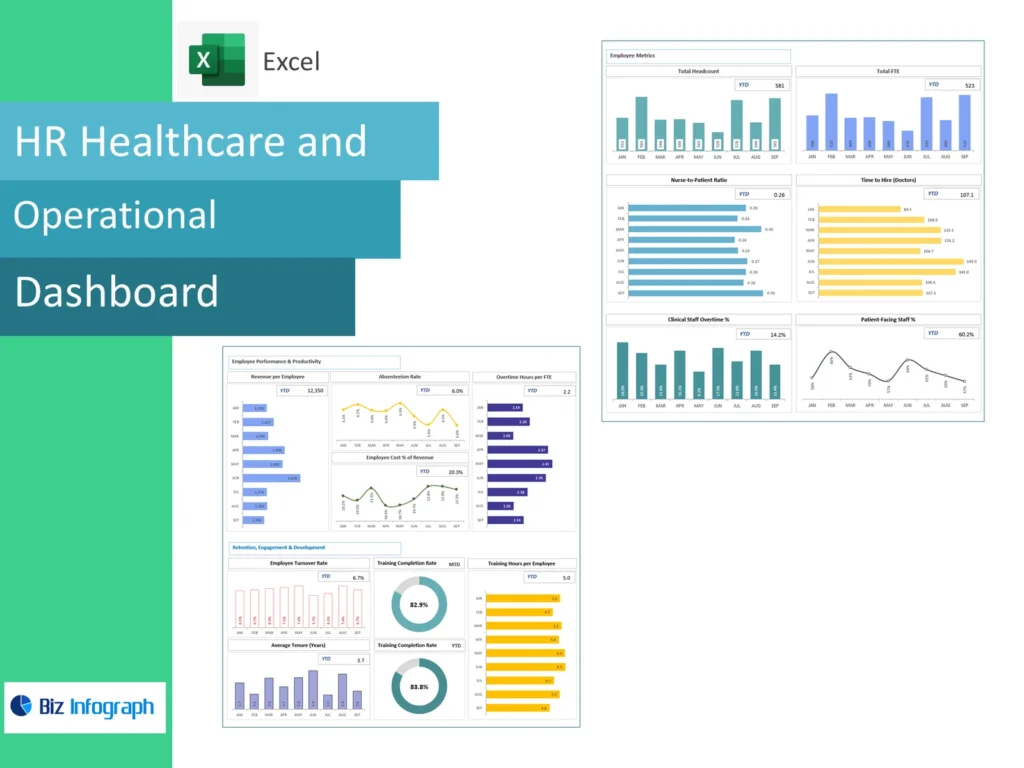
How the HR healthcare performance dashboard works as a BI analytics tool
An HR healthcare performance dashboard is a business intelligence tool that pulls data from multiple sources — payroll systems, attendance records, and clinical rosters — and presents it as real-time metrics in one place. The dashboard provides real-time visibility into how the hr department is performing across the organization. Rather than waiting for a monthly hr report, hr professionals can analyze data on demand, turning raw workforce data into actionable insights that support faster, more confident decisions.
Key differences between a performance dashboard and a standard HR report
A traditional hr report is static — it shows what happened last quarter. An HR healthcare performance dashboard, by contrast, is a powerful hr tool that provides real-time visibility into performance data as it changes. It allows hr leaders to spot workforce trends the moment they emerge rather than weeks later. The dashboard shows live performance ratings, number of employees by department, and top performers, making it far more valuable for proactive hr management than a standard document-based report.
Core KPIs tracked in an HR healthcare performance dashboard
Workforce key metrics: headcount, turnover, and retention analytics
The most critical key metrics on any HR healthcare performance dashboard are the ones that reveal workforce health at a glance. Tracking the number of employees per shift, unit, and role gives hr leaders a clear picture of capacity. Turnover rates expose gaps in retention efforts before they escalate, while people analytics data highlights where healthcare professionals are most likely to disengage. The dashboard allows hr teams to use these metrics to identify patterns early, strengthening workforce planning across the organization.
Engagement dashboards: measuring staff satisfaction across healthcare teams
Engagement dashboards provide visibility into how connected healthcare professionals feel to their work and organisation. Metrics such as net promoter score, pulse survey responses, and absenteeism rates sit alongside performance data to give hr professionals a fuller view of staff wellbeing. Performance dashboards help hr leaders correlate low engagement scores with rising turnover, enabling targeted interventions. For modern hr teams, engagement analytics dashboards are no longer optional — they are central to understanding workforce trends and protecting workforce health long term.
Compensation dashboards: monitoring pay equity and financial health metrics
Compensation dashboards provide insights into salary distribution, pay equity gaps, and total benefits spend across the organization. When integrated into the HR healthcare performance dashboard, this financial performance data helps hr management align compensation strategy with retention efforts and budget constraints. Hr analytics drawn from compensation data reveal whether top performers are being rewarded competitively or are at risk of leaving. Real-time metrics on pay bands and overtime costs also feed directly into an executive-level dashboard for leadership review.
HR healthcare performance dashboard template: how to get started
Choosing the right dashboard template for your HR workforce management needs
Selecting the right HR healthcare performance dashboard template starts by mapping your dashboard needs to the hr dashboard types available — operational, strategic, or executive-level dashboard formats. An operational template focuses on real-time metrics for day-to-day workforce management, while a strategic template surfaces workforce trends and performance metrics for quarterly planning. Various hr analytics platform providers offer pre-built templates that are ready to connect to your hr data sources. The best hr dashboards are those that match the scale of your hr department and the decisions your hr leaders make most often.
HR dashboard example: a step-by-step dashboard to track healthcare workforce data
The most effective hr dashboard example for healthcare follows a clear structure: start with a workforce summary panel showing the number of employees by role and location, then layer in performance rating distributions and turnover trends. The dashboard to track these data points should pull data from various systems — HRIS, scheduling, and payroll — so hr professionals access a single, unified view. These examples to help teams get started demonstrate how a well-built dashboard shows both current performance data and forward-looking workforce planning indicators in one screen.
HR healthcare performance dashboard Excel: building it in a spreadsheet
Setting up your HR healthcare performance dashboard Excel with key metric columns
An HR healthcare performance dashboard Excel file is a practical starting point for smaller hr departments that need access to data without a dedicated analytics platform. Begin by defining columns for each of your key metrics — headcount, turnover rate, performance rating, absenteeism, and net promoter score. Use pivot tables to aggregate workforce data by team or department, and conditional formatting to flag performance metrics that fall outside healthy ranges. While Excel lacks dashboards provide real-time visibility capabilities, it remains a useful tool to build dashboards quickly for hr professionals working with limited technology budgets.
When to move from Excel to an interactive dashboard for deeper analytics
Excel works well for small teams, but as workforce data volumes grow, the limitations become clear. An interactive dashboard on a dedicated hr analytics or data analytics platform connects data from multiple live sources, refreshes automatically, and allows hr leaders to filter and drill into performance data without manual updates. For healthcare organisations managing shift workers across multiple sites, the move to an interactive dashboard is essential. Modern hr platforms give the hr department real-time visibility, while Excel can only offer a historical snapshot updated when someone remembers to export it.
Using the HR dashboard to improve management decisions across departments
Dashboard example: reducing turnover through real-time workforce management insights
A practical hr dashboard example that delivers measurable results is one built specifically to support retention efforts. By surfacing real-time metrics on exit patterns, flight-risk scores, and department-level turnover, the HR healthcare performance dashboard enables hr management to act before a resignation is submitted. Analytics dashboards that pull data from various sources — engagement surveys, performance reviews, and absence logs — give hr professionals a 360-degree view of at-risk employees. This use of data into actionable insights is one of the clearest ways performance dashboards help organisations reduce turnover costs in healthcare.
How HR teams use a dashboard to track KPIs and act on live data
Modern hr teams use a dashboard to track KPIs across the full employee lifecycle — from onboarding completion rates and performance rating trends to workforce planning gaps and succession readiness. The dashboard allows hr leaders to share an executive-level dashboard view with senior management, ensuring access to data is not limited to the hr department. When performance metrics shift, people analytics alerts can be configured to notify hr professionals immediately. This kind of real-time visibility transforms hr management from a reactive function into a strategic partner that can help hr leaders steer workforce health proactively.
HR healthcare performance dashboard best practices for HR teams
Keeping your HR dashboard data clean for accurate metric reporting
The value of any HR healthcare performance dashboard depends entirely on the quality of the hr data feeding it. Before you build dashboards or connect an analytics platform, audit your workforce data sources for duplicate records, inconsistent job titles, and missing fields. Establish a data governance policy that defines who is responsible for updating hr data across the organization. Clean, consistent hr data allows the dashboard to show reliable performance metrics, accurate workforce trends, and trustworthy key metrics — giving hr professionals and hr leaders confidence in every figure the dashboard provides real-time visibility on.
Scaling your dashboard example into a full BI-powered HR analytics system
The most successful various hr teams start with a focused dashboard example and expand over time. Once your HR healthcare performance dashboard template is stable, connect it to a wider data analytics or business intelligence tool to unlock deeper people analytics capabilities. Add performance reviews data, workforce planning models, and compensation dashboards to build a comprehensive analytics platform. The result is a powerful hr system that dashboards provide visibility across every corner of the hr department — from day-to-day workforce management to strategic executive-level dashboard reporting that helps hr leaders shape the future of healthcare workforce planning.
For ready-to-use Dashboard Templates: