

A customer journey map infographic shows how someone experiences a business over time, from first awareness through purchase and beyond. It brings customer actions, touchpoints, emotions, and channels together in one visual story. Unlike a buyer journey map, which focuses on the path to a purchase, a customer journey map also shows what happens after the sale.
A polished visual is a useful starting point, but a map helps only when it reflects real customer experiences and informs decisions. A tidy diagram is not necessarily a validated view of the journey; the difference is evidence. Customer feedback, behavioral data, and clear goals help turn observations into practical improvements.
Learn how customer and buyer journey maps differ, which templates and components suit your needs, and how to create and validate a map step by step. You’ll also see how to connect journey insights to teams, decisions, and measures of progress, so your finished map is clear, credible, and ready to guide action.
Key Takeaways
- Choose a customer journey map to understand the full relationship with your business, including what happens after purchase; use a buyer journey map to focus on the path to a sale.
- Select a template that fits your purpose, audience, and presentation format, then keep the layout easy to scan.
- Build a useful map around a specific persona and scenario, showing actions, touchpoints, channels, and emotions across journey phases.
- Use customer feedback and behavioral data to validate the map, and flag assumptions that lack evidence.
- Turn the validated map into action by connecting improvement opportunities to responsible teams and defining how outcomes will be measured.
Benefits of customer journey mapping
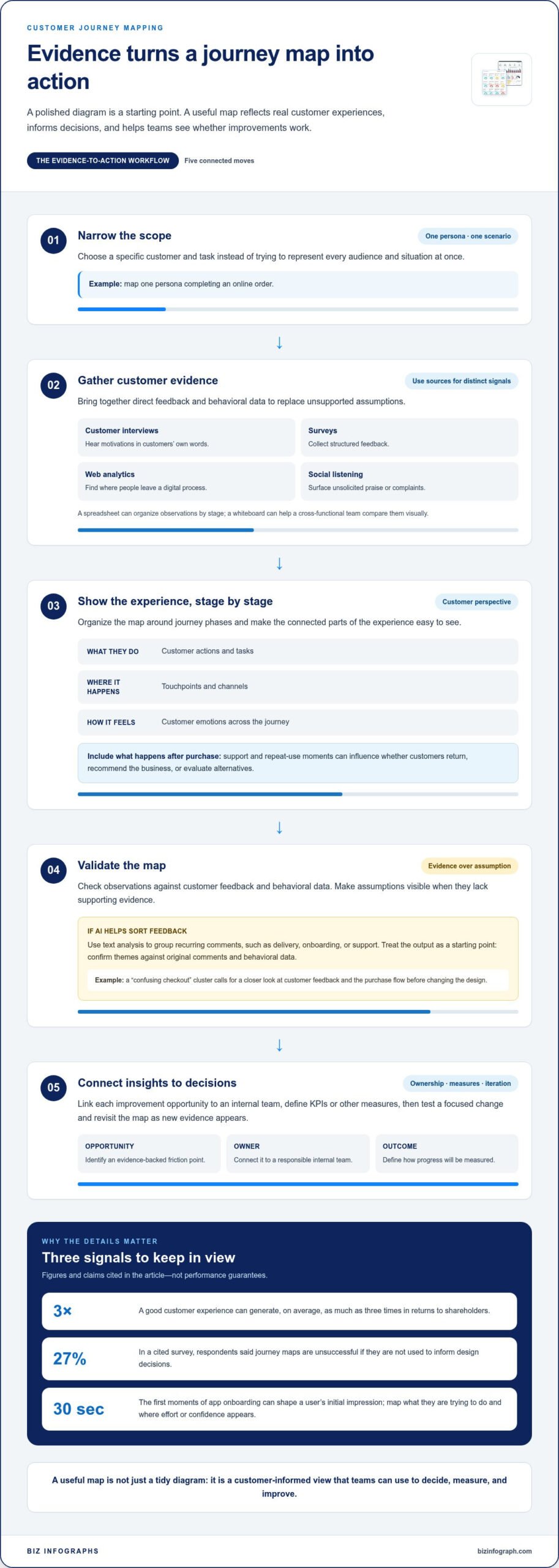
Journey mapping helps teams see where customer expectations meet the actual experience, then prioritize practical improvements. A map can reveal repeated friction, such as shoppers comparing products across channels but finding inconsistent information. Teams can use those points to improve communication, assign ownership, and measure whether changes help. A good customer experience can generate, on average, as much as three times in returns to shareholders.
The approach has evolved beyond a one-way funnel. In the late 2000s, McKinsey argued that the consumer journey was a continuous cycle in which active evaluation occurred alongside postpurchase experiences. That idea supports the loyalty loop: a customer’s experience after buying can shape whether they return, recommend the business, or evaluate alternatives. Mapping postpurchase support and repeat-use moments helps teams spot opportunities beyond the initial sale.
Research-informed customer journey mapping replaces assumptions with evidence. Use customer interviews to hear motivations in customers’ own words, surveys to collect structured feedback, and web analytics to find where people leave a digital process. Social listening can surface unsolicited praise or complaints. A spreadsheet can organize observations by journey stage, while a whiteboard helps a cross-functional team compare them visually. Each tool serves a different purpose; none makes an assumption true without supporting evidence.
Challenges often arise when a map tries to represent every audience and scenario at once. Narrow the scope to one persona and a specific task, such as completing an online order. Another risk is creating a polished customer journey map infographic that never informs a decision. In a cited survey, 27% of respondents said journey maps are unsuccessful if they aren’t used to inform design decisions. Link each opportunity to an internal team, then define KPIs or other measures for tracking outcomes.
AI-assisted mapping can speed up the sorting of large volumes of feedback. Text analysis can group recurring comments about delivery, onboarding, or support, helping researchers spot patterns for further review. Treat AI output as a starting point, not as customer evidence: confirm themes against the original comments and behavioral data. For example, a cluster labeled “confusing checkout” calls for a closer look at customer feedback and the purchase flow before the team changes its design.
Customer experience can carry high emotional stakes even in a brief interaction. The first 30 seconds of app onboarding, for example, can shape a user’s initial impression. Use that moment to map what the person is trying to do, what they encounter, and where the experience creates effort or confidence. Then prioritize the clearest evidence-backed points, test a focused improvement, and revisit the map as new feedback and behavior reveal what changed.
Customer journey map templates for presentation and design software
Free options include a basic journey chart, a brainstorm canvas, or a whiteboard layout created in presentation or design software. Choose a format that fits the task: a chart to present a clear sequence, a brainstorm canvas to collect ideas, or a whiteboard for collaborative planning. Then adapt its labels and stages to the customer experience you need to show.
A customer journey map template organizes the customer’s perspective; it is not a finished account of the experience. Look for space to record journey phases, customer actions, touchpoints, emotions, and supporting evidence. For example, a purchase map might show product research, checkout, delivery, and the first support interaction. A customer journey map infographic can present these connected points in a visual sequence for a meeting or report.
Template formats suit different tasks. PowerPoint works well for a polished presentation, while Miro’s whiteboard format supports collaborative brainstorming. Figma is useful for arranging and refining visual components. Excel can organize touchpoints and observations in rows, making details easier to sort before you transfer them into a visual map. Choose a tool based on how the team will build, review, and share the map.
Examples from the available template options show how layouts vary by purpose and scale:
- Brainstorming: Colorful Clean Rainbow Customer Journey Map Brainstorm has 8 slides for organizing ideas across a presentation.
- Journey charting: Blue Simple Customer Journey Map Chart has 10 slides for laying out a customer’s path visually.
- Whiteboarding: Customer Journey Map Whiteboard has 2 slides for a compact workshop or planning session.
- Marketing presentations: Orange and Yellow Geometric Modern Customer Journey Marketing Presentation has 10 slides for presenting journey insights.
- Brand roadmapping: Red Black and White Modern Brand Journey Roadmap Presentation has 10 slides for connecting brand experience to journey stages.
Customize a template by starting with one persona and scenario. Rename generic stages to match the actual experience, such as “compare plans” or “track delivery.” Add relevant channels, and distinguish observed facts from team assumptions. Keep labels brief enough to scan, but include a note or data point when it helps explain a customer’s action.
Before sharing, test the layout with a real example. Trace one customer task from its first touchpoint through the outcome, then check that each stage has room for actions, feelings, and evidence. If your team needs a clean presentation format, explore editable presentation layouts as a starting point for a clear visual story.
Customer journey maps versus buyer journey maps
A buyer journey map focuses on how a prospective buyer moves toward a purchase. It often tracks awareness, consideration, and purchase, helping marketing and sales teams understand decisions before conversion. A customer journey map follows the broader relationship with a business, including onboarding, product use, support, renewal, and repeat purchases. The distinction matters: a retailer studying abandoned carts needs a different visual from one examining customer retention.
Both journey maps use storytelling and visual cues, but they answer different questions. A buyer-focused view asks what information helps someone compare options and choose. A customer-focused view asks how people experience the business over time, where expectations break down, and what might encourage continued engagement. For a subscription service, the first view could map plan research through sign-up; the second could continue through setup, billing, support, and renewal.
Choose a map type to match the decision you need to make:
- Current-state maps show how an experience works now, such as a customer’s path from booking to service follow-up.
- Future-state maps describe a planned experience, such as a simpler returns process, and help teams align around intended changes.
- Day-in-the-life maps place a persona’s interactions within their wider routine. A commuter’s morning might include checking an app, traveling, and contacting support.
- Circular journey maps show repeated or connected stages instead of a one-way path. They suit experiences where use, support, and repurchase can lead back to evaluation.
A day-in-the-life map can reveal context that a brand-only view misses. For example, a customer may check a delivery notification while traveling, then contact support after arriving home. Marking the situation, channel, action, and reaction gives teams a fuller perspective. A circular visual can then show how delivery and support shape later decisions, rather than ending at the first purchase.
Validation keeps either map grounded in actual customer experience. Compare its stages with recent customer research, feedback, and behavioral data. Excel can help organize interview notes or customer comments by stage; Miro can help a team review and revise a visual map together. Google Analytics can support analysis of digital behavior, while interviews can explain why customers took those actions.
Iteration follows a practical cycle: collect evidence, update the map, review the changed experience, and compare new feedback. If an updated support process reduces repeated questions, record the change and its evidence. Keep the original version for comparison, label assumptions clearly, and revise the map when new behavior contradicts its story. This makes the visual useful for decisions, not just a record of workshop opinions.
Map components, including personas, touchpoints, emotions, and channels
Build the map around one persona and a specific goal. For example, a first-time meal-kit customer may want to select meals, schedule delivery, and prepare the first recipe. Record relevant context, expectations, and constraints, such as dietary needs or limited time. This keeps the map focused on an actual perspective instead of a broad, fictional profile.
Use clear stages to organize the experience, such as Awareness, Consideration, and Purchase. Add post-purchase stages when the scenario includes delivery, setup, support, or repeat use. Within each stage, list customer actions alongside the product or service touchpoints involved. A meal-kit journey could include seeing an online ad, comparing menus, completing checkout, receiving a delivery, and following recipe instructions.
- Actions: Record what the persona does, such as comparing meal options or changing a delivery date.
- Touchpoints: Note each interaction, including a website, confirmation email, package, app, or support conversation.
- Channels: Identify where the interaction happens, such as mobile, email, phone, or in person.
- Emotions and pain points: Capture the customer’s expressed reaction, such as confusion about meal selection or relief when delivery arrives.
- Evidence and ownership: Link observations to feedback or behavioral data, then name the team responsible for the touchpoint.
Keep concurrent experiences visible. A customer may read a delivery email while checking an order page, so actions and experiences can happen at the same time. Use connected rows or swimlanes to show customer actions, channels, and internal processes side by side. A spreadsheet is useful for sorting touchpoints and evidence; Miro can help teams arrange those relationships on a shared visual board.
Describe product-customer touchpoints specifically. For a software product, map account creation, the first useful task, an error message, and access to help. For a physical product, include unboxing, setup instructions, product use, and service support. At each point, note what the customer expects, what actually happens, and what causes extra effort. This makes improvement opportunities easier to locate.
Use a consistent emotional scale or plain-language labels throughout the map. For example, mark an interaction as confident, uncertain, frustrated, or satisfied, and tie each label to customer comments or observed behavior. Avoid assigning emotions based only on team opinion. In a customer journey map infographic, color or icons can distinguish stages, channels, and emotional shifts, while a short evidence note keeps the visual grounded.
Steps for creating and validating a customer journey map
A useful map starts with a decision, not a decorative layout. Define the business question, the customer group, and the specific scenario. For example, a team might investigate why first-time subscribers abandon onboarding before completing their first task. In a cited survey, 13% of respondents said successful journey maps need defined goals, a clear purpose, and one key scenario.
- Set the scope. Identify one persona and a journey boundary, such as discovering a service through completing a first purchase. Name the question the map should answer, such as where customers struggle to understand delivery options. A focused scope helps teams avoid blending different needs into one story.
- Choose the phases. Divide the experience into stages such as Awareness, Consideration, and Purchase. Add stages that fit the scenario, including delivery, setup, or support. A customer setting up a new account, for instance, may move from comparing plans to registration and first use.
- Gather evidence. Use solicited data, such as interviews and surveys, alongside unsolicited data, such as customer comments and support messages. Behavioral data can show what customers do; interviews can help explain why. Collect evidence about both pain points and moments of success.
- Build the map. Arrange customer actions, touchpoints, channels, emotions, and evidence across the phases. A spreadsheet can organize observations before a team moves them into a visual board. Mark a sticky note red when it isn’t backed by at least one piece of data.
- Validate and revise. Compare the map with customer research, feedback, and behavioral data. Ask customer-facing teams whether the documented steps match what they observe. Update unsupported assumptions, then connect each improvement opportunity to an internal team and a KPI or other measure.
Validation is more than proofreading. If a map suggests customers leave during checkout, compare that claim with purchase behavior and feedback about the checkout experience. If the evidence points elsewhere, revise the map before assigning a design change. This helps teams avoid acting on an attractive but inaccurate story.
Keep the map useful after the workshop. Record its purpose, scenario, evidence, and owner beside the visual, then revisit it as customer behavior changes. A clear customer journey map infographic can make findings easier to share, while the underlying evidence helps teams act with confidence. Explore editable visual layouts to present validated journey findings clearly.
Biz Infographs: PowerPoint Infographic Templates
Biz Infographs offers PowerPoint Infographic Templates to help turn validated journey findings into clear, presentation-ready visuals. Use a template to organize stages, customer actions, touchpoints, and evidence into a visual story your team can review and share. For related analysis, Excel Dashboard Templates and Power BI Templates help present data insights, while Automation Templates support workflow needs.
Choose a presentation template when your map needs to communicate insights in a meeting, report, or planning discussion. Keep the customer perspective central, and adapt the layout to the scenario and evidence you’ve gathered.
Explore the available options or visit Biz Infographs to find a visual format for your work.
Put your journey insights into action
Your next step is to choose one customer experience and turn its strongest evidence into a decision your team can act on. A customer journey map infographic makes that story easier to share, but its value comes from what happens next: teams use the insight to improve an interaction, then learn from the response.
For a clear way to present findings, Biz Infographs offers PowerPoint Infographic Templates. Excel Dashboard Templates and Power BI Templates can also help display customer and performance data alongside the map. Choose the format that suits your audience and the work ahead.
Contact Biz Infographs to discuss your infographic and explore a visual format for your journey insights. Your next map can give your team a sharper view of where to focus and a confident starting point for improvement.
Frequently Asked Questions
What does a visual customer journey map show?
A customer journey map infographic shows how someone interacts with an organization while trying to achieve a goal. It can help a product team see where a customer needs guidance, while a leadership team can use it to discuss priorities. For example, a map of appointment booking might reveal how a confusing confirmation message affects a customer’s preparation for a visit.
What are the key stages of a customer journey map?
Common stages include Awareness, Consideration, Purchase, and post-purchase use or support. Adapt them to the experience instead of forcing every journey into the same sequence. A healthcare appointment map might begin with recognizing a need, then continue through finding a clinic, booking, attending, and receiving follow-up. Include a stage only when it reflects a meaningful customer goal or transition.
What information should a customer journey map include?
Include the scenario, persona, customer goal, journey stages, actions, channels, and evidence behind key observations. Add a short note identifying who owns a relevant internal process. For example, a billing journey could identify a customer’s question, the account page they use, the message they receive, and the team responsible for resolving unclear charges. Keep detailed research notes outside the visual when space is limited.
How do you create a customer journey map step by step?
Start with a focused question, such as why new users don’t complete account setup. Select the customer group and define where the scenario begins and ends. Gather relevant interviews, feedback, and behavioral data; arrange observations in journey order; then identify gaps between expectations and experience. Review the draft with people familiar with the process, revise unsupported claims, and assign an owner to each priority action.
What are examples of effective customer journey map infographics?
An effective map makes one experience easy to understand and act on. An online retailer could show product discovery, delivery updates, receipt of an order, and a return request, highlighting where information becomes hard to find. A software company might map a new user’s route to completing a first task. In both cases, clear labels and evidence notes help readers see what needs attention.
Which tools are best for creating customer journey maps?
The best tool depends on how you’ll build and share the map. PowerPoint suits a presentation, while Miro supports collaborative workshop boards. Excel can organize research notes in sortable rows before visualization, and Figma is useful for arranging visual elements. To create a customer journey map infographic, choose a tool that helps your audience follow the story and keeps supporting evidence accessible.
How do you map customer touchpoints, emotions, and pain points?
Trace the customer’s actions in sequence, then record each interaction alongside the channel where it occurs. Use customers’ own words to describe emotions rather than guessing based on internal opinions. For instance, note “couldn’t find the cancellation option” beside the account page, then attach the feedback source. Mark friction where effort, confusion, or delay interrupts the customer’s goal, and connect it to a responsible team.
What are common customer journey mapping mistakes?
Common mistakes include combining distinct customer groups, treating assumptions as facts, and mapping only the steps visible to internal teams. A map can also lose value if it ends at purchase or does not inform a decision. Avoid these problems by choosing one scenario, labeling evidence gaps, including post-purchase experiences when relevant, and giving each improvement opportunity a clear owner and a way to assess progress.