

What if a development plan measured more than course completion? A practical training and development plan template connects a real skill gap to on-the-job practice, manager support, and observable progress. Turning broad needs into clear goals can be tricky, and a list of courses alone won’t show whether learning is being used.
You need a structure that’s consistent enough to guide meaningful conversations and flexible enough for different roles and learners. This article shows you how to build a reusable plan with fields for development goals, learning actions, support, success measures, and review dates, plus practical examples to make each part easier to complete.
You’ll also learn how to link learning to everyday work, track progress in a straightforward spreadsheet, and set a simple review rhythm for managers and employees. The result is a clear, adaptable plan that turns development priorities into focused action and measurable growth.
Key Takeaways
- Use a training and development plan template to capture role context, current capability, target skills, and how development supports business needs.
- Keep individual training plans distinct from career development plans and organization-wide learning strategies, so each serves a clear purpose.
- Match each skill gap with a relevant learning approach and practical evidence that shows how the employee is applying it at work.
- Build a review process that moves from needs assessment to agreed actions, progress checks, and updated priorities.
- Use a spreadsheet to track owners, dates, and review notes, while considering access, sensitive data, version control, and reporting needs.
What Is a Training and Development Plan Template, and Who Needs One?
A training and development plan template is a shared document that helps an employee and manager identify a development need, agree on a goal and learning actions, assign support, and review progress. It turns a general intention, such as “improve communication,” into a plan with clear responsibilities and a way to assess what the employee is learning and applying.
The plan works best as a conversation, not a form completed in isolation. Employees can describe the skills they want or need to build, while managers connect those skills to role expectations. An HR partner or learning and development team can help align individual plans with wider development priorities. The broader practice of Training and development includes learning that supports both current work and future capability. An individual plan makes the next steps tangible.
Training plan, development plan, or L&D strategy?
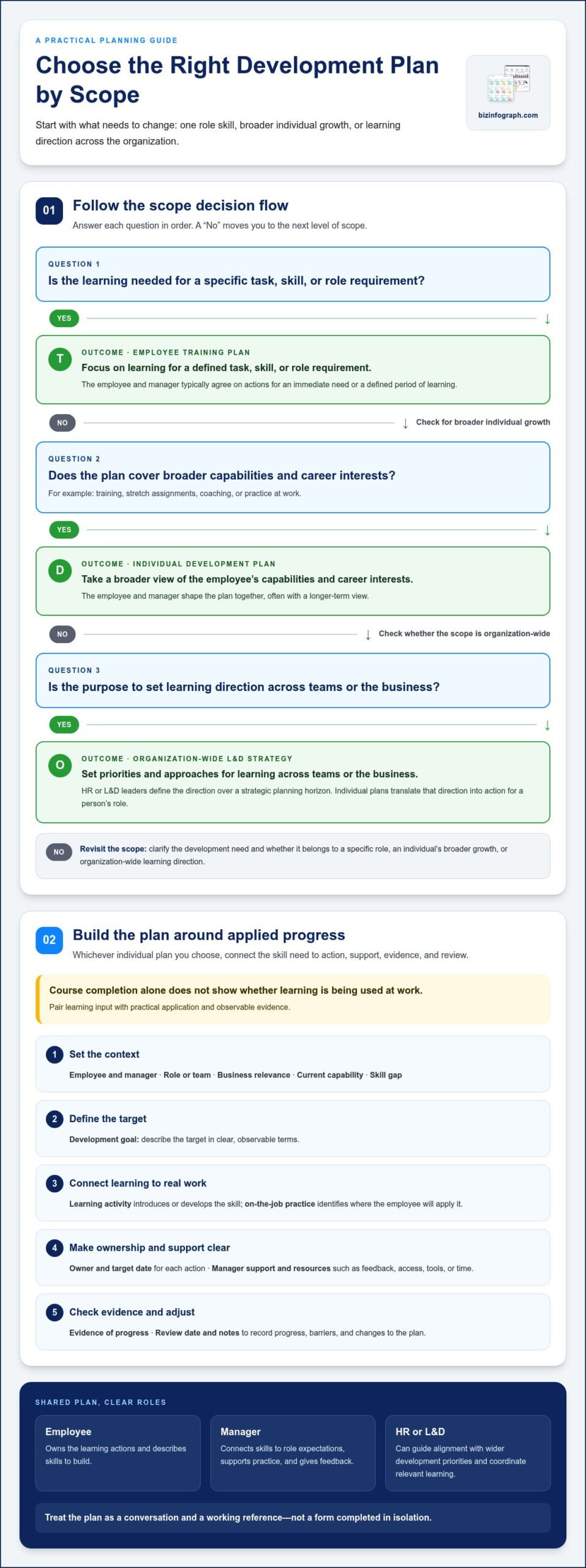
These documents are related, but they operate at different levels. Their scope, owner, and time horizon help determine which one you need.
- Employee training plan: Focuses on learning needed for a specific task, skill, or role requirement. The employee and manager typically agree on the actions, which may address an immediate need or a defined period of learning.
- Individual development plan: Covers a broader set of capabilities and career interests, including training, stretch assignments, coaching, or practice at work. The employee and manager shape it together, often with a longer-term view.
- Organization-wide L&D strategy: Sets direction for learning across teams or the business. HR or L&D leaders define priorities and approaches over a strategic planning horizon. Individual plans translate that direction into action for a person’s role.
Training can be one part of a broader development plan, rather than the whole plan. For example, an employee preparing to lead projects might take a course, practise facilitating team discussions, and receive feedback from a manager. The organization-wide strategy sets direction; the individual plan maps relevant steps.
When does a training and development plan help?
Use a plan when expectations or responsibilities are changing. A new hire may need a structured onboarding path; an employee moving into a different role may need to build specific capabilities; and someone addressing a performance need may benefit from agreed practice and check-ins. Career growth is another useful prompt, especially when an employee is exploring skills needed for a future opportunity.
Make learning expectations visible: clarify what the employee will do, what support the manager will provide, and what evidence you’ll review. Evidence might include a completed work task, feedback on a presentation, or the ability to use a process independently. The employee owns their learning actions, while the manager supports practice and gives feedback. HR or L&D can provide guidance and coordinate relevant learning. This shared understanding gives everyone a practical reference point without treating course completion as proof that a skill has been applied.
What Should a Training and Development Plan Template Include?
A useful plan captures enough context to make each development action relevant, then gives the employee and manager a way to check progress. Keep the fields focused. The goal is a working document, not a form so detailed that nobody updates it.
A good training and development plan template connects a defined skill goal to learning actions, workplace support, observable evidence, and a scheduled review.
Use this copy-ready field list as a starting point. Adapt it to the role, the skill being developed, and the way your team reviews learning.
- Employee and manager: Identify who the plan supports and who will guide progress.
- Role or team: Add the work context that makes the development need relevant.
- Business relevance: Explain how the skill connects to role expectations, team priorities, or upcoming responsibilities.
- Current capability: Record what the employee can do now, using examples or feedback where useful.
- Skill gap: State the specific capability to develop, rather than a broad label such as “leadership.”
- Development goal: Describe the target in clear, observable terms.
- Learning activity: Note the learning input, such as coursework, coaching, shadowing, or guided practice.
- On-the-job practice: Specify where the employee will apply the skill in real work.
- Owner and target date: Assign responsibility and a realistic completion date to each action.
- Manager support and resources: Capture feedback, access, tools, or time needed to make progress.
- Evidence of progress: Define what will demonstrate learning, such as completed work, a skill demonstration, or feedback.
- Review date and notes: Set a check-in point and record progress, barriers, and any changes to the plan.
Core fields for goals, skills, and learning actions
Make the starting point and target specific enough to guide action. For example, replace “improve reporting” with “build a monthly report that explains key changes to the team.” Then separate how the employee will learn from where they’ll practise. A short course may introduce a method; applying it to the next team report is the practice. Give each action an owner and due date.
Fields for progress, support, and evaluation
Define evidence before learning begins, so review focuses on application rather than attendance alone. Note the support the manager will provide, along with likely barriers such as limited time or access to a project. At the review, record what’s working and revise actions if priorities shift. For team-level summaries, Excel dashboard templates can help organize and present progress data without replacing the individual plan.
How to Tailor Training to Roles and Skill Gaps
The right learning activity depends on what’s getting in the way. An employee who doesn’t know a process may need clear instruction; someone who understands it but struggles to apply it may need guided practice and feedback. Before adding training to a plan, identify whether the gap is knowledge, practice, process, or access to resources. A course won’t fix a workflow that prevents the employee from using the skill.
Choose a learning method that fits the capability gap, then look for evidence that the skill transfers to the work.
Match learning methods to the development need
Start with the role’s actual tasks and the employee’s current capability. The examples below connect a development need to a suitable learning approach and a practical way to review its application.
| Development need | Learning approach | Evidence at work |
|---|---|---|
| Knowledge of a new procedure | Instruction, reference material, or coursework | Employee explains the steps and follows them on a relevant task |
| Skill is understood but not yet fluent | Guided practice with feedback | Completed work shows the skill applied with less prompting |
| Limited exposure to a task or role | Shadowing, followed by a structured assignment | Employee completes a similar task and discusses key decisions |
| Need to strengthen judgment or communication | Coaching or peer learning | Manager or peer feedback reflects a specific observed behavior |
| Unclear or obstructive process | Process clarification or resource support | Employee can complete the task using the agreed workflow and tools |
For example, if a team member knows how to prepare a client update but hesitates when presenting it, repeating the same course may not help. Rehearsing with a manager, delivering an update, and receiving focused feedback better address the practice gap.
Balance individual goals with team priorities
Role requirements clarify which capabilities matter for current work, while employee input helps shape relevant, motivating goals. Discuss both before setting priorities. A skill can benefit the team and support an employee’s interests, but the plan should also account for workload, access to practice, and the manager’s ability to provide feedback.
SMART goals make expectations easier to review by defining a specific outcome, how progress will be measured, and a realistic timeframe. Instead of “get better at presentations,” a goal might be “present the monthly project update using a clear summary and respond to questions, then review feedback with the manager.” Adjust the target to the role and available opportunities to practise.
A spreadsheet dashboard for tracking team progress can summarize development activity alongside other reporting, while the individual plan keeps each person’s goals and feedback in context.
How Do You Create and Review a Training and Development Plan?
A reliable plan takes shape through a conversation, then stays useful through follow-up. Work through these steps together so the employee understands the goal, the manager knows how to support it, and both can see whether learning is showing up in the work.
- Start with role expectations. Identify the tasks, responsibilities, or upcoming changes that make development relevant. Invite the employee to describe where they feel confident and where they need practice.
- Choose the priority gap. Compare role needs with current capability. If several gaps emerge, rank them by relevance to current responsibilities, urgency, and opportunity to practise. Start with the gap that matters most now; add another only if there’s enough time and support to address it.
- Agree on an observable goal. Describe what the employee should be able to do and how you’ll recognize progress. “Improve client communication” is broad; “lead the next client update and respond clearly to questions” gives both people something concrete to review.
- Plan learning and application. Select a suitable learning activity, then identify where the employee will use the skill in their work. Training and practice are related, but they aren’t interchangeable: completing a lesson doesn’t create an opportunity to apply it.
- Assign responsibilities and milestones. Agree who owns each action, what the manager will provide, and when you’ll check in. Set dates that account for workload, access to relevant tasks, and operational commitments.
- Review, learn, and adjust. At each check-in, discuss evidence, feedback, obstacles, and any changes in role priorities. Record the next action and its owner so the conversation leads to clear follow-through.
Build the plan together, from need to action
Before learning begins, confirm the goal, method, practice opportunity, and support with the employee. The employee can own activities such as preparing for an assignment or applying a new technique; the manager can arrange opportunities, provide feedback, or remove a barrier. Agreeing on responsibilities prevents assumptions about who will do what and helps keep milestones achievable.
Review progress and keep the plan useful
Schedule check-ins around meaningful milestones, such as completing a first assignment or demonstrating a skill in a real task, rather than relying only on a course-completion date. Keep the conversation practical: What evidence shows progress? What’s getting in the way? Has the role or priority changed? Update the plan when the original approach isn’t creating useful learning.
Review evidence of skill application, not just completed activities, and adjust the actions when the learning isn’t transferring to work. An Excel dashboard template can summarize team-level progress, while the individual plan retains the context behind each employee’s goals and next steps.
Use Excel dashboard templates to organize and present development progress with a clear visual summary.
How Can a Spreadsheet Make Training Plan Tracking Easier?
A spreadsheet can be a practical starting point when a team needs a clear record of development actions, owners, target dates, and review notes. It brings key details into one view, making it easier to spot overdue milestones or plans that need a check-in. Keep the individual training and development plan as the source for each person’s goals, and use the spreadsheet to monitor activity across employees.
Keep the tracker focused on coordination. It should help managers and employees know what happens next, not become a storehouse for every detail of a person’s performance or career history.
What should a training progress tracker show?
Use one row per development action, or a consistent group of fields for each plan. Include an employee or plan owner, development goal, learning activity, status, milestone, and review date. If actions have different owners, record the responsible person for each one. Add brief review notes that capture the next step rather than lengthy personal commentary.
Agree on status labels before multiple managers start updating the tracker. For example, define “Not started,” “In progress,” “Needs review,” and “Complete” so they mean the same thing across teams. Use a milestone to describe the next observable point, such as applying a method to a project task. Excel dashboard templates can summarize progress patterns for a team overview without turning a tracker into an individual assessment.
Protect employee privacy. Share only the information each audience needs, and keep sensitive feedback or personal details out of broad team summaries. A team view might show counts by status or upcoming review dates, while individual conversations retain the context behind each person’s plan.
When should teams move beyond a spreadsheet?
A spreadsheet may stop being manageable as employee numbers grow, reporting needs become more complex, or several people need to update the same records. Pay attention to access control, version management, and consistent data entry from the start. Decide who can view or edit the file, establish one authoritative version, and avoid storing sensitive employee information in a broadly shared tracker.
Consider a more structured system when teams need established approval workflows, detailed access permissions, or reporting across many plans. A learning management system (LMS) may support course delivery and completion records; an individual development plan can still capture goals, workplace practice, manager support, and review actions. These tools serve related but different purposes, and a spreadsheet shouldn’t be treated as a replacement for HR systems or learning platforms.
For a compact team, keep the spreadsheet tidy and review it regularly. As reporting needs expand, a dashboard view can make patterns easier to scan while preserving appropriate access to individual plan details. Downloadable Excel dashboard templates provide a polished starting point for summarizing training progress with less manual setup.
Put Your Development Plan Into Motion
Your next step doesn’t have to be a full-scale rollout. Choose one upcoming responsibility or role transition and use it to test your training and development plan template. After the first review, note which parts helped the employee take action and which fields felt unclear. That feedback gives you a practical way to refine the format before using it more broadly.
Keep the plan flexible as work changes. A development goal should support real responsibilities while leaving room to adjust the learning approach when priorities, access to practice, or available support shift. Consistent, thoughtful updates help make development conversations more focused and useful over time.
For a clear way to present business reporting, explore downloadable Excel dashboard templates from Biz Infographs. The templates include free lifetime updates, helping you keep your reporting resources current. Choose a template to create a clearer visual summary of development progress and put your plan into action.
Frequently Asked Questions
What is the difference between a training plan and a development plan?
A training plan focuses on learning activities that build a particular skill or prepare someone for a task. A development plan takes a broader view, connecting capability-building with an employee’s career interests and future responsibilities. For example, training might help a new supervisor learn a scheduling process, while their development plan could include leading projects, receiving feedback, and exploring longer-term management goals.
What should a training and development plan include?
A training and development plan should connect a clear goal to the capability the employee wants or needs to build. Include role context, the employee’s starting point, relevant learning and work-based actions, the people responsible, needed support, and a way to review progress. Make each action relevant to the goal. If an action no longer fits the employee’s work, revise it instead of preserving it just to fill a field.
How do you identify employee training needs?
Compare role expectations with employee input and evidence from day-to-day work, then consider current business priorities. Look for patterns: repeated corrections on reports may point to a technical skill gap, while delays caused by unclear approvals may signal a process issue instead. Ask the employee what feels difficult, review relevant work examples, and identify what successful performance would look like before choosing a learning response.
How often should a training and development plan be reviewed?
Review a plan at milestones tied to learning and work, such as after a practice assignment or before a new responsibility begins. Set the next check-in when agreeing on the plan, so both people know when they’ll revisit it. Schedule an earlier discussion if the employee’s role, workload, access to practice, or team priorities change. Use each review to decide whether to continue, adjust, or replace an action.
Can a training and development plan include on-the-job learning?
Yes. On-the-job learning gives employees a chance to build skills in the setting where they’ll use them. A new project coordinator, for instance, could shadow a colleague during a project handoff, then lead a handoff with coaching available. Record the task, the support provided, and an observable result, such as whether key decisions and next steps were communicated clearly.
How do you measure whether employee training is effective?
Measure more than attendance or course completion. First note what the employee can do before learning begins, then compare it with a later demonstration or work sample. For instance, after training on a reporting process, review whether the employee can prepare the report accurately and explain the figures. Feedback from a manager or colleague can add context, especially when the skill involves communication or collaboration.
Can you use Excel to track employee development plans?
Yes, Excel can track employee or plan owners, goals, actions, statuses, target dates, milestones, and review notes when a shared spreadsheet meets the team’s needs. Limit access to appropriate users, avoid unnecessary sensitive details, and manage versions so updates aren’t lost or duplicated. If your team needs more complex permissions, workflows, or reporting, an HR system or learning platform may be a better fit for those functions.