
Introduction to Sales Reports Dashboard
What Is a Sales Reports Dashboard and Why It Matters
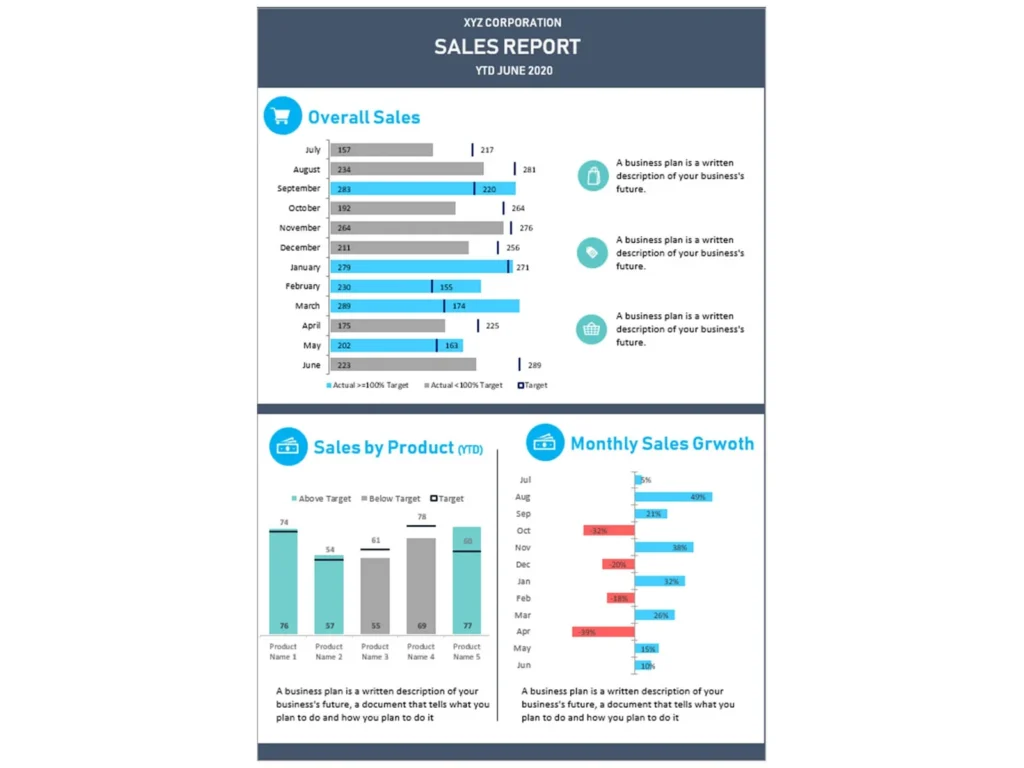
A Sales Reports Dashboard is a centralized reporting view that organizes the most important sales information into one easy-to-read format. It helps businesses review revenue, pipeline progress, team activity, and target achievement without relying on scattered spreadsheets. In simple terms, a report is a document that communicates business performance, and a dashboard improves that process by making the information visual and easier to analyze. A strong Sales Reports Dashboard excel file helps teams understand sales trends quickly and supports better decisions. It is especially useful for leaders who need a complete picture of the company’s sales performance.
How a Sales Dashboard Supports Better Sales Reporting
A well-structured Sales Dashboard improves reporting by turning raw data into meaningful business insight. Instead of manually checking several files, teams can use sales reporting tools to view revenue, activities, pipeline movement, and trends in one place. This saves time and improves reporting accuracy. It also helps management focus on the purpose of the report, which is to understand current performance and plan the next steps. When sales data is presented clearly, sales reporting helps business leaders identify strengths, weaknesses, and opportunities. This is why dashboards are now an important part of modern sales reporting software and performance management.
Why Businesses Use a Sales Reports Dashboard Excel Template
Many businesses choose a Sales Reports Dashboard template because it gives them a ready-made structure for organized reporting. A practical Sales Reports Dashboard excel file can include charts, tables, summary cards, and formulas that make reporting more efficient. This reduces manual effort and standardizes the way teams track performance. Companies often use a monthly sales report template or a customizable dashboard because it is faster than building a report from scratch. A strong template also makes it easier to create a sales report that is professional, consistent, and aligned with business goals. This supports better communication across the sales function.
Importance of Sales Reports in Business
How to Write a Sales Report for Better Decision-Making
To write a sales report effectively, businesses must first define the audience, the metrics to include, and the purpose of the report. A useful sales report should clearly summarize current results, compare performance against goals, and highlight trends that need action. It should include data that helps leaders make decisions to improve sales rather than simply listing numbers. Good reports often explain why performance changed and what actions are required next. When businesses know how to create a sales report properly, they can communicate results more clearly and support better planning. This is essential for performance-focused organizations.
Benefits of Sales Reporting for the Sales Team
There are many benefits of sales reporting when it is done consistently and accurately. Reporting helps the team track progress, manage accountability, and understand whether targets are being met. It also improves visibility into performance at both the individual and team level. For example, leaders can review sales rep performance, monitor trends, and identify where support is needed. Regular reporting also helps salespeople understand priorities and stay focused on measurable outcomes. Since sales reporting provides structure and clarity, it plays an important role in building disciplined execution. Over time, this leads to stronger performance and better coordination across the team.
Creating a Sales Reporting Process for Effective Sales Management
A good reporting system does not happen by chance. It requires a clear process for collecting data, preparing reports, and reviewing results regularly. Regular sales reporting helps leadership monitor activity, pipeline status, and closing performance in a consistent way. This improves control and keeps the team aligned with sales objectives. A strong reporting process should define what data is needed, who updates it, and when reports are reviewed. This makes reporting more reliable and useful for management meetings. In practice, sales reporting can help leaders spot issues early, adjust strategy, and improve overall control of the sales cycle.
Types of Sales Reports
Understanding Different Types of Sales Reports for Business Needs
Businesses use different types of sales reports depending on what they want to measure and improve. Some reports focus on revenue, some track activity, and others analyze customer conversion or pipeline performance. These different types of sales reporting help leaders answer different business questions. For example, one report may review closed deals, while another may examine prospect movement through the funnel. Understanding the types of sales reports available helps companies choose the right structure for daily management and strategic planning. A thoughtful Sales Reports Dashboard can combine several report views into one place for better visibility and control.
Daily Sales Report, Weekly Sales Report, and Monthly Sales Report Uses
A daily sales report is useful for monitoring short-term activity, urgent pipeline updates, and immediate follow-up needs. A weekly report often focuses on progress toward goals, new opportunities, and team activity levels. A monthly sales report provides a broader view of performance, trends, and achievement over time. Each report serves a different purpose, and together they build a complete reporting system. A daily sales report template helps businesses standardize everyday tracking, while a monthly sales report template supports deeper review and performance discussion. These reporting cycles help leaders respond quickly while also planning for long-term growth.
Choosing the Right Sales Report for Sales and Marketing Analysis
Not every report fits every business need. The right report depends on the audience, goals, and questions being asked. For example, a sales leader may want to review close rates and pipeline movement, while marketing may focus on lead quality and conversion. In this way, the Sales Dashboard supports both sales and marketing alignment. Choosing the right sales report allows managers to focus on the most important data rather than too much information. When businesses match report structure to business need, they improve clarity, save time, and make reporting more useful for decision-making and strategic review.
Key Metrics in a Sales Reports Dashboard
Important Sales Metrics to Include in a Sales Dashboard
A useful Sales Reports Dashboard should include the most important measures that reflect business performance clearly. These may include revenue, number of deals, average deal size, conversion rate, and target achievement. It can also include key sales indicators such as customer acquisition, lost opportunities, and quota attainment. The goal is to give users a clear view of how the company’s sales function is performing. When choosing measures, the focus should remain on what helps managers understand sales outcomes and take action. Good dashboards avoid clutter and emphasize the figures that matter most to leadership.
Tracking Monthly Sales, Daily Sales, and Weekly Sales Performance
A strong dashboard should allow users to track daily sales, weekly sales, and monthly sales in one reporting framework. Daily reporting helps teams react quickly to problems or missed follow-ups. Weekly reporting shows short-term patterns and supports coaching. Monthly reporting helps leadership review overall trends and strategic progress. This multi-level view gives managers a better understanding of whether the sales team is performing consistently or only in certain periods. When all these views are available in one Sales Reports Dashboard excel file, reporting becomes more efficient and more valuable for planning, team review, and ongoing management.
Measuring Sales Pipeline, Team Output, and Sales Analysis Results
A complete dashboard should go beyond revenue and include pipeline and activity reporting. This can include number of qualified opportunities, pipeline value, meeting counts, proposal activity, and closed deals. It may also include a sales activity report to show how much effort is being applied across the funnel. These metrics strengthen sales analysis by showing the connection between effort and outcome. They help leaders see if pipeline levels are strong enough to support future results and whether activity is turning into revenue. This type of reporting also gives managers a better basis for coaching and performance evaluation.
Sales Reports Dashboard Excel Features
How Sales Reports Dashboard Excel Simplifies Reporting
A well-built Sales Reports Dashboard excel file simplifies reporting by combining calculations, charts, and summaries into one place. This reduces manual work and makes it easier to update reports regularly. Businesses that do not want expensive systems often use Excel because it is flexible and familiar. It can support trend analysis, pipeline tracking, and performance summaries without much complexity. When dashboards are set up well, sales reporting helps organizations save time and improve consistency. Excel also allows businesses to customize their report structure to match their own reporting style, which makes the dashboard more practical for everyday use.
Using a Monthly Sales Report Template for Fast Reporting
A monthly sales report template is useful because it gives businesses a pre-designed format for structured analysis. Instead of starting from a blank file each month, users can simply update the data and review the results. This saves time and ensures that important sections are not missed. A good Sales Reports Dashboard template can include trend charts, product summaries, activity reports, and target comparisons. It also makes monthly review meetings more effective because everyone sees the same structure. For teams that need speed and consistency, a monthly template is one of the most practical reporting tools available.
Building an Effective Sales Report with a Sales Reports Dashboard Template
Creating an effective sales report requires more than listing numbers. The report should explain performance clearly, highlight changes, and support action. A strong Sales Reports Dashboard template helps by organizing the report into logical sections such as revenue, activity, pipeline, and goal tracking. The dashboard can also include comments or notes to explain what changed and why. This makes the report more useful for managers and executives. A well-designed template improves communication, strengthens accuracy, and helps teams use sales reporting more strategically. It is one of the best ways to standardize and improve the reporting process.
Sales Team and Performance Reporting
How Sales Teams Use Dashboards to Monitor Performance
Dashboards help the team understand current results and adjust action before problems grow larger. Representatives can review activity levels, opportunities, and target progress, while managers can compare results across the team. This visibility is valuable because it shows whether the sales team is performing as expected. A dashboard also allows management to review sales rep performance fairly using the same measures for everyone. This creates more transparency and accountability. With one clear view of metrics, the sales team can focus on execution rather than on compiling information manually. That improves efficiency and supports stronger performance culture.
Improving Effective Sales with Structured Sales Reports
Structured reports help teams turn data into action. When reporting is organized and reviewed regularly, managers can identify gaps in prospecting, follow-up, or closing. This supports more effective sales management and better coaching conversations. Clear dashboards also make it easier to compare actual outcomes against sales objectives and identify where changes are needed. Since sales reporting can help guide daily and strategic decisions, it becomes a practical tool for improving team discipline. Over time, stronger reporting improves execution, highlights the right sales priorities, and supports more predictable business performance across the organization.
Supporting Sales and Marketing Alignment with Better Reports
The best reporting systems create better communication between sales and marketing teams. Marketing may generate leads, while sales converts them into customers, so both sides need a shared view of results. A Sales Dashboard can show lead volume, conversion rates, revenue outcomes, and campaign impact. This helps both teams understand what is working and where adjustment is needed. Better reporting also reduces blame and increases collaboration because decisions are based on facts. When reporting is clear and consistent, it becomes easier to align lead generation, pipeline quality, and revenue goals across the business.
Sales Pipeline and Activity Monitoring
Tracking Sales Pipeline Stages in a Sales Dashboard
A strong dashboard should show each stage of the sales cycle so managers can understand where opportunities are building or stalling. This includes lead qualification, proposal, negotiation, and closing stages. Reviewing the pipeline in this way helps leaders assess whether the funnel is healthy and whether future revenue is realistic. It also helps managers understand the length of the sales process and where delays occur. A dashboard with pipeline visibility strengthens planning and improves accountability. It is especially helpful for businesses that want to monitor conversion quality and manage their sales process more actively.
Using Reports to Review Daily Sales and Weekly Sales Activities
Daily and weekly reviews are important because they show the effort behind final results. A dashboard can summarize meetings, calls, proposals, and opportunity progress through a sales activity report or productivity section. This allows managers to evaluate whether the team is doing enough of the right work. It also supports faster corrections when activity drops or follow-up slows down. A daily sales report template is especially useful for operations-focused teams that need frequent review. By monitoring activity consistently, businesses can strengthen discipline, improve follow-through, and connect sales effort to revenue results more effectively.
How Effective Sales Report Design Improves Visibility
Design matters in reporting. Even strong data loses value if the report is confusing or poorly structured. A well-designed Sales Reports Dashboard improves visibility by organizing information into clear sections and using charts that highlight performance quickly. Good design supports creating an effective sales report because users can understand trends without reading through too much detail. A clear report can also make meetings more productive and decisions faster. Since sales reporting provides insight only when people can interpret it easily, report design plays a major role in making dashboards practical and actionable.
Conclusion
Why a Sales Reports Dashboard Template Is a Practical Reporting Tool
A Sales Reports Dashboard template is a practical solution for businesses that want better visibility, stronger reporting consistency, and faster analysis. It organizes the most important sales information into one structured view and supports decision-making at multiple levels. Whether the goal is tracking revenue, pipeline, or team activity, a dashboard helps leaders review performance more efficiently. It also creates a professional way to write a sales report and communicate results clearly. For many businesses, this makes dashboard-based reporting one of the most useful tools for performance management and business planning.
Final Thoughts on Creating a Sales Report for Better Business Performance
The real value of reporting lies in using it to improve action. When businesses learn how to create a sales report that is clear, relevant, and consistent, they gain better control over performance. Good reporting helps leaders understand sales, evaluate progress, and make smarter decisions. It also supports better coaching, stronger planning, and more disciplined execution. A well-designed Sales Dashboard brings together the data needed to guide growth and improve focus. In the long run, better reporting leads to better management, stronger team alignment, and stronger business results.
For ready-to-use Dashboard Templates: