
Introduction to HR Termination Dashboard
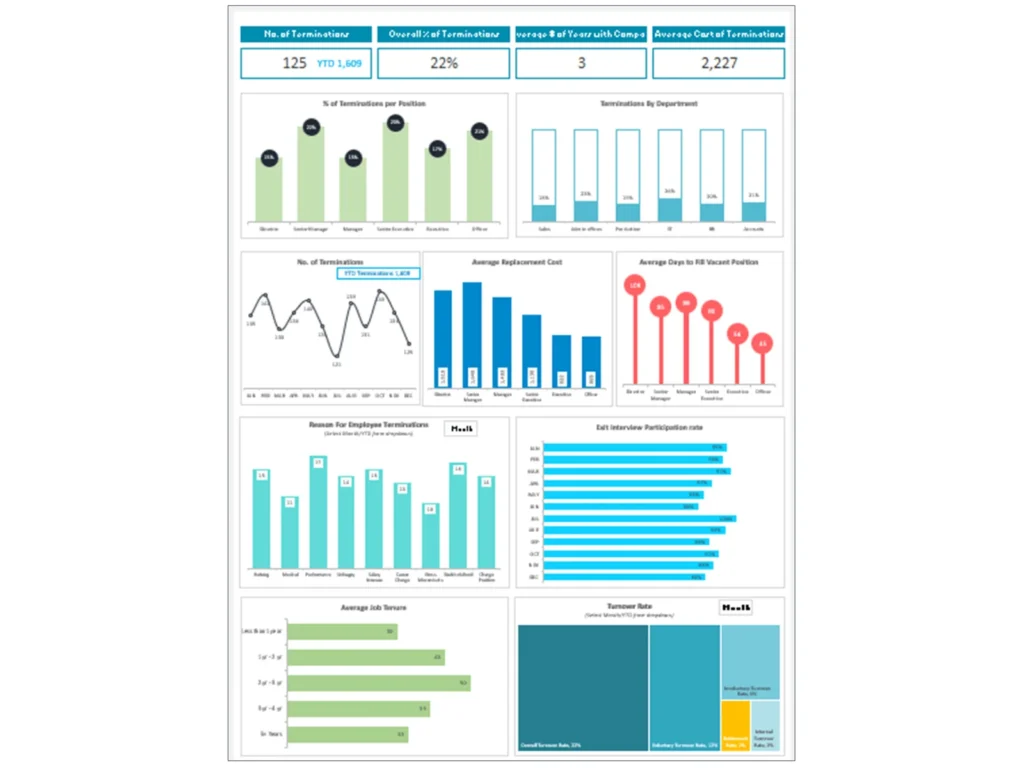
What Is an HR Termination Dashboard in HR Analytics and Workforce Management
The HR Termination Dashboard is a specialized HR Dashboard designed for HR analytics and workforce management, focusing on tracking employee exits, turnover patterns, and termination-related key metrics. It transforms raw HR data into actionable insights, allowing HR departments to monitor workforce trends and identify patterns in employee departures.
This dashboard focuses on analyzing people analytics data such as employee attendance, performance trends, and termination reasons. By using advanced analytics, HR professionals can uncover patterns in employee behavior that lead to turnover. The HR Termination Dashboard is designed for HR teams to proactively manage workforce challenges and improve employee retention strategies.
HR dashboards enable organizations to track key HR metrics and align HR processes with business goals. It gives HR leaders the ability to turn HR data into meaningful dashboards and reports, helping them take proactive steps to reduce unwanted attrition and improve overall HR management.
Why Organizations Use HR Termination Dashboard Excel and Dashboard Templates
Organizations widely adopt HR Termination Dashboard Excel and HR Termination Dashboard templates because they offer flexibility, cost-efficiency, and ease of implementation. These templates allow HR teams to create an HR dashboard quickly without relying entirely on complex HR software systems.
A well-structured HR Termination Dashboard template helps HR teams track metrics such as termination rate, employee retention, and workforce trends. It enables the HR department to organize dashboard data efficiently and analyze termination patterns using tools like Google Sheets or Excel.
Templates also support best practices by standardizing HR reporting and ensuring consistency in data analysis. They allow HR professionals to build an HR dashboard tailored to their needs, including tracking employee performance dashboard data alongside termination insights.
By using templates, organizations can highlight areas for improvement, improve workforce planning and retention strategies, and make more effective HR decisions. These templates empower HR teams to manage data efficiently and gain deeper insights into workforce dynamics.
Role of HR Dashboard in Tracking Termination Metrics and HR Reporting
The HR Dashboard plays a critical role in tracking termination metrics and enhancing HR reporting. The HR Termination Dashboard allows HR teams to monitor key performance indicators related to workforce exits, including turnover rates and termination reasons.
It helps HR professionals track metrics and analyze dashboard data to identify trends early. For example, if certain departments show higher termination rates, HR teams can investigate underlying issues such as low engagement or poor performance management.
The dashboard also supports dashboards and reports that provide real-time insights into workforce changes. This allows HR leaders to make data-driven decisions and improve HR processes.
By providing clear and actionable insights, the HR Termination Dashboard helps HR departments improve employee retention, optimize workforce planning, and ensure effective HR management practices.
Key Termination Metrics in HR Termination Dashboard
Understanding Termination Metrics and Workforce Data
Termination metrics are essential for understanding workforce dynamics and improving HR management. The HR Termination Dashboard tracks key metrics such as employee turnover rate, voluntary and involuntary termination, and retention rate.
These metrics provide insights into workforce data and help HR teams evaluate the effectiveness of HR processes. By analyzing patterns in employee departures, HR professionals can identify root causes and take corrective actions.
The dashboard also integrates people analytics data, allowing HR teams to analyze relationships between termination and factors such as employee attendance and performance. This holistic view helps organizations improve workforce planning and retention strategies.
Understanding termination metrics is crucial for building an effective HR strategy and ensuring long-term organizational success.
Tracking Employee Termination Trends Using HR Analytics Dashboard
Tracking termination trends is a key function of the HR analytics dashboard. The HR Termination Dashboard enables HR teams to monitor changes in workforce composition and identify patterns in employee exits over time.
By analyzing dashboard data, HR professionals can detect trends early and take proactive steps to address potential issues. For example, a sudden increase in termination rates may indicate problems with management, workplace culture, or employee engagement.
Using advanced analytics, HR teams can segment termination data by department, role, or location to gain deeper insights. This allows organizations to implement targeted strategies to reduce turnover and improve employee retention.
The dashboard helps HR teams make data-driven decisions and align workforce strategies with business goals.
Measuring Workforce Impact with People Analytics and Key HR Metrics
People analytics plays a vital role in measuring the impact of workforce changes. The HR Termination Dashboard uses people analytics data to evaluate how terminations affect employee retention, performance, and overall workforce stability.
Key HR metrics such as retention rate, employee performance, and attendance patterns provide valuable insights into workforce health. By tracking these metrics, HR teams can assess the effectiveness of HR strategies and identify areas for improvement.
The dashboard gives HR leaders the ability to analyze workforce data and understand the impact of terminations on organizational performance. This helps HR departments take proactive steps to improve retention and enhance workforce planning.
HR Analytics and BI in HR Termination Dashboard
Using HR Analytics and Analytics Dashboards for Termination Insights
HR analytics dashboards provide powerful tools for analyzing termination data and generating actionable insights. The HR Termination Dashboard leverages analytics dashboards to track key HR metrics and identify trends in employee exits.
These dashboards enable HR professionals to turn HR data into meaningful insights that support decision-making. By analyzing termination patterns, HR teams can identify factors that contribute to turnover and implement strategies to address them.
Analytics dashboards also support real-time reporting, allowing HR leaders to monitor workforce changes and respond quickly to emerging issues. This ensures that HR processes remain effective and aligned with organizational goals.
Leveraging Power BI and Google Sheets for HR Reporting
Tools like Power BI and Google Sheets enhance the capabilities of the HR Termination Dashboard by providing advanced reporting and visualization features. Using Power BI, HR teams can create interactive dashboards that display termination data in real time.
Google Sheets offers a flexible and accessible platform for managing HR data and building dashboards. These tools enable HR teams to track metrics, analyze workforce data, and generate reports efficiently.
By integrating these tools with HR software, organizations can improve data accuracy and streamline HR reporting processes. This enhances the overall effectiveness of HR management and supports data-driven decision-making.
Comparing Dashboard vs Traditional HR Reporting Methods
Comparing dashboard vs traditional HR reporting methods highlights the advantages of using an HR Termination Dashboard. Traditional reporting methods often rely on static reports that lack real-time insights and flexibility.
In contrast, dashboards provide dynamic and interactive views of HR data, allowing HR teams to track metrics and analyze trends more effectively. Dashboards also enable real-time updates, ensuring that HR leaders have access to the latest information.
The HR Termination Dashboard simplifies complex data analysis and improves decision-making by presenting information in a visual format. This makes it easier for HR professionals to identify trends and take proactive steps to improve workforce management.
HR Termination Dashboard Examples and Use Cases
HR Termination Dashboard Example for Workforce Analysis
An HR Termination Dashboard example demonstrates how organizations analyze workforce data to identify termination trends and improve HR processes.
HR Dashboard Examples for Termination and Workforce Metrics
HR dashboard examples highlight how termination metrics and workforce data are tracked and analyzed.
HR Analytics Dashboard Example for People Analytics Insights
HR analytics dashboard examples show how people analytics data is used to improve workforce planning and retention.
Building HR Termination Dashboard Template in Excel
Designing HR Termination Dashboard Excel Template
Designing an HR Termination Dashboard Excel template involves structuring key metrics and workforce data into visual formats that are easy to interpret. HR teams can build an HR dashboard using Excel by organizing termination data into tables, charts, and pivot reports.
This process includes collecting accurate HR data, performing data cleaning, and ensuring consistency across datasets. The template should include key performance indicators such as termination rate, retention rate, and employee performance metrics.
A well-designed template enhances dashboard capabilities and allows HR professionals to analyze data effectively. It also supports dashboards and reports that provide actionable insights for workforce planning.
Structuring Termination Metrics and Workforce Data in Dashboard
Structuring termination metrics is essential for creating an effective HR Termination Dashboard. HR teams need to organize workforce data into meaningful categories such as department, role, and termination type.
By structuring data properly, HR professionals can track metrics more accurately and identify patterns in employee departures. This helps in highlighting areas for improvement and implementing targeted HR strategies.
The dashboard should include visual elements such as charts and graphs to present data clearly. This ensures that HR leaders can quickly understand workforce trends and make informed decisions.
Creating Interactive HR Dashboard Templates for Analytics
Interactive HR dashboard templates enhance the usability and effectiveness of the HR Termination Dashboard. These templates allow HR teams to explore data dynamically and gain deeper insights into workforce trends.
By incorporating advanced analytics features, HR teams can analyze termination data in real time and identify trends early. Interactive dashboards also improve collaboration among HR professionals and support better decision-making.
These templates empower organizations to manage workforce data effectively and improve HR processes through data-driven insights.
Benefits of HR Termination Dashboard for HR Leaders
Improving HR Reporting and Workforce Visibility
The HR Termination Dashboard improves HR reporting by providing clear and actionable insights into workforce data. It enhances visibility into termination trends and helps HR leaders track key metrics effectively.
Supporting Data-Driven HR Decisions and Workforce Planning
The dashboard supports data-driven decisions by providing insights into workforce planning and retention strategies. It helps HR teams make informed decisions and improve organizational performance.
Enhancing Effective HR Management with Analytics Insights
Analytics insights enable HR leaders to improve HR management practices and optimize workforce strategies.
Best Practices for Implementing HR Termination Dashboard
Selecting the Right Termination Metrics and HR Analytics
Selecting the right metrics ensures accurate analysis and effective decision-making.
Using HR Termination Dashboard Templates and Tools Effectively
Using templates and tools improves efficiency and reporting.
Building Best HR Dashboards for Termination Analysis and Reporting
Building effective dashboards ensures successful implementation and long-term value.
For ready-to-use Dashboard Templates: