

An annual report can tell a clear story without asking donors to wade through a long document. A non profit annual report infographic presents an organization’s work, results, financial information, and supporters in a visual format. Midwives For Haiti created a single-page infographic annual report for 2013, showing how a concise design can bring these elements together.
Donors want to understand what an organization accomplished and how their support contributed. A non profit annual report infographic can make that story easier to follow by choosing clear information, explaining the numbers, and presenting them honestly.
Learn what belongs in a nonprofit annual report, how donor-focused design can guide its layout, and how templates can turn the information into a polished, readable infographic.
Key Takeaways
- Understand how an annual report communicates an organization’s work, finances, and impact to supporters.
- Choose a template that gives key information a clear structure and makes updates easier to manage.
- Design around donor questions so readers can quickly see what their support helps accomplish.
- Build trust by explaining setbacks plainly and showing how the organization is responding.
1. What is a nonprofit annual report?
A nonprofit annual report explains an organization’s work, progress, finances, and support in a format donors can understand. It connects program activity to outcomes, helping readers see what the organization did and how resources contributed. Midwives For Haiti showed one concise approach with a single-page infographic annual report for 2013.
That infographic brought together the problem and solution, the organization’s approach and progress, financial information, and an acknowledgement of supporters. Other examples use different formats: the Atlanta Humane Society’s 2024 impact report is two pages long, while Feeding America’s annual report covers 2024 and Housing Works’ report covers 2025.
In the United States, nonprofits are required to submit Form 990 to the IRS every year. According to the Internal Revenue Service, an exempt organization other than a private foundation that normally has annual gross receipts of $50,000 or less may be eligible to file Form 990-N instead of an annual information return.
How much does an infographic cost to design? The cost depends on the project’s scope, data complexity, design work, and production and distribution choices. A focused, single-page report requires a different amount of content and design work than a multi-section report.
To visualize donations, expenses, and program spending, group figures into clear categories and choose charts that make comparisons easy. Label categories plainly, distinguish income from spending, and pair totals with a brief explanation of what they mean for programs.
Share the infographic through channels supporters already use. Midwives For Haiti emailed its report with a letter from its Executive Director and mailed hard copies to some supporters. For organizations planning tangible mailouts, commercial printing specialists like printitza.co.za can handle high-quality litho and digital production. You can also feature a digital report in your organization’s email and on its website, with a short introduction that points readers to the key findings.
An annual report can also work as a self-mailer: a 2-4 page document designed to reach supporters directly. This format offers room to explain results and finances while keeping the piece easy to distribute. With 57% of Americans saying they have a high level of trust in nonprofits, a clear report can help organizations communicate openly. A capital campaign example started in 2022 and was scheduled to wrap up in 2025.
2. Annual report templates
A strong template gives each report a repeatable structure without forcing every year’s story into identical content. Start with a cover naming the reporting period and organization, then guide readers through the mission, program activity, outcomes, finances, and acknowledgements. For example, a community food program could pair a short service update with a chart showing how its work is distributed.
Choose a format based on how supporters will read the report. A single-page infographic can spotlight a focused story, while a longer digital document gives program details and financial explanations more room. Either way, establish a clear reading path: lead with the central impact, group related information, and place supporting details beside the figures they explain.
Before adapting a template, gather approved copy, financial figures, program outcomes, and brand assets in one working file. Map each item to a planned section to spot gaps early and avoid a crowded layout. Keep labels and chart styles consistent so readers can compare program areas without having to relearn the visual system.
- Opening: State the organization’s purpose and the report’s central message.
- Program story: Connect activities to outcomes with a specific example.
- Financial view: Show income and spending with clear labels and context.
- Closing: Recognize supporters and explain what comes next.
Use editable layouts for recurring elements such as headings, captions, and chart titles. Leave room for explanations where figures need context, and remove decorative elements that compete with the message. A template should make updates straightforward while allowing room for new priorities and honest explanations.
Before sharing, review the report on a phone and a desktop screen. Check that text is readable, charts have descriptive labels, and each section leads naturally to the next. A carefully adapted template can turn scattered material into a coherent report donors can scan and understand.
3. Donor-centric report design
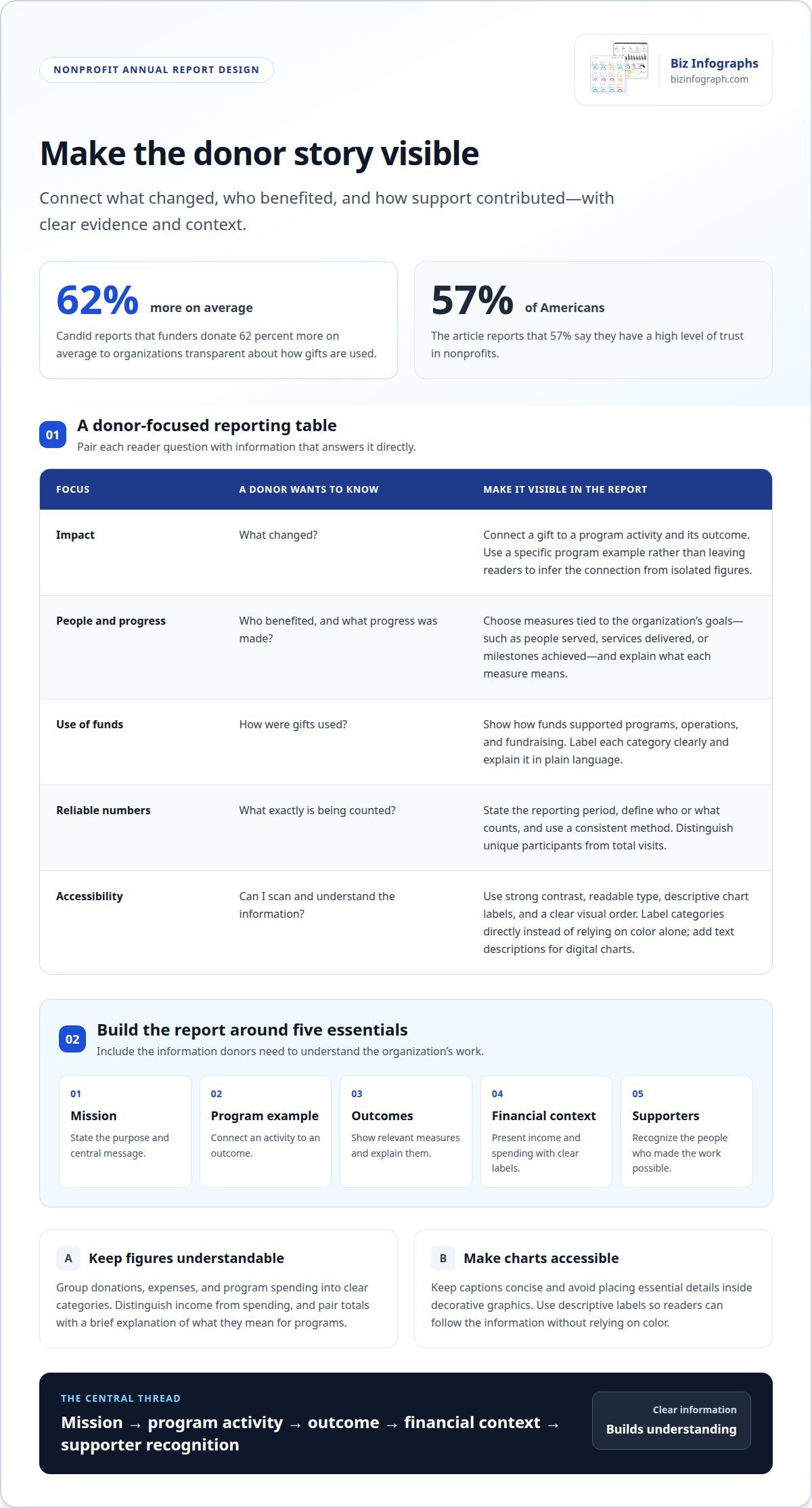
Start with a donor’s perspective: what changed, who benefited, and how did support contribute? Use a specific program example to connect a gift with an activity and an outcome. A non profit annual report infographic should make that connection visible, rather than leave readers to infer it from isolated figures. Show how a community program’s work advances its stated purpose.
Transparency matters. Candid reports that funders donate 62 percent more on average to organizations transparent about how gifts are used. Show how funds supported programs, operations, and fundraising, then explain each category in plain language. This gives readers context for interpreting financial information.
Include the mission, a concise program example, outcomes, financial context, and supporter recognition. Choose metrics that demonstrate reach and progress, such as people served, services delivered, or milestones achieved. Pair each measure with a short explanation of what it means. In a non profit annual report infographic, prioritize the measures that best reflect the organization’s goals.
For accessible design, use strong contrast, readable type, descriptive chart labels, and a clear visual order. Don’t rely on color alone to distinguish categories; label each one directly. Add text descriptions for digital charts so readers using assistive technology can access the same information. Keep captions concise, and don’t place essential details inside decorative graphics.
Calculate impact statistics from defined records, not estimates presented as confirmed results. Specify the reporting period, define who or what counts, and use a consistent method across programs. For example, distinguish unique participants from total visits. When comparing periods, explain changes in program scope or counting methods so readers can understand the comparison.
- Reach: People or communities served.
- Delivery: Services or resources provided.
- Progress: Outcomes tied to program goals.
- Stewardship: How support was allocated.
Before publishing, ask a donor unfamiliar with the program to interpret a chart. If the takeaway is unclear, refine the label or add context. This review can reveal whether the report communicates its meaning to the people it is designed to serve.
4. Honest reporting on setbacks
A credible annual report explains unmet goals as well as achievements. If a job-training program served fewer participants than planned, state the goal, the actual result, and the reason. Keep the explanation factual: a delayed launch, staffing change, or lower-than-expected enrollment gives readers useful context. Don’t disguise a shortfall with celebratory language or leave it out of the story.
Separate confirmed results from plans. For example, explain that a program revised its outreach approach after enrollment fell short, then describe its next action. Don’t present the change as a proven solution until results support that claim. This distinction helps donors understand what happened, what the organization learned, and what it intends to do next.
Use a consistent structure for each setback: identify the target, report the outcome, explain contributing factors, and describe the response. A housing nonprofit might say that a service milestone was delayed because partner coordination took longer than expected. It can then describe how it adjusted scheduling without implying the delay has already been resolved.
- Be specific: Name the program or goal affected.
- Give context: Explain relevant constraints without shifting blame.
- Show the response: Describe the action already taken or planned.
- Set expectations: Identify what future progress will demonstrate.
In an infographic, give setbacks the same clear labels and visual treatment as other results. Don’t hide a difficult outcome in tiny text or use a chart that makes a shortfall look like progress. Add a concise note beside the relevant figure, and distinguish completed actions from future commitments. A straightforward design helps readers interpret the information accurately.
Before publication, compare every claim with program records and approved financial figures. Ask whether a donor can tell what fell short, why it happened, and what comes next. Use a clear visual structure for your report to present the full story with care.
Biz Infographs: PowerPoint Infographic Templates
Biz Infographs offers PowerPoint Infographic Templates to help nonprofits present verified program and financial information in polished slides. Turn an approved report outline into a clear visual story, then adapt the slides to your organization’s message and brand. A consistent layout makes impact figures, program updates, and supporter acknowledgements easier to scan.
Use an infographic template when your content is ready but arranging charts, captions, and key points feels time-consuming. For related data work, Excel Dashboard Templates and Power BI Templates can help present organizational information visually. Choose the option that fits how you’ll organize and share your report.
A template supports how you present your information; your organization remains responsible for accurate figures and honest context. Explore Biz Infographs’ PowerPoint Infographic Templates for your next nonprofit report.
Make your next report a starting point
Your report can do more than document the past. Use it to shape the next conversation with supporters: invite them to reflect on the work, understand what comes next, and stay connected to the mission. A non profit annual report infographic can bridge the organization’s progress and future priorities, especially when its central message remains clear after publication.
Plan for continued use as you prepare the report. Keep approved source material together, note which explanations readers found useful, and record questions that surfaced after sharing. These details can guide the next report’s content and make updates more deliberate. Each reporting cycle can then build on what the organization learned instead of starting from a blank page.
Ready to shape your report into a compelling visual story? Contact Biz Infographs to discuss your report, and take the next step with confidence.
Frequently Asked Questions
What is a nonprofit annual report?
A nonprofit annual report is a public-facing account of an organization’s work and stewardship. It helps supporters connect program activity with results and understand the thinking behind key decisions. Unlike raw records, a well-prepared report gives figures context, defines unfamiliar terms, and makes the organization’s priorities understandable to readers who don’t work with its data.
What are the best nonprofit annual report infographic examples?
The strongest examples make a specific mission easy to grasp and connect activities with outcomes. For instance, a literacy organization might show how tutoring sessions support a student’s progress, while an animal rescue could pair adoption activity with a short story about care. Look for clear labels, meaningful context, and a focused narrative, rather than decorative charts or unexplained numbers.
What tools and templates can nonprofits use to create an annual report infographic?
Nonprofits can use presentation software for page layouts, spreadsheets to organize and check figures, and dashboard tools to explore data before deciding what to show. Start with a template suited to your format, then replace sample content with approved text and figures. Keep chart data in a separate source file so updates can be reviewed without rebuilding the design.