

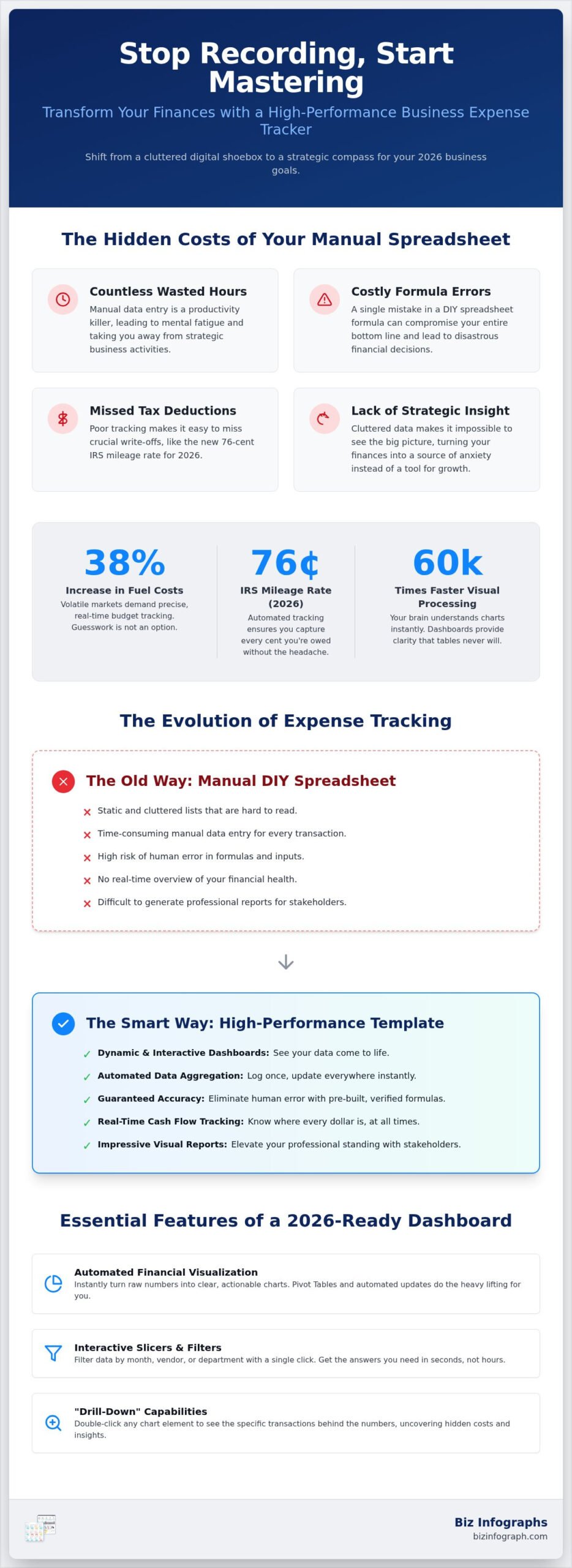
Why are you still treating your business finances like a digital shoebox when your dashboard should be a strategic compass? You likely spend far too many hours on manual data entry, only to end up with cluttered spreadsheets that make it impossible to see the big picture. It’s exhausting to feel like you’re falling behind, especially when missing a single tax deduction or failing to track the new 76-cent IRS mileage rate can hurt your bottom line. With fuel costs up 38% this year, there’s no room for guesswork in your budget. You deserve to feel confident in your numbers, not overwhelmed by them.
I’m going to show you how to turn that frustration into professional pride by using a high-performance business expense tracker excel template. You’ll discover how to automate your reporting and create visuals that actually impress your stakeholders. We will walk through the essential features of a 2026-ready dashboard, from real-time cash flow tracking to seamless Microsoft 365 integration, ensuring you save time while gaining total clarity over where every dollar is going. It’s time to stop recording data and start mastering your financial future.
Key Takeaways
- Transform your financial workflow by shifting from basic data entry to high-level strategic oversight with dynamic 2026 dashboards.
- Discover how a premium business expense tracker excel template uses automated data aggregation and interactive slicers to turn messy numbers into clear, actionable insights.
- Uncover the hidden costs of manual DIY spreadsheets, including the risk of formula errors that could compromise your 2026 bottom line.
- Master a step-by-step implementation strategy to audit your current financial data and map it seamlessly into a high-performance reporting structure.
- Elevate your professional standing with best-in-class visualization tools that provide automated chart updates and free lifetime support.
Why Excel Dashboards are Essential for 2026 Success
Many business owners mistake a basic list for a financial strategy. In reality, modern spreadsheets have evolved far beyond being just computerized analogs of paper accounting worksheets. While a static list merely tells you what you spent, a dynamic dashboard explains why it matters. This psychological shift from recording the past to predicting the future is what separates struggling operations from market leaders in 2026. Excel remains the gold standard because it offers the perfect balance of customization and power, allowing you to build a system that grows with your ambitions.
The Evolution of Expense Tracking: Beyond the Ledger
Manual data entry is the primary productivity killer for small business owners today. It isn’t just the hours lost to typing; it’s the mental fatigue that comes from managing repetitive tasks. Human error is an inevitable byproduct of manual entry, which can be disastrous when you’re trying to track specific 2026 requirements like the 76 cents per mile IRS mileage rate. Automation is the only way to ensure your reporting remains accurate and reliable.
By implementing a professional business expense tracker excel template, you establish a single source of truth for your organization. This means you no longer have to hunt through different files or emails to find a specific receipt or category. Everything is centralized, verified, and ready for analysis. This level of organization doesn’t just save time; it builds a foundation of professional pride and confidence in your financial health.
Visualizing Your 2026 Budget for Maximum Impact
Did you know your brain processes visual charts 60,000 times faster than text tables? When you’re managing a volatile budget where fuel costs have surged 38% in a single year, you don’t have time to scan endless rows of data. You need immediate answers. High-performance dashboards provide at-a-glance KPIs that allow for instant daily decision-making. You can see exactly where your cash is flowing before a minor leak becomes a major crisis.
Visual clarity is the ultimate cure for financial anxiety. Most stress stems from the unknown, but a well-designed dashboard illuminates every corner of your spending. It transforms raw numbers into clear, actionable signals. This sets the stage for professional-grade reporting that impresses stakeholders and proves you have a firm grip on your company’s trajectory. You aren’t just tracking expenses; you’re mastering your financial destiny with a business expense tracker excel template designed for excellence.
Key Features of a High-Performance Business Expense Tracker Excel Template
A high-performance business expense tracker excel template does the heavy lifting for you by utilizing advanced slicers and real-time data connections. Why settle for a flat list when you can have a command center? The best templates in 2026 prioritize automated data aggregation, meaning you spend less time wrestling with complex formulas and more time analyzing your results. This automation ensures that every time you log a bill, your entire financial overview updates instantly, giving you a live look at your company’s pulse.
Interactive slicers allow you to filter through months, departments, or specific vendors with a single click. This level of interactivity is essential to understand your business’s financial health without getting lost in rows of text. When your charts update dynamically, you can spot spending spikes the moment they happen, allowing for agile adjustments in a fast-moving economy.
Automated Financial Visualization
Pivot tables are the engine behind any elite dashboard, silently organizing thousands of data points into meaningful summaries. The most effective trackers include “Drill-Down” capabilities, which allow you to double-click any chart element to see the specific transactions behind the number. This feature is vital for uncovering hidden costs or identifying why a specific category is over budget. By creating a seamless flow from raw data entry to visual charts, you eliminate the friction that usually leads to neglected bookkeeping. If you want to see how this looks in practice, you can explore our excel dashboard for bills and expenses to see these features in action.
Category Management and Tax Readiness
Standardizing your categories is the secret to a stress-free tax season in 2026. A professional business expense tracker excel template helps you distinguish between recurring bills, like software subscriptions, and one-time capital investments. This categorization makes it much easier to pull reports for your accountant or to verify your deductions against the latest IRS mileage rates. When your categories are clean, your financial strategy becomes much clearer.
Visual excellence is not just about looking good; it’s about building stakeholder confidence. When you present a polished, well-designed dashboard to investors or partners, it signals that you have total control over your operations. If you’re ready to upgrade your reporting, consider using professional data visualization tools that turn raw numbers into a source of pride. High-quality design ensures that your data is not only accurate but also persuasive and easy to digest for everyone involved.
DIY vs. Premium Templates: Why Your Manual Spreadsheet is Costing You Money
Is your “free” spreadsheet actually draining your bank account? It’s a common trap to assume that building your own tool saves money, but the hidden costs of DIY development are staggering. When you calculate the hourly value of your time, spending ten or more hours wrestling with cell formatting and complex logic is an expensive distraction from your core business. A best-in-class business expense tracker excel template eliminates this wasted effort, providing an immediate return on investment by letting you skip the struggle and go straight to the results.
Formula errors are the silent killers of small business profitability. A single broken link or a misplaced dollar sign in a DIY sheet can lead to massive inaccuracies in your 2026 bottom line. These mistakes often go unnoticed until tax season, when they can result in missed deductions or costly filing errors. Professional templates are rigorously tested to ensure data integrity, giving you the confidence that every calculation is accurate and reliable. You deserve the peace of mind that comes from a high-quality, professional-grade solution.
The Time-Value Gap in Financial Reporting
Time is your most valuable asset. Comparing the ten-plus hours of DIY design to a five-minute template setup reveals a massive productivity gap. Professional designers spend hundreds of hours perfecting layout and logic so you don’t have to. By exploring these excel dashboard examples, you can see the level of sophistication that is nearly impossible to replicate on your own. This high-end design prevents the “Excel Frustration” that often leads business owners to abandon their tracking altogether. When the system is beautiful and easy to use, you’re more likely to stick with it.
Scalability and Future-Proofing Your Data
What happens when your data grows? Many DIY spreadsheets crawl to a halt once you add a few thousand rows of transactions. Optimized templates are built for performance, ensuring your dashboard remains fast and responsive as your business scales. Since Microsoft 365 now provides continuous updates rather than standalone versions, your tools must be built to adapt. Choosing a premium business expense tracker excel template often includes the benefit of lifetime updates and professional support. This ensures your financial command center remains compatible with the latest software features throughout 2026 and beyond, protecting your data and your time for the long haul. This same focus on efficiency can be applied to your personal interests; for instance, using YumiShare to save and organize recipes from social media helps you manage digital content as effectively as your business finances.
Transitioning from a manual list to an automated system is a defining moment for your professional efficiency. It’s the point where you stop chasing data and start leading with it. Implementing a business expense tracker excel template doesn’t have to be a daunting task. By following a structured approach, you can ensure your transition is smooth and your data remains a reliable source of truth.
- Step 1: Audit your 2026 data. Gather your current bank statements and receipts to verify that every entry is accurate before you begin the migration process.
- Step 2: Map your categories. Align your unique business costs with the template structure to ensure your visual reports reflect your actual operations.
- Step 3: Use bulk uploads. Avoid the productivity drain of manual entry by importing your data through CSV files or copy-paste functions.
- Step 4: Tailor the visuals. Adjust the dashboard colors and fonts to match your corporate identity, making your reports ready for any stakeholder presentation.
- Step 5: Set a review rhythm. Establish a weekly 15-minute session to analyze your cash flow trends and stay ahead of your 2026 budget goals.
Data Preparation and Cleaning
Accuracy starts with clean data. Before you populate your new system, you must identify and remove duplicate entries that could skew your financial charts. Standardizing your date formats and currency symbols is equally important for maintaining consistent reporting throughout the year. If you’re curious about the technical side of the setup, you can learn how to create dashboard in excel with our comprehensive guide. This foundational work ensures your dashboard remains a high-performance asset rather than a source of confusion.
Optimizing for Daily Use
A dashboard is only effective if you actually use it. Create a dedicated “Quick Entry” tab to log daily expenses in seconds, keeping your records current without disrupting your workflow. You can also set up conditional formatting alerts to flag budget overruns or upcoming bill due dates, providing a proactive safety net for your cash flow. Once your system is running, you can securely share the file with your accountant or business partners to ensure everyone is on the same page. To get started with a professional-grade solution today, explore our full range of Excel dashboard templates and take command of your 2026 finances.
Elevate Your Financial Reporting with Biz Infographs Premium Excel Dashboards
Why settle for mediocre when you can lead with excellence? Biz Infographs has established itself as the global leader in professional data visualization assets because we understand that your data deserves more than a standard grid. We act as your expert facilitator, bridging the gap between complex data analysis and high-end design. Our team of seasoned data professionals builds every business expense tracker excel template with a focus on impact and precision. This ensures you have the tools to shine in front of any audience, from local partners to global investors.
Beyond simple tracking, we offer specialized solutions like our operations dashboard template for those who need to manage broader business metrics alongside their bills. You aren’t just buying a file; you’re adopting a more sophisticated and modern way of working. Join the thousands of businesses that have already transformed their 2026 reporting from a source of daily stress into a point of professional pride.
Designed for Impact, Built for Efficiency
Our “no-manual-design” philosophy means you never have to waste another minute on font sizes, color palettes, or chart alignment. We’ve done the aesthetic heavy lifting so you can focus entirely on strategic oversight and decision-making. These aren’t just spreadsheets; they are high-performance productivity tools designed to get your reports noticed and respected by stakeholders. By using high-energy visuals and intuitive, scannable layouts, we ensure your financial story is told with clarity and authority every single time. Just as you prioritize a strong visual identity for your data, you can also discover Sasshole® | Premium Graphic Apparel for Women with Attitude to find bold styles and size guides that help you project confidence in every setting.
Choosing the right business expense tracker excel template depends on the specific needs of your industry and the scale of your operations. Whether you are a solo entrepreneur tracking every cent or a manager overseeing a growing team, we have a solution that fits your unique workflow. It’s time to leave the manual struggle behind and embrace a more effective way of working. You already have the talent and the vision; now you just need the right digital assets to support your growth.
Are you ready to stop feeling overwhelmed by your finances and start feeling empowered? Experience the confidence and relief of having a clean, automated overview of your business health at your fingertips. You can finally move from simple data recording to strategic financial leadership. Transform your business finances with our premium templates today.
Take Command of Your Financial Future Today
Transforming messy spreadsheets into professional decision-making powerhouses is no longer a luxury; it’s a necessity for 2026 success. You’ve discovered how a high-performance business expense tracker excel template saves you hours of manual labor while providing the visual clarity needed to make faster, smarter decisions. By choosing a premium solution over a risky DIY project, you’re investing in accuracy and scalability that grows alongside your ambitions.
Don’t let another month go by feeling overwhelmed by cluttered data or missing deductions. With our commitment to professional data visualization standards and free lifetime updates, you have everything you need to succeed. There are absolutely no design skills required to look like a financial expert in front of your stakeholders. It’s time to turn your financial data into a source of personal pride and total confidence.
Download Your Professional 2026 Excel Expense Dashboard Here
You already have the talent to lead your business to new heights. Now you finally have the high-performance tools to prove it. Start your journey toward total financial mastery today.
Frequently Asked Questions
Can I customize the categories in a business expense tracker excel template?
Yes, you can fully adapt the categories to fit your specific 2026 operational needs. Most professional templates include a dedicated settings or lookup tab where you can rename or add new expense types. Once you update these labels, the dropdown menus in your data entry table and the headers on your visual charts will update automatically. This ensures your dashboard remains a precise reflection of your unique business structure without breaking any background formulas.
How do I protect my dashboard data from being accidentally deleted?
You should utilize Excel’s built-in “Protect Sheet” and “Protect Workbook” features to lock cells containing complex formulas. Professional templates often come with these protections pre-configured to ensure that only the data entry fields remain editable. It’s also a smart strategy to save your file on a cloud service like OneDrive. This provides a version history, allowing you to quickly restore an earlier copy of your dashboard if a significant error occurs during entry.
Is an Excel dashboard for bills and expenses better than accounting software?
Excel offers a level of customization and data ownership that subscription-based software often lacks. While accounting platforms provide automated feeds, a business expense tracker excel template gives you total control over how your data is visualized without recurring monthly fees. You can build specific KPIs that matter most to your strategy. For many professionals in 2026, the ability to customize every chart and avoid “subscription fatigue” makes Excel the superior choice for financial oversight.
Do I need advanced Excel skills to use a Biz Infographs template?
No, you don’t need to be a spreadsheet expert to achieve professional results. Our templates are designed with an “Expert Facilitator” approach, meaning all the difficult pivot tables and data connections are handled in the background. You simply type your transaction details into a clean table, and the dashboard handles the rest. We prioritize a “no-manual-design” philosophy so you can focus on making decisions rather than wrestling with software settings or complex formatting.
How can I track multiple currencies in one expense dashboard?
You can manage multiple currencies by adding a conversion column to your data entry sheet. Simply record the original amount and apply a conversion formula to translate it into your primary reporting currency. This ensures your aggregate charts and total spending figures remain accurate. Some advanced dashboards even allow you to use slicers to filter your spending by specific currency, providing a clear view of your international costs alongside your local 2026 business expenses.
Will my Excel dashboard work on both Mac and Windows in 2026?
Yes, modern Excel dashboards are designed to be fully compatible across both operating systems. Since Microsoft 365 delivers continuous, unified updates, the core functionality of tables, slicers, and dynamic charts remains consistent whether you’re on a PC or a Mac. You’ll enjoy the same high-performance experience and visual quality on either platform. This cross-system reliability is essential for businesses that need to share financial reports with partners or accountants who might use different hardware.
Can I integrate my bank statements directly into the Excel template?
You can easily import your financial data by downloading a CSV or Excel file from your bank’s online portal. Once you have the file, you can copy and paste the transaction columns directly into your business expense tracker excel template. This bulk upload method is significantly faster than manual typing and eliminates the risk of human error. It’s the most efficient way to keep your 2026 financial health overview current while saving hours of administrative work.
One reply on “Mastering Your Finances: The Ultimate Excel Dashboard for Bills and Expenses in 2026”
[…] revenue ensures you’re profitable in real time. Pairing your operations data with a dedicated business expense tracker excel template gives you a complete picture of where every dollar is going across your […]