
Introduction to Inventory Dashboard Power BI
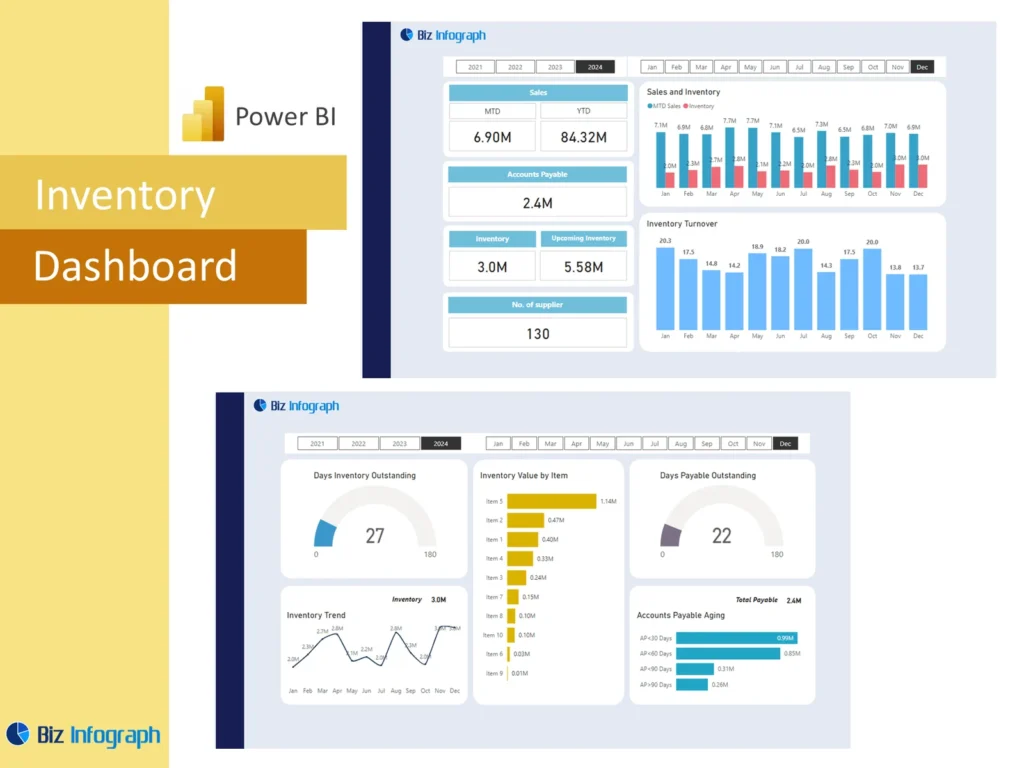
What Is an Inventory Dashboard Power BI and Why It Matters
An Inventory Dashboard Power BI solution is a visual reporting tool that helps businesses monitor stock movement, inventory value, and supply conditions in one place. Instead of relying on scattered spreadsheets, manual exports, or static inventory reports, teams can use a single power bi dashboard to understand stock conditions more clearly. This matters because inventory affects customer service, purchasing, working capital, and warehouse efficiency. A strong dashboard improves visibility into inventory, helps teams track inventory more consistently, and supports better planning. When reporting is clear and structured, leaders can make faster and more informed decisions.
How a Finance Dashboard Power BI Supports Inventory Reporting and Control
A strong Finance Dashboard Power BI supports inventory reporting because inventory is not only an operational issue, but also a financial one. It affects working capital, stock value, cost control, and overall business health. When finance and operations can review stock information together, they gain a clearer understanding of how inventory levels influence the business. A good dashboard shows the connection between stock movement and the financial impact behind it. This improves inventory control, helps leadership understand risk, and makes it easier to balance product availability with cost efficiency.
Why Businesses Use an Inventory Dashboard Power BI Template
Many organizations use an Inventory Dashboard Power BI template because it offers a repeatable structure for reporting stock performance. A template can include KPI cards, turnover analysis, stock summaries, and category comparisons without requiring the report to be rebuilt every period. This saves time and improves consistency. A reusable template also supports better communication because the same report format is used across cycles. For teams that need regular inventory reporting, this makes it easier to focus on decision-making instead of formatting. A strong template becomes a practical foundation for better inventory visibility and control.
Core Benefits of Inventory Dashboard Power BI
Improving Inventory Management Visibility with a Power BI Dashboard
A good power bi inventory dashboard improves visibility by giving teams one central place to review stock, item movement, and warehouse conditions. Instead of switching between different files or systems, users can rely on one inventory management dashboard to understand what is happening. Better visibility helps inventory managers and supply chain teams recognize shortages, excess stock, and unusual movements more quickly. It also improves oversight of inventory distribution and availability across the business. When the dashboard creates stronger visibility into stock, the business can respond faster and manage inventory with greater confidence.
How Inventory Analysis Supports Smarter Inventory Control Decisions
Strong inventory analysis helps businesses understand why stock is changing and where action is needed. A dashboard can reveal whether products are overstocked, moving too slowly, or at risk of shortage. This supports smarter inventory control because it helps teams prioritize replenishment, reduce waste, and improve stock planning. By using visual analysis, businesses can answer practical business questions about stock behavior much more easily. Better analysis also helps leaders take data-driven decisions instead of reacting only when service problems appear. This improves control across purchasing, warehousing, and replenishment planning.
Using Power BI for Real-Time Inventory Reporting and Visualization
One of the major benefits of using power bi is the ability to create real-time or frequently refreshed inventory reporting. This gives teams real-time visibility into what is in stock, what is moving, and where issues may be emerging. A strong inventory dashboard in power bi uses visualization to turn complex stock data into something easier to understand. This is especially useful in fast-moving environments where delays in reporting can affect sales or service. Better reporting speed supports faster action, better coordination, and more effective inventory control across the business.
Key Metrics in an Inventory Dashboard Power BI
Essential Key Inventory Metrics Every Business Should Track
Every Inventory Dashboard Power BI report should include the key inventory metrics that show stock health clearly. These usually include quantity on hand, total stock value, reorder status, stock aging, and turnover. These key metrics help teams understand whether the business is carrying the right amount of stock or whether inventory is drifting into risky territory. A strong dashboard should also use well-defined kpis that support purchasing and operational review. When the right metrics are displayed, leadership gets a clearer understanding of inventory conditions and can manage stock more effectively.
Measuring Stock Levels, Stock Value, and Inventory Turnover
A strong inventory power bi dashboard should measure inventory levels, stock value, and inventory turnover together. Looking at quantity alone is not enough, because the business also needs to understand how much money is tied up in stock and how efficiently products move. A dashboard that compares inventory value with turnover helps users see whether stock is productive or whether cash is sitting idle in slow-moving items. This combination of measures is essential for both operations and finance because it connects physical stock with financial impact and working capital efficiency.
Tracking Stockouts, Turnover Analysis, and Inventory Performance Trends
A practical dashboard should highlight stockouts, turnover analysis, and long-term inventory performance trends. These views help users understand whether certain products are consistently understocked, whether specific items are moving too slowly, and how overall stock behavior is changing over time. Monitoring turnover rates is especially useful because it shows whether the company is holding inventory too long. Trend visibility also helps teams spot recurring stock issues before they affect service. Strong trend reporting supports better replenishment and stronger planning for future demand patterns.
Inventory Dashboard Power BI Features
How an Inventory Power BI Dashboard Simplifies Inventory Reporting
An inventory power bi dashboard simplifies reporting by turning raw stock files into a structured and visual report. Instead of manually sorting item lists, stock balances, or location summaries, teams can review a single dashboard that combines the most important results. This supports better inventory reporting because users can monitor exceptions, compare locations, and review stock status more quickly. A dashboard also reduces dependence on repetitive manual reporting. For organizations managing many categories or locations, a visual dashboard is a much more efficient way to monitor inventory than traditional spreadsheet-based methods.
Building Better Reports with Visualization, Wireframe, and Dashboard Design
A strong dashboard begins with careful design. A useful wireframe helps define where KPI cards, trend charts, and stock detail sections should appear before the final dashboard is built. Good visualization choices make the report easier to understand, especially when users need to compare item categories, locations, or stock trends. A well-designed management power bi dashboard should support both summary and detail. Clear design improves usability, helps users find answers faster, and makes the final report more practical in meetings. Better design leads to better decisions and stronger day-to-day reporting value.
Why an Inventory Dashboard Power BI Template Saves Time and Improves Accuracy
A reusable Inventory Dashboard Power BI template saves time because users can refresh the latest inventory data without redesigning the report. It also improves accuracy because the same calculations, structures, and KPI definitions are used consistently. This helps teams avoid confusion and makes period-to-period comparisons more dependable. Templates are especially useful when businesses review stock regularly across many categories, warehouses, or stores. By standardizing the report format, the template supports better communication and reduces manual reporting effort. That makes it a practical tool for both inventory and finance teams.
Inventory Reporting and Analysis
Using an Analysis Dashboard to Monitor Inventory Trends Over Time
An analysis dashboard is especially useful when inventory must be reviewed over weeks, months, or seasons. Trend reporting helps businesses understand whether stock is increasing too quickly, whether certain categories are becoming slow-moving or obsolete, and whether stock turnover is improving or weakening. Long-term trend analysis also helps leadership compare inventory patterns with changing demand. When teams can see how stock behaves over time, they make stronger planning decisions. This kind of visibility supports better replenishment, helps prevent overstock, and improves the ability to maintain healthy inventory across the business.
Connecting Inventory Data, Sales Data, and Financial Data for Better Decisions
A strong dashboard should connect inventory data, sales data, and financial data so teams can understand how stock relates to real business performance. For example, fast-selling items may justify more replenishment, while products with weak demand and high stock value may need corrective action. When the dashboard combines these data sets, it creates more meaningful actionable insights. This is especially useful for answering deeper business questions about demand, margin, and cash tied up in stock. A connected reporting model helps leadership make smarter inventory decisions across operations and finance.
How Data Analysis Helps Optimize Inventory and Reduce Carrying Costs
Strong data analysis helps businesses optimize stock decisions by showing where inventory is excessive, insufficient, or poorly allocated. This makes it easier to optimize stock levels, avoid waste, and reduce carrying costs tied to excess inventory. By reviewing turnover, replenishment timing, and stock location, teams can improve how they use warehouse space and working capital. A good dashboard supports more effective inventory management because it turns stock numbers into priorities and actions. Better analysis means better decisions about what to keep, what to move, and what to reduce.
Dashboard Design and Practical Use
Creating Clear Inventory Dashboard in Power BI Views for Business Questions
A strong inventory dashboard in power bi should be designed to answer the real business questions users ask every day. These may include which items are low stock, which locations are understocked, where excess inventory is building, and how stock is performing across time. Clear dashboard views help users move directly to answers without searching through detailed tables. A report that is built around business questions becomes more practical and more actionable. This is one reason dashboards are more effective than raw reports when businesses need better operational visibility.
Organizing Comprehensive Inventory Data for Better Reporting
A good dashboard depends on well-organized comprehensive inventory data. This includes product IDs, quantities, warehouse locations, item status, supplier information, and sales or purchase details where relevant. If the data is inconsistent, the dashboard becomes harder to trust. Proper data structure also supports data cleaning, which is important before reports are built. A strong data analyst or reporting team will usually prepare the source carefully to ensure accuracy. Better organization improves reporting clarity, makes visuals more reliable, and creates a stronger foundation for inventory decision-making across the business.
Using Power BI Skills and Real-Time Visibility to Improve Operational Efficiency
Strong power bi skills help teams build reports that create real-time visibility and improve action speed across operations. A dashboard that updates frequently helps users monitor stock levels, respond faster to changes, and improve replenishment decisions. This can be especially valuable when managing stock across different warehouses or multiple stores. Better reporting speed supports better service and stronger control. When organizations combine good dashboard design with real-time visibility, they can improve operational efficiency, reduce manual work, and respond more effectively to changing stock conditions.
Practical Value of Inventory Dashboard Power BI
Supporting Better Inventory Management with Inventory Dashboards and Reporting
A strong Inventory Dashboard Power BI solution supports better inventory management because it helps users review stock conditions visually and consistently. Rather than reacting only when issues become urgent, teams can use the dashboard to spot problems earlier and manage inventory with more discipline. This improves replenishment, stock allocation, and control over item movement. Better dashboards also support stronger discussions between operations, finance, and procurement. When organizations rely on clear reporting, they can reduce waste, improve service levels, and use inventory as a more strategic part of the business.
Improving Visibility into Stock Through Power BI Inventory Dashboard Insights
A power bi inventory dashboard improves visibility into stock by helping users review stock balances, movement, and location differences in one place. It can show individual items, group totals, and changes across different warehouses or business units with much more clarity than manual files. Better visibility supports faster action on low stock, excess inventory, and stock availability issues. This is especially useful when the business needs stronger control over item-level decisions. Clear insight helps teams solve problems earlier and manage the flow of goods more effectively throughout the supply chain.
Building a Finance Dashboard Power BI and Inventory Dashboard Together for Better Control
Combining an Inventory Dashboard Power BI report with Finance Dashboard Power BI views creates stronger business control because inventory has a direct effect on cost, cash flow, and profitability. When stock analysis is connected to finance reporting, leadership can see how working capital is tied up in products and how stock decisions affect cash use. This broader view improves management discipline and supports better coordination between inventory operations and finance. It also helps ensure that stock decisions are not made only from an operational view, but with full business impact in mind.
Conclusion
Why an Inventory Dashboard Power BI Template Is a Practical Reporting Tool
An Inventory Dashboard Power BI template is practical because it combines structure, consistency, and flexibility in one reporting solution. It allows teams to refresh inventory reports quickly, maintain the same KPI logic across periods, and improve the quality of stock review without rebuilding the report every time. Templates also reduce repetitive reporting effort and improve clarity in meetings. For organizations that need better stock visibility and more reliable reporting, a reusable template offers a strong foundation for ongoing inventory analysis and better inventory control.
Final Thoughts on Using an Inventory Dashboard Power BI for Inventory Management, Visualization, and Smarter Inventory Control Decisions
A well-designed Inventory Dashboard Power BI report helps businesses turn stock records into meaningful operational insight. It supports stronger inventory analysis, better inventory control, inventory analytics, and clearer decisions about replenishment, movement, and working capital. With strong visuals, reliable data, and practical KPI design, the dashboard helps teams move from reactive inventory handling to more proactive control. Better reporting means better stock decisions, better coordination across operations and finance, and a stronger ability to maintain service while controlling cost. That is what makes an inventory dashboard such a valuable business tool.
For ready-to-use Dashboard Templates: