
Introduction to Sales KPI Dashboard
What Is a Sales KPI Dashboard and Why It Matters
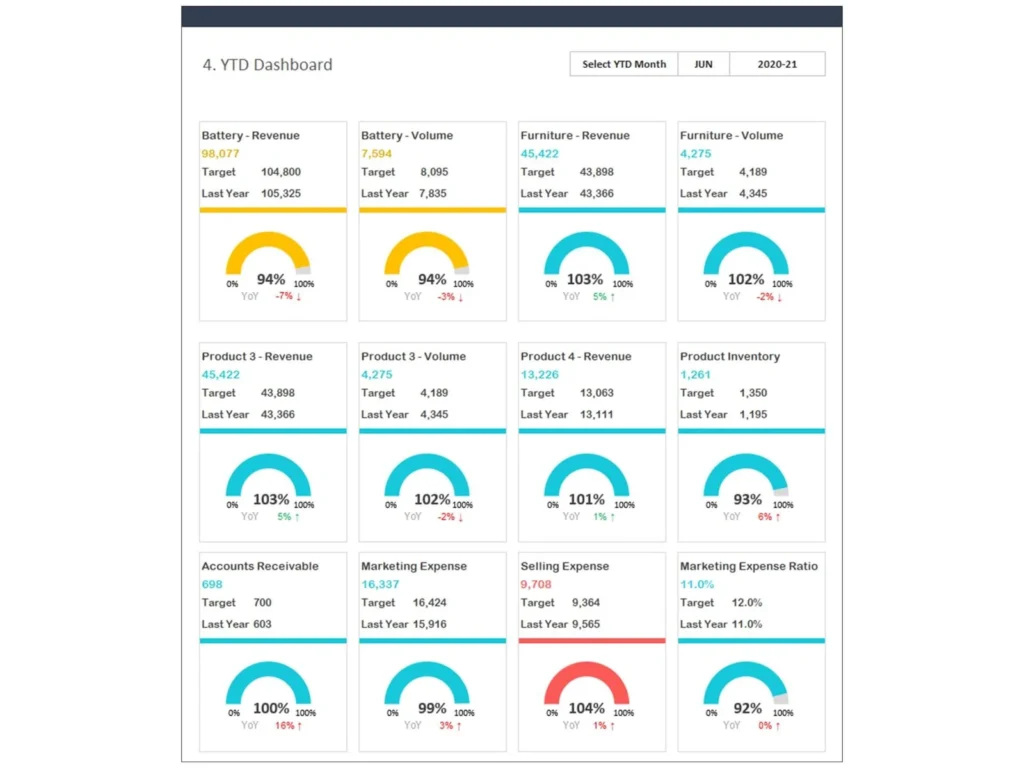
A Sales KPI Dashboard is a visual reporting tool that brings together the most important sales numbers in one place so businesses can monitor results, trends, and opportunities more effectively. It helps teams review total sales, pipeline status, conversion performance, and other critical KPIs without searching across different reports. A well-designed Sales KPI Dashboard Excel file makes it easier to understand what is happening across the entire sales organization. By using one organized Sales Dashboard, companies can improve visibility, support stronger sales decisions, and focus on the essential KPIs that drive sales growth and long-term success.
How a Sales KPI Dashboard Supports Better Sales Tracking
A strong Sales KPI Dashboard improves performance tracking by helping businesses track sales performance in real time or through regular updates. It gives visibility into actual sales, quota progress, pipeline value, and metrics such as sales volume, close rates, and follow-up activity. With the right layout, sales reps and managers can evaluate daily progress and compare outcomes against sales target goals. This kind of kpi tracking supports better planning, clearer priorities, and faster adjustments. When teams can see the overall sales picture, they can manage sales efforts more effectively and work toward successful sales outcomes.
Why Businesses Use a Sales KPI Dashboard Excel Template
Businesses prefer a Sales KPI Dashboard template because it saves time and provides a ready-made structure for analysis and reporting. A practical Sales KPI Dashboard Excel file connects key inputs, charts, and formulas into one flexible system. This template is especially valuable for small and mid-sized teams that want a professional dashboard without building one from scratch. A good kpi dashboard template helps standardize reporting, supports sales management, and keeps attention on the sales kpis to track every week or month. It also allows companies to review sales dashboard examples and choose the version that best matches their goals.
Core Benefits of a Sales KPI Dashboard
Improving Sales Team Visibility with a Performance Dashboard
A performance dashboard gives the sales department clear visibility into activities, targets, and outcomes. It allows managers to see which products are moving, where deals are stuck, and how each representative is contributing to the team result. This level of visibility improves accountability and coordination across the entire sales process. A Sales KPI Dashboard also highlights individual and team performance, making it easier to reward strong results and coach weaker areas. Because the dashboard is updated in one place, sales teams can focus on meaningful action instead of spending time compiling scattered reports from different sales data sources.
Using Sales Analytics to Measure Sales Performance
Sales analytics transforms raw numbers into useful insight by showing patterns, comparisons, and trends that support smarter action. In a Sales Dashboard, leaders can compare monthly revenue, close rates, lead quality, and product performance to understand what is driving results. This makes it easier to identify the right sales strategies and correct underperforming areas. A dashboard that combines charts and KPI views helps track overall sales, evaluate sales growth, and see whether the efficiency of your sales process is improving. Strong analytics also help leaders make faster and more confident sales decisions based on evidence rather than guesswork.
Tracking Sales Activities, Sales Opportunities, and Pipeline Progress
A useful Sales KPI Dashboard tracks not only revenue but also the activity that leads to revenue. It can monitor calls, meetings, proposals, and follow-ups, along with open sales opportunities and progress through each pipeline stage. This ensures that teams do not focus only on final numbers while ignoring earlier indicators of future performance. A dashboard that shows the sales pipeline, opportunity counts, and conversion stages can help improve forecasting and identify gaps in execution. When sales managers can use one view to monitor activities and progress, they gain stronger control over the entire sales organization.
Key Metrics Included in a Sales KPI Dashboard
Essential Sales KPIs Every Sales Manager Should Monitor
Every Sales KPI Dashboard should include the essential KPIs that show how well the team is performing. Common measures include total sales, win rate, deal count, average deal size, quota attainment, and lead conversion. These are the critical sales numbers that help managers understand whether the team is on pace to meet goals. A dashboard can also compare current results against a sales target and prior periods for better context. Since sales managers can use these insights to guide coaching and planning, selecting the right sales kpis to track is one of the most important dashboard design decisions.
Sales Metrics for Rep Performance and Team Productivity
A dashboard should also include sales metrics that reflect rep performance and workload efficiency. These may include number of calls, number of qualified leads, meetings booked, proposals sent, and deals closed. By reviewing these indicators, managers can understand whether weak results come from low activity, poor conversion, or market conditions. A good Sales KPI Dashboard helps teams improve accountability and identify training needs. It also supports increase sales productivity by showing which actions contribute most to wins. Measuring both individual and team performance allows companies to balance personal coaching with broader team development.
Financial KPI, Product Performance, and Custom Sales KPI Tracking
Beyond standard metrics, many companies include financial KPI measures such as gross margin, revenue by category, and profitability per customer or product. These figures help businesses evaluate not just activity, but the value created from selling efforts. A dashboard can also compare product sales and product performance to identify top-performing offers and weak areas. In some organizations, a custom sales kpi may be needed to reflect industry-specific goals or internal priorities. Adding these measures ensures the Sales KPI Dashboard Excel file supports real business strategy and not just basic reporting. The best dashboards balance universal KPIs with company-specific needs.
Sales KPI Dashboard Excel Features
How a Sales KPI Dashboard Excel Simplifies KPI Dashboards
A Sales KPI Dashboard Excel solution makes reporting practical because Excel is accessible, flexible, and easy to update. It can pull data from different sheets or sales data sources, calculate performance measures, and display charts in one place. For many businesses, this is the easiest way to build kpi dashboards without expensive software. A structured file also allows managers to compare historical results, track trends, and create simple forecast views. Because formulas automate calculations, the dashboard supports reliable kpi tracking and consistent reporting. This is why a Sales KPI Dashboard template remains a popular option across many industries.
Interactive Filters, Dashboard Examples, and Visual KPI Tracking
A strong dashboard becomes even more useful when it includes interactive filters for product, region, salesperson, or time period. These features help users move from summary to detail quickly. Many businesses study sales dashboard examples and kpi dashboard examples to understand how to design clear visuals and useful layouts. Good charts and slicers make performance tracking easier and improve communication during meetings. Instead of reading through long reports, teams can review one Sales Dashboard and identify trends in seconds. Visual reporting also helps managers explain performance to leadership and turn data into action more effectively.
Building Better Reports with a Sales KPI Dashboard Template
A reliable Sales KPI Dashboard template provides a consistent structure for reporting and reduces the risk of missing important data. It can include areas for trends, targets, pipeline summaries, and activity analysis. This helps managers organize the most important measures in a way that supports decision-making. A professional kpi dashboard template can also make monthly reviews faster and more focused. Since a dashboard should serve both detail and summary needs, it must combine flexibility with clarity. The best Sales KPI Dashboard Excel files are easy to update, visually clean, and designed around the critical KPIs that matter most.
Sales Pipeline and Opportunity Tracking
Monitoring Sales Pipeline Stages with a Sales Pipeline Dashboard
A sales pipeline dashboard helps users see how deals move from lead stage to close. It gives a clear view of the number and value of deals in each stage, helping teams understand whether the pipeline is healthy enough to support future revenue. This is particularly important for identifying bottlenecks and improving conversion. A good Sales KPI Dashboard also compares current pipeline levels with expected goals and past trends. Because the dashboard is particularly useful for forward-looking analysis, it can support stronger sales forecasts and improve the planning of future sales efforts across the team.
Using a Sales Opportunity Dashboard to Improve Conversions
A sales opportunity dashboard focuses on open deals and helps managers evaluate quality, stage progression, expected close dates, and conversion probability. This view supports better prioritization and helps teams spend time on the opportunities most likely to close. It can also reveal where deals are getting delayed or lost. When leaders review sales opportunities using a clear dashboard, they can strengthen follow-up strategy and improve close rates. A focused Sales Opportunity Dashboard also supports better coaching because managers can examine specific pipeline issues rather than relying only on summary reports of actual sales after the fact.
Tracking Pipeline Health, Sales Rep Activity, and Follow-Up Progress
Pipeline health depends on more than the number of deals in progress. It also depends on timely action, strong follow-up, and consistent movement through stages. A dashboard can combine activity counts, response times, and stage aging to show whether the team is managing opportunities effectively. This is useful for evaluating rep performance, identifying stalled deals, and improving the efficiency of your sales process. By linking activity data with opportunity results, the Sales KPI Dashboard helps teams align action with outcomes. This leads to stronger execution, better conversion, and more reliable long-term sales performance.
Sales Team Performance Management
Measuring Sales Rep Results with KPI Dashboard Examples
Managers often use kpi dashboard examples to determine which measurements best reflect salesperson contribution. These may include revenue closed, meetings completed, conversion rate, and average deal value. A good Sales KPI Dashboard allows leaders to compare reps fairly while considering both volume and efficiency. Measuring rep performance in a structured way helps support accountability, coaching, and recognition. It also helps the organization define what best sales performance looks like. When performance is clearly measured, team members understand expectations better and can align their daily work with company objectives and approved sales plans.
How Sales Managers Use Sales Dashboard Reports for Coaching
A Sales Dashboard is not only for reporting upward to leadership; it is also a practical coaching tool. Sales managers can use dashboard insights to identify where each representative needs support, whether in prospecting, follow-up, negotiation, or closing. They can review sales activities, compare activity with results, and spot patterns that affect sales performance. This creates a more objective coaching process based on facts instead of assumptions. When coaching is tied to dashboard findings, it becomes easier to improve consistency and execution. Over time, this can improve sales, develop stronger reps, and support healthier team performance.
Comparing Individual and Team Sales Performance Effectively
One of the most valuable uses of a Sales KPI Dashboard is comparing individual and team performance side by side. This helps managers see whether overall results are driven by a few top performers or by strong execution across the team. It also highlights whether coaching should focus on specific reps or on broader process issues. Comparing individuals and teams helps leadership manage the sales department more strategically. It supports fair evaluation, better resource allocation, and more targeted planning. For organizations seeking to increase sales, balanced visibility into team and individual outcomes is essential.
Dashboard Examples and Template Use Cases
Sales Dashboard Examples for Daily, Weekly, and Monthly Reporting
Different reporting cycles require different dashboard views. Daily dashboards may highlight activity, open deals, and urgent follow-ups. Weekly dashboards often focus on pipeline progress and target pacing. Monthly dashboards usually emphasize total sales, trend comparison, and revenue achievement. Reviewing sales dashboard examples helps businesses decide which structure works best for their reporting needs. A flexible Sales KPI Dashboard template can support all three views using the same data foundation. This improves consistency and saves time. Whether the goal is quick monitoring or strategic review, dashboard structure should match the rhythm of the business.
KPI Dashboard Examples for Sales Teams Across Different Industries
Different industries require different dashboard emphasis. Some sales teams focus heavily on lead generation, while others prioritize renewals, account growth, or product sales. Reviewing kpi dashboard examples helps organizations understand how to adapt a dashboard to their own process. For example, one business may focus on average sales cycle length, while another may care more about recurring revenue or cross-sell conversion. The best dashboard design reflects the nature of the company’s pipeline, team structure, and revenue model. A thoughtful Sales KPI Dashboard Excel setup helps translate industry needs into clear and usable reporting.
Choosing the Right Sales KPI Dashboard Template for Your Business
Selecting the right Sales KPI Dashboard template depends on the goals of the business, the data available, and the reporting habits of leadership. The ideal template should be easy to update, simple to understand, and strong enough to support both daily review and strategic analysis. It should also reflect the specific kpi measures that matter most to the company. A dashboard with too many metrics becomes confusing, while one with too few may miss critical trends. The best choice is a kpi dashboard template that helps the team track sales performance, review sales analytics, and act with confidence.
Customization and Practical Use
How to Customize a Sales KPI Dashboard Template for Business Goals
Customization is what turns a basic dashboard into a powerful business tool. A company may want to add a custom sales kpi, adjust visuals, or include market-specific measures to reflect internal strategy. This makes the Sales KPI Dashboard more relevant to leadership and more useful for the people who rely on it every day. For example, businesses may add profitability, renewal rate, or account retention alongside standard revenue measures. A customized Sales KPI Dashboard Excel file ensures reporting supports real priorities, helps guide sales plans, and strengthens execution across the entire sales organization.
Adapting Sales Dashboard Metrics for Different Sales Activities
Not every sales role has the same focus, so dashboards should reflect different responsibilities. Inside sales may require call and meeting metrics, while account managers may need retention and upsell indicators. Field teams may focus on visits, regional performance, and opportunity movement. Adapting the Sales Dashboard to different sales activities ensures the right people are measured in the right way. This improves fairness, clarity, and relevance. It also helps sales leaders can use dashboards to align measurement with business roles. When metrics fit the work being done, the dashboard becomes far more effective in driving performance.
Turning Dashboard Data into Action with Sales KPI Dashboard Insights
A dashboard delivers value only when insight leads to action. The purpose of a Sales KPI Dashboard is not just to display numbers, but to guide better decisions that increase sales and improve execution. Teams can use trends to shift attention toward high-value deals, adjust weak processes, or refine territory focus. Leaders can review patterns to improve forecasting and strengthen sales management. Because a dashboard highlights the critical KPIs behind results, it helps organizations respond faster and smarter. Over time, this supports sales growth, better alignment, and stronger performance across the entire sales function.
Conclusion
Why a Sales KPI Dashboard Excel Template Is a Practical Reporting Tool
A well-built Sales KPI Dashboard Excel solution is a practical choice for businesses that need visibility, flexibility, and control. It organizes sales analytics, highlights sales kpis to track, and supports clear reporting without unnecessary complexity. Because it combines visuals, formulas, and structured layouts, it helps teams make faster and better decisions. A strong Sales KPI Dashboard template can support daily review, monthly reporting, and long-term planning in one file. For many businesses, this makes Excel one of the most effective tools for sales reporting and performance tracking.
Final Thoughts on Using a Sales Dashboard for Better Sales Performance
A well-designed Sales Dashboard gives leaders and teams a better understanding of what drives results. It helps organizations monitor actual sales, manage pipeline movement, performance metrics review financial KPI trends, and improve product performance over time. Most importantly, it helps turn data into action. When businesses choose the right metrics, use a smart Sales KPI Dashboard, and keep reporting consistent, they create a stronger foundation for growth. This approach helps the team stay focused, improve sales, and build a more disciplined, data-driven path to long-term sales success.
For ready-to-use Dashboard Templates: