
Introduction to Sales Budget vs Actual Dashboard
What Is a Sales Budget vs Actual Dashboard in Sales Analytics
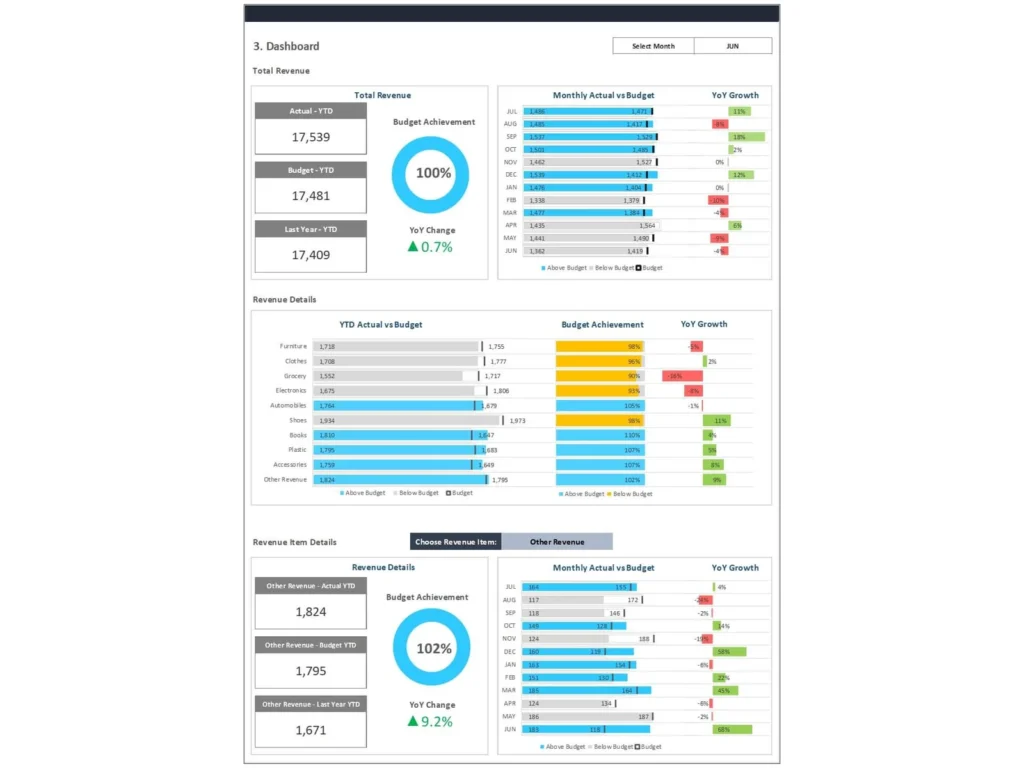
A Sales Budget vs Actual Dashboard is a powerful financial and sales analytics tool that compares budgeted amounts with actual results to evaluate financial performance. This dashboard to compare planned versus actual sales, expenses, and revenue helps organizations monitor performance across departments and identify variances quickly.
It consolidates data sources such as ERP systems, spreadsheets, and financial tools into a single power bi report or Excel-based solution. The dashboard uses visualization techniques like graphs and KPI cards to present budget figures against actual revenue, enabling users to quickly identify discrepancies.
This budget versus actual dashboard is essential for financial management because it highlights positive variance and negative variance, helping businesses understand overspend or underperformance. By providing real-time insights, it empowers decision-makers to optimize sales targets, manage cash flow, and maintain financial health.
Why Businesses Use Sales Budget vs Actual Dashboard Excel and Templates
Businesses use Sales Budget vs Actual Dashboard excel and templates because they are customizable, cost-effective, and easy to implement. These templates allow companies to compare budgeted financial data with actuals using structured spreadsheets, reducing reliance on complex systems.
A customizable template helps organizations configure key metrics like actual sales, actual expenses, and operating expenses. It simplifies variance analysis and supports better forecasting accuracy by tracking budget accuracy over time.
Templates also enable role-based access and customization, allowing finance teams and sales managers to focus on relevant data. They provide actionable insights into spending or revenue patterns, helping organizations optimize ROI and improve efficiency.
Additionally, templates integrate seamlessly with tools like Power BI enhancing visualization and enabling real-time financial monitoring. This makes them an ideal solution for businesses looking to streamline financial analysis and improve decision-making.
Role of Sales Dashboard in Budget vs Actual Performance Tracking
The Sales Dashboard plays a critical role in tracking budget vs actual performance by providing a centralized view of financial and sales data. It enables organizations to monitor actual revenue, actual spending, and sales targets in real time.
The dashboard provides real-time financial insights that help businesses identify variances and take corrective actions. For example, if actual expenses exceed budgeted amounts, the dashboard highlights the discrepancy, allowing teams to address overspend promptly.
By using visualization tools like graphs and KPI cards, the dashboard simplifies complex financial data and makes it easier to analyze performance across different categories. It also supports forecasting accuracy by tracking historical trends and comparing them with current results.
Ultimately, the Sales Dashboard helps organizations make data-driven decisions, improve financial health, and optimize overall business performance.
Key Components of Sales Budget vs Actual Dashboard
Understanding Budget vs Actual Metrics and Actual Revenue
Understanding budget vs actual metrics is essential for evaluating financial performance. The Sales Budget vs Actual Dashboard tracks key metrics like actual revenue, actual sales, budgeted amounts, and actual expenses. These metrics provide insights into how well an organization is performing against its financial goals.
The dashboard compares budgeted financial figures with actual results, helping businesses identify discrepancies and measure budget accuracy. It also tracks expenses by category, including operating expenses, to provide a detailed view of financial performance.
By analyzing these metrics, organizations can identify trends, optimize sales targets, and improve financial management. The dashboard also supports better cash flow management by monitoring real-time financial data and ensuring that spending aligns with budgeted plans.
Variance Analysis and Performance Comparison in Sales Dashboard
Variance analysis is a core feature of the Sales Budget vs Actual Dashboard. It involves comparing budgeted figures against actual results to identify positive variance or negative variance. This process helps businesses understand whether they are overperforming or underperforming.
The dashboard uses visualization tools like graphs to highlight variances and make it easier to analyze performance. It allows users to compare budgeted amounts with actuals and identify areas where adjustments are needed.
By conducting variance analysis, organizations can quickly identify unfavorable trends, such as overspend or lower-than-expected revenue. This enables them to take proactive measures to improve financial performance and optimize operations.
Key Components of Sales Budget vs Actual Dashboard for Decision-Making
The key components of a Sales Budget vs Actual Dashboard include KPI cards, graphs, and data tables that provide actionable insights. These components are designed to help users make informed decisions by presenting data in a clear and structured format.
Key components include metrics like actual revenue, actual expenses, budget figures, and variance analysis. The dashboard also integrates data sources such as ERP systems and spreadsheets to ensure accurate and up-to-date information.
By combining these elements, the dashboard provides real-time insights into financial performance and helps organizations identify areas for improvement. This enables businesses to optimize processes, improve efficiency, and achieve better financial outcomes.
Sales Analytics and BI in Budget vs Actual Dashboard
Using BI and Power BI for Sales Budget vs Actual Dashboard
Business Intelligence (BI) tools like Power BI play a crucial role in enhancing the capabilities of the Sales Budget vs Actual Dashboard. These tools enable organizations to create interactive dashboards that provide real-time financial insights and advanced analytics.
Power BI allows users to integrate multiple data sources, including ERP systems and spreadsheets, into a single dashboard. This ensures that data is accurate and up to date, enabling better decision-making.
The dashboard uses BI features such as KPI cards and visualization tools to present data in an intuitive format. This helps users quickly identify variances and analyze financial performance.
By leveraging Power BI, organizations can improve forecasting accuracy, optimize ROI, and make data-driven decisions that enhance business performance.
Leveraging Power BI Report and ZoomCharts for Visualization
Visualization is a key aspect of the Sales Budget vs Actual Dashboard, and tools like Power BI reports and ZoomCharts enhance this capability. These tools allow organizations to create dynamic graphs and interactive dashboards that make data easier to understand.
ZoomCharts provides advanced visualization options that enable users to drill down into data and analyze performance at a granular level. This helps organizations identify trends and patterns that may not be visible in traditional reports.
By using these tools, businesses can improve financial management and gain real-time insights into their operations. The combination of Power BI and ZoomCharts ensures that dashboards are both informative and visually appealing.
Analytics Techniques to Compare Budget vs Actual Sales Performance
Analytics techniques play a vital role in comparing budget vs actual sales performance. The dashboard uses advanced analytics to evaluate financial data and identify trends.
Techniques such as variance analysis, trend analysis, and forecasting help organizations understand performance across different periods. These techniques enable businesses to compare budgeted amounts with actual results and identify discrepancies.
By using these analytics methods, organizations can improve decision-making, optimize processes, and achieve better financial outcomes.
Sales Budget vs Actual Dashboard Examples and Use Cases
Sales Budget vs Actual Dashboard Example for Revenue Analysis
A Sales Budget vs Actual Dashboard example demonstrates how organizations analyze actual revenue and compare it with budgeted figures.
Sales Dashboard Example for Budget vs Actual Comparison
This example highlights how businesses compare budgeted amounts with actual results using dashboards.
Variance Analysis Dashboard Example for Sales Performance
Variance analysis dashboards show how organizations identify variances and improve performance.
Building Sales Budget vs Actual Dashboard Template in Excel
Designing Sales Budget vs Actual Dashboard Excel Template
Designing a Sales Budget vs Actual Dashboard excel template involves creating a structured spreadsheet that captures budgeted amounts, actuals, and variance analysis. The layout should include KPI cards, graphs, and tables to present financial data clearly.
The template should be customizable, allowing users to configure metrics and integrate data sources such as ERP systems. This ensures accurate and real-time financial reporting.
Structuring Budget, Actuals, and Variance Metrics
Structuring data is essential for effective analysis. The dashboard should organize budget figures, actual results, and variance metrics into clear categories.
This enables users to compare budgeted financial data with actuals and identify discrepancies. Proper structuring also improves forecasting accuracy and supports better decision-making.
Creating Custom Sales Budget vs Actual Dashboard Templates
Creating custom templates allows organizations to tailor dashboards to their specific needs. These templates can include advanced analytics features and integration with BI tools.
Benefits of Sales Budget vs Actual Dashboard
Improving Sales Performance with Variance Analysis
Variance analysis helps organizations improve sales performance by identifying gaps between budget and actual results.
Optimizing Revenue Tracking and Decision-Making
The dashboard enables better tracking of revenue and supports informed decision-making.
Enhancing Sales Analytics with Real-Time Insights
Real-time insights improve analytics and help businesses respond quickly to changes.
Best Practices for Implementing Sales Budget vs Actual Dashboard
Selecting the Right Metrics for Budget vs Actual Analysis
Choosing the right metrics ensures accurate analysis and better outcomes.
Using Power BI and Analytics Tools Effectively
Effective use of tools enhances dashboard performance and usability.
How to Use This Budget vs Actual Dashboard for Business Growth
Using the dashboard effectively helps organizations achieve growth and improve financial health.
For ready-to-use Dashboard Templates: