
Introduction to HR Headcount Dashboard
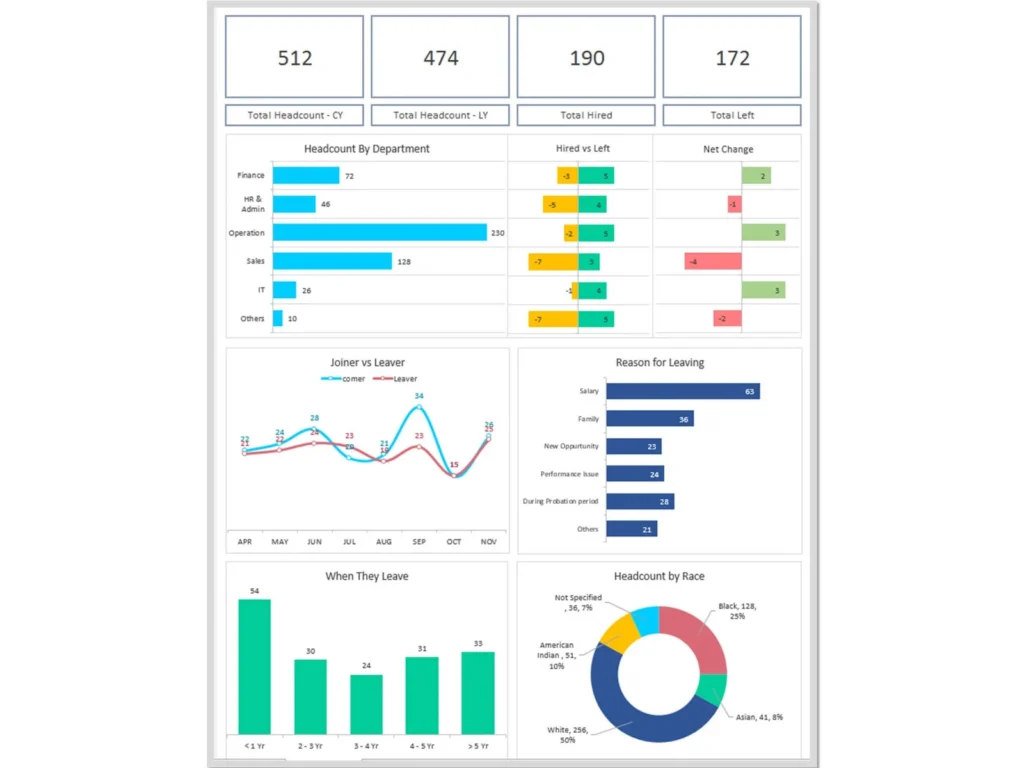
What Is an HR Headcount Dashboard in Modern Human Resource Management
An HR Headcount Dashboard is a modern human resources dashboard designed to track workforce headcount, monitor employee distribution, and analyze key workforce metrics across an organization. In modern HR environments, HR professionals rely on HR dashboards to transform raw HR data into meaningful insights that support workforce planning and HR strategy.
The HR Headcount Dashboard provides a clear visual representation of employee headcount across departments, job roles, and organizational units. HR executives and HR managers can use the dashboard to analyze workforce growth, recruitment trends, and employee tenure. By presenting workforce information visually, the dashboard helps HR teams identify patterns and workforce trends quickly.
In modern HR tech environments, HR dashboards transform traditional HR reporting into interactive HR analytics platforms. The HR Headcount Dashboard integrates with existing HR systems and HR tech tools to generate reports and insights in real time. A powerful HR dashboard example may include additional analytics modules such as recruitment dashboards, employee development dashboards, and attrition dashboards to provide a comprehensive workforce overview.
Why Organizations Use HR Headcount Dashboard Excel and HR Headcount Dashboard Templates
Organizations widely adopt HR Headcount Dashboard Excel tools because they provide flexibility, customization, and simplicity in HR reporting. An HR Headcount Dashboard template allows HR professionals to track workforce data, monitor employee headcount trends, and measure HR metrics in a structured and accessible format.
Using a dashboard in Excel enables HR teams to analyze key workforce metrics such as employee tenure, promotions, recruitment performance, and attrition trends. HR managers can use customizable dashboard templates to generate workforce reports and evaluate employee distribution across departments.
Dashboard templates also help HR professionals maintain consistent HR reporting practices across the organization. By integrating HR data with HR tech tools and existing HR systems, these dashboards allow HR teams to analyze workforce performance more effectively. HR dashboard templates are particularly useful for HR professionals who want a customizable solution that aligns with organizational HR dashboard needs.
Role of HR Dashboard in Headcount Monitoring and HR Reporting
The HR dashboard plays an essential role in workforce headcount monitoring and HR reporting. The HR Headcount Dashboard enables HR professionals to track workforce size, analyze employee distribution, and monitor workforce changes over time.
HR teams can use the dashboard to monitor recruitment activities, internal promotions, employee tenure, and workforce attrition. Regular reporting enables HR leaders to identify trends in workforce growth and evaluate the effectiveness of HR initiatives.
By presenting HR data visually, the dashboard provides insights that help HR managers make informed workforce planning decisions. The HR dashboard also supports HR executives by providing a comprehensive view of workforce performance and organizational capacity. Using the right HR dashboard ensures organizations maintain transparency in workforce reporting and make strategic HR decisions.
Key Headcount Metrics in HR Headcount Dashboard
Understanding Headcount Metrics and Key Performance Indicators
Headcount metrics and key performance indicators are fundamental components of the HR Headcount Dashboard. These metrics provide insights into workforce size, employee distribution, and workforce growth trends. An HR metrics dashboard allows HR professionals to track these KPIs in one centralized location.
Common headcount metrics include total workforce size, new hires, employee departures, internal promotions, and workforce distribution across departments. Tracking these metrics enables HR managers to evaluate workforce performance and organizational capacity.
The dashboard provides a clear view of these key workforce metrics, allowing HR teams to analyze workforce trends and identify potential workforce challenges. HR professionals track these KPIs to ensure HR strategies align with business objectives and workforce planning goals.
Tracking Employee Tenure with Employee Tenure Dashboard
Employee tenure is an important workforce metric that measures the length of time employees remain with an organization. An employee tenure dashboard integrated within the HR Headcount Dashboard allows HR teams to analyze workforce stability and retention patterns.
Tracking employee tenure helps HR managers evaluate employee engagement, organizational loyalty, and workforce retention strategies. HR teams can use the dashboard to monitor tenure distribution across departments and identify trends related to employee retention.
The employee tenure dashboard also provides insights into employee development and career progression. By analyzing tenure data, HR professionals can evaluate whether employee development initiatives and internal promotions support long-term workforce stability.
Monitoring Workforce Changes Using Attrition Dashboard Metrics
Attrition metrics provide critical insights into workforce turnover and employee departures. An attrition dashboard integrated within the HR Headcount Dashboard helps HR professionals track workforce changes and analyze attrition patterns.
The attrition dashboard allows HR managers to identify departments with high turnover rates and investigate potential causes of workforce attrition. These metrics also help HR teams evaluate the effectiveness of employee retention strategies.
By tracking attrition trends through the dashboard, HR professionals can anticipate workforce gaps and implement recruitment strategies to maintain workforce stability. Monitoring attrition metrics is essential for maintaining organizational productivity and ensuring workforce continuity.
Types of HR Dashboards for Workforce Headcount Analysis
Headcount Dashboard for Workforce Planning and HR Teams
A headcount dashboard is designed to support workforce planning and HR decision-making. This type of HR dashboard enables HR teams to analyze workforce size, monitor recruitment trends, and evaluate employee distribution across departments.
HR managers can use the dashboard to assess workforce capacity and determine whether staffing levels align with business objectives. By tracking key workforce metrics, HR teams can make strategic decisions related to hiring, workforce expansion, and resource allocation.
Headcount dashboards are particularly useful for organizations undergoing workforce growth or restructuring, as they provide a clear overview of workforce distribution.
Span of Control Dashboard for Organizational Structure Analysis
The span of control dashboard analyzes the relationship between managers and their direct reports. This dashboard helps HR professionals evaluate organizational structure and determine whether management responsibilities are distributed effectively.
A balanced span of control ensures managers have an appropriate number of employees reporting to them. HR professionals use this dashboard to identify potential management inefficiencies and optimize organizational structures.
The span of control dashboard also helps HR leaders evaluate leadership capacity and determine whether additional management support is required.
Promotions Dashboard for Monitoring Internal Workforce Growth
A promotions dashboard tracks internal career advancement and employee development within the organization. This dashboard helps HR teams analyze how frequently employees receive promotions and how career progression occurs across departments.
Monitoring promotions allows HR professionals to evaluate the effectiveness of employee development programs and leadership training initiatives. Promotions dashboards also highlight whether internal mobility opportunities exist for employees.
By tracking promotions and internal career growth, HR teams can ensure employees have opportunities for advancement and professional development.
HR Headcount Dashboard Examples and Use Cases
HR Headcount Dashboard Example for Workforce Monitoring
An HR Headcount Dashboard example for workforce monitoring typically includes visual charts that display workforce size, recruitment trends, and employee distribution across departments. These dashboards provide HR leaders with a comprehensive view of workforce dynamics.
HR managers use these dashboards to monitor workforce capacity and identify potential workforce gaps. By analyzing workforce data through dashboards, HR professionals can develop workforce strategies that support organizational growth.
Human Resources Dashboard Example for Headcount and Employee Performance
A human resources dashboard example may combine workforce headcount metrics with employee performance data. This integration allows HR professionals to analyze the relationship between workforce size and employee productivity.
By analyzing employee performance metrics alongside headcount data, HR managers can evaluate workforce efficiency and identify opportunities to improve employee performance.
Metrics Dashboard Example for Headcount and HR Reporting
Metrics dashboards provide HR executives with insights into workforce size, employee tenure, and workforce performance indicators. These dashboards enable HR leaders to generate reports and analyze workforce trends.
Metrics dashboards support HR reporting by presenting workforce data in a structured and visually accessible format.
Building an HR Headcount Dashboard Template in Excel
Designing an HR Headcount Dashboard Excel Template
Designing an HR Headcount Dashboard Excel template involves organizing workforce data into structured tables and charts. Excel allows HR teams to create customizable dashboards that track workforce metrics and generate HR reports.
Structuring Headcount Metrics Dashboard and HR KPIs in Excel
Structuring workforce metrics properly ensures HR dashboards provide accurate insights into workforce performance.
Creating Interactive HR Dashboard Templates for Workforce Analysis
Interactive dashboards allow HR teams to explore workforce data dynamically and analyze workforce metrics more effectively.
Capabilities of an HR Dashboard for Headcount Management
Key Capabilities of an HR Dashboard for Workforce Insights
The capabilities of an HR dashboard include workforce analytics, headcount tracking, and HR reporting.
Using Dashboard Tools for HR Reporting and Headcount Analysis
Dashboard tools enable HR teams to generate reports and analyze workforce metrics efficiently.
Integrating Employee Performance and Workforce Metrics in HR Dashboard
Integrating employee performance data with workforce metrics provides deeper insights into workforce productivity.
For ready-to-use Dashboard Templates: