
Budget Vs Actual Excel Template Dashboard Excel for Variance Analysis
Why Budget Vs Actual Template Dashboard Excel is essential for budget vs actual tracking
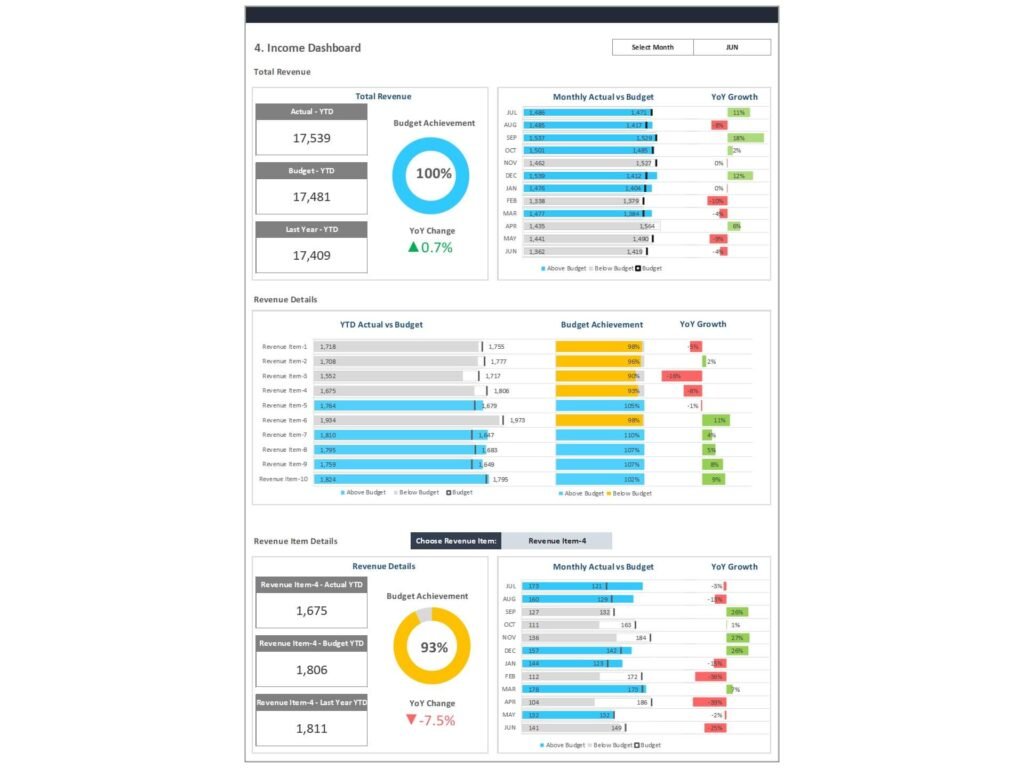
Budget vs Actual Excel Template Dashboard Excel is essential for businesses and individuals who want to manage finances effectively. It helps compare budgeted amounts and actual figures, giving a clear view of financial performance. By using a structured budget spreadsheet template, users can track actual data against planned budgets and identify differences quickly. This process, known as budget vs actual tracking, allows managers to monitor actual expenses, actual income, and actual spending in real time. The dashboard provides insights into where budgets are being exceeded or underutilized. Whether for a personal budget, business budget, or project budget, this template helps track actual financial performance and ensures better control over financial planning.
Benefits of using Budget vs Actual Excel Template Dashboard Excel for variance and reporting
Using an Actual Vs Budget Excel Template Dashboard Excel provides several benefits for variance analysis and reporting. It allows users to measure actual variance between budgeted amounts and actual results, helping identify areas for improvement. The template automatically calculates differences, making it easier to generate accurate budget reports and actuals reports. This dashboard also simplifies financial reporting by presenting data in a visual and easy-to-understand format. With proper budget vs actuals analysis, businesses can make adjustments based on actual performance and improve future budgeting. The dashboard template supports data-driven decisions, helping organizations manage costs and improve financial efficiency.
How to Build Budget vs Actual Excel Template Dashboard Excel for Budget Planning
Steps to create a budget vs actual excel template using Actual Vs Budget Excel Template Dashboard Excel
Creating a budget vs actual excel template involves a few key steps. First, define your budget categories, such as income, expenses, and investments. Next, create columns for planned vs actual amounts, ensuring you can track actual results alongside budgeted figures. Enter the actual data regularly to keep the dashboard updated. Using Microsoft Excel budget templates, you can automate calculations for variance and totals. The template works best when it includes summary tables and charts to visualize trends. This allows users to track actual versus budget performance over time and make better financial decisions.
Choosing the right budget template and spreadsheet in Actual Vs Budget Excel Template Dashboard Excel
Choosing the right budget template is critical for effective budget planning. A good template should be customizable, easy to use, and capable of handling detailed budget data. Whether you use Excel or Google Sheets, the template should support both monthly budget tracking and yearly budget analysis. For personal use, a simple budget template may be sufficient, while businesses may require a detailed budget with multiple categories. A well-designed dashboard in Excel should include sections for income, expenses, and variance analysis. By selecting the right template for Excel, users can streamline budget tracking and improve financial planning accuracy.
Key Metrics in Actual Vs Budget Excel Template Dashboard Excel for Variance Analysis
Financial metrics and actual variance in Actual Vs Budget Excel Template Dashboard Excel
An effective Actual Vs Budget Template in Excel focuses on key financial metrics that drive decision-making. These include revenue, expenses, profit margins, and cost analysis. By tracking actual variance, users can identify differences between planned and actual performance. For example, comparing actual costs to budgeted costs helps highlight inefficiencies. The dashboard provides a clear view of financial data, enabling users to analyze trends and make informed decisions. With accurate tracking of actual financial performance, organizations can ensure that budgets are aligned with business goals.
Planned vs actual and forecast vs actual tracking in Actual Vs Budget Excel Template Dashboard Excel
Tracking planned vs actual and forecast vs actual is essential for effective financial management. The Actual Vs Budget Excel Template Dashboard Excel allows users to compare planned budgets with actual results and forecasts. This helps identify trends and adjust future budgets accordingly. By analyzing actual versus budget performance, users can improve forecasting accuracy and reduce financial risks. The dashboard also supports adjustments based on actual data, ensuring that budgets remain realistic and achievable. This level of analysis helps businesses maintain financial stability and achieve long-term goals.
Monthly and Annual Budget Tracking with Actual Vs Budget Excel Template Dashboard Excel
Monthly budget tracker and yearly budget planning in Actual Vs Budget Excel Template Dashboard Excel
A monthly budget tracker is an essential feature of any budget template. It allows users to monitor income and expenses on a monthly basis, ensuring that budgets are followed consistently. The Actual Vs Budget Excel Template Dashboard Excel also supports yearly budget planning, providing a comprehensive view of financial performance over time. By tracking monthly and annual budgets, users can identify seasonal trends and make better financial decisions. This approach ensures that budgets are realistic and aligned with long-term goals.
Personal budget, household budget, and business budget tracking in Actual Vs Budget Excel Template Dashboard Excel
The Actual Vs Budget Excel Template Dashboard Excel is versatile and can be used for personal, household, and business budgets. For individuals, it helps manage daily expenses and savings goals. For households, it provides a clear overview of income and expenses, ensuring financial stability. For businesses, it supports budget vs actual tracking across multiple departments and projects. By using a single template, users can track actual spending, monitor performance, and improve financial planning. This flexibility makes it an essential tool for anyone looking to manage finances effectively.
Interactive Dashboard in Actual Vs Budget Excel Template Power BI
Creating interactive dashboards with Actual Vs Budget Excel Template Power BI
An Actual Vs Budget Excel Template Power BI enhances traditional Excel dashboards by adding interactive features. Power BI allows users to create dynamic dashboards that update automatically with real-time data. This makes it easier to analyze financial performance and identify trends. Interactive dashboards enable users to filter data, drill down into details, and explore different scenarios. By integrating data from multiple sources, Power BI provides a comprehensive view of budget vs actual performance. This helps organizations make data-driven decisions and improve financial management.
Dashboard examples for budget vs actual reporting using Actual Vs Budget Excel Template Power BI
There are many dashboard examples that demonstrate the power of Power BI for budget vs actual reporting. These dashboards typically include charts, graphs, and KPI indicators that highlight key metrics. By visualizing data, users can quickly identify trends and make informed decisions. Power BI dashboards also support collaboration, allowing teams to share insights and work together effectively. With advanced analytics capabilities, Power BI provides deeper insights into financial performance, helping organizations optimize their budgeting processes.
Using Actual Vs Budget Excel Template Google sheet for Real-Time Budget Tracking
Benefits of Actual Vs Budget Excel Template Google sheet for collaboration and budget tracking
The Actual Vs Budget Excel Template Google sheet is a powerful tool for collaboration and real-time budget tracking. Google Sheets allows multiple users to access and update data simultaneously, making it ideal for teams. This ensures that budget data is always up to date and accurate. By using Google Sheets, organizations can streamline budget tracking and improve communication. The template provides a flexible and cost-effective solution for managing budgets.
Managing budget vs actuals tracking with Actual Vs Budget Excel Template Google sheet
Managing budget vs actuals tracking is easier with Google Sheets. The platform supports real-time updates, allowing users to track actual performance continuously. By analyzing actual data, users can identify trends and make adjustments based on actual results. Google Sheets also integrates with other tools, enabling data from multiple sources to be combined into a single dashboard. This ensures that users have access to accurate and up-to-date information, supporting better financial decision-making.
Best Practices for Actual Vs Budget Excel Template Dashboard Excel
Designing a budget vs actual dashboard template in Actual Vs Budget Excel Template Dashboard Excel
Designing an effective budget vs actual dashboard template requires a focus on clarity and usability. The dashboard should include key metrics such as income, expenses, and variance. Visual elements such as charts and graphs should be used to present data clearly. A well-designed dashboard provides insights that are easy to understand, helping users make informed decisions. By following best practices, users can create dashboards that are both functional and visually appealing.
Improving budget reports and actuals report using Actual Vs Budget Excel Template Dashboard Excel
Improving budget reports involves ensuring that data is accurate and up to date. The Actual Vs Budget Excel Template Dashboard Excel allows users to generate detailed reports that highlight key metrics. By analyzing these reports, users can identify areas for improvement and make adjustments based on actual performance. This helps improve financial planning and ensures that budgets are realistic and achievable.
For ready-to-use Dashboard Templates: