
Introduction to Applicant Tracking Dashboard
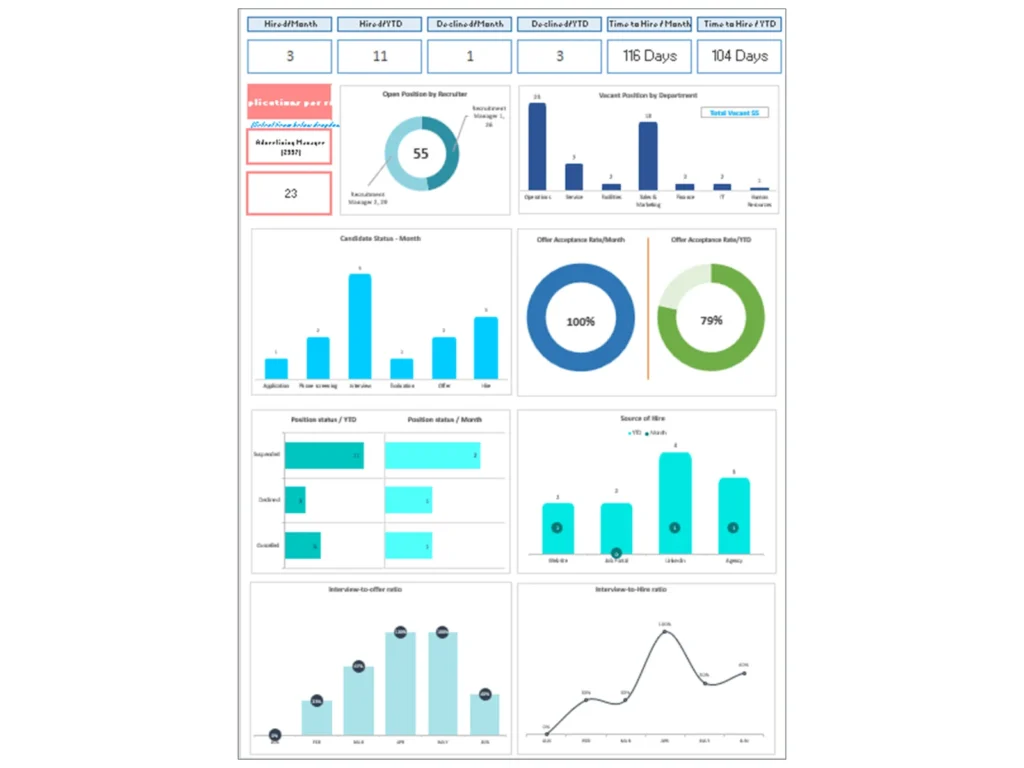
What Is an Applicant Tracking Dashboard in Modern Applicant Tracking System (ATS)
An Applicant Tracking Dashboard is a centralized dashboard within an applicant tracking system that enables HR teams and hiring managers to manage candidate tracking, recruitment workflows, and hiring decisions efficiently. It acts as a visual interface where recruiters can monitor the entire recruitment process, from job post creation to onboarding. The dashboard captures candidate data, candidate profiles, and application status across multiple job boards simultaneously.
Modern ATS platforms combine recruiting and applicant tracking with analytics, allowing organizations to streamline hiring and improve candidate experience. The ATS dashboard provides insights into candidate sources, recruitment metrics, and hiring pipeline performance. It also supports talent acquisition by helping recruiters identify top talent and manage a strong talent pool. This all-in-one recruiting approach improves the effectiveness of the hiring process while enhancing employer branding and candidate engagement.
Why Organizations Use Applicant Tracking Dashboard Excel and Dashboard Templates
Organizations use Applicant Tracking Dashboard Excel and customizable templates because they provide a structured, flexible, and cost-effective way to manage recruitment data. These templates allow HR teams to track candidate applications, manage candidate communications, and analyze recruitment metrics without complex ATS software.
A customizable dashboard helps recruitment teams monitor candidate status, interview scheduling, and job offers efficiently. It enables recruiters to streamline hiring workflows and optimize recruitment strategies using data-driven insights. Templates also support small businesses that may not have access to advanced ATS tools but still require effective recruiting software.
By using dashboard templates, organizations can integrate candidate tracking, CRM functions, and reporting and analytics into one system. This improves collaboration among hiring team members and ensures a consistent recruitment process. Templates also help HR teams evaluate candidate quality and improve candidate selection processes.
Role of HR Dashboard in Candidate Tracking and Recruitment Automation
The HR Dashboard plays a critical role in automating and optimizing candidate tracking and recruitment workflows. It allows HR teams and hiring managers to manage candidate information, track application status, and monitor recruitment progress in real time.
The dashboard enables automation of repetitive tasks such as interview scheduling, sending notifications, and managing candidate communications. This reduces manual effort and improves efficiency across the hiring process. Recruitment teams can use the dashboard to track candidate evaluation, manage talent pipelines, and ensure timely hiring decisions.
Additionally, the dashboard supports integration with ATS tools, CRM systems, and job boards, allowing seamless data flow across platforms. This integration enhances the user experience for recruiters and ensures better relationships with potential candidates. Ultimately, the HR Dashboard helps organizations streamline hiring, improve recruitment performance, and hire the best candidates.
Key Features of Applicant Tracking Dashboard and ATS Tools
Understanding Applicant Tracking System (ATS) and Candidate Tracking Capabilities
An applicant tracking system (ATS) is a powerful recruiting platform designed to manage candidate tracking, recruitment workflows, and hiring processes. The Applicant Tracking Dashboard provides visibility into candidate applications, candidate details, and work experience, enabling recruiters to evaluate potential candidates effectively.
ATS software allows HR teams to track candidate profiles, manage candidate data, and monitor candidate progress through different roles and stages of the recruitment process. The dashboard shows the talent pipeline and helps recruiters identify bottlenecks in the hiring process.
With ATS tools, organizations can manage candidate evaluation, candidate selection, and interview scheduling more efficiently. The system also supports integration with job boards, enabling recruiters to post job descriptions and source candidates from multiple channels. This improves recruitment efficiency and ensures access to a broader talent pool.
Managing Candidate Data, Application Status, and Candidate Communications
Managing candidate data is a core function of the Applicant Tracking Dashboard. The dashboard captures applicant data, candidate information, and candidate profiles, allowing recruiters to track application status and monitor recruitment progress.
The dashboard helps HR teams manage candidate communications, ensuring timely updates and maintaining a positive candidate experience. Recruiters can send notifications, schedule interviews, and track candidate engagement directly from the dashboard.
Effective candidate data management also supports better decision-making. By analyzing candidate details and recruitment metrics, hiring managers can evaluate candidate quality and make informed hiring decisions. This improves the overall recruitment process and enhances candidate experience.
Automate Recruitment Workflows and Schedule Interviews Using ATS
Automation is a key feature of modern ATS platforms. The Applicant Tracking Dashboard enables HR teams to automate recruitment workflows, including job posting, candidate tracking, and interview scheduling.
The dashboard allows recruiters to schedule interviews, send automated notifications, and manage candidate pipelines efficiently. Automation reduces manual tasks and improves the speed of the hiring process.
By automating workflows, organizations can streamline hiring and ensure consistent recruitment processes. This also improves collaboration among recruitment teams and enhances the user experience for recruiters. Automation helps HR teams focus on strategic tasks such as talent acquisition and candidate evaluation.
Recruitment Analytics and Metrics in Applicant Tracking Dashboard
Tracking Recruitment Metrics and Candidate Source Performance
The Applicant Tracking Dashboard provides advanced analytics and reporting capabilities to track recruitment metrics and evaluate candidate source performance. It helps HR teams analyze hiring data and identify the most effective candidate sources.
Recruitment metrics such as time to hire, candidate conversion rates, and application process efficiency provide insights into recruitment performance. The dashboard shows how candidates move through the recruitment pipeline, allowing HR teams to optimize sourcing strategies.
By analyzing recruitment data, organizations can improve recruitment strategies and allocate resources more effectively. This ensures better hiring outcomes and improves overall recruitment performance.
Using Analytics to Improve Candidate Experience and Hiring Decisions
Analytics plays a vital role in improving candidate experience and supporting data-driven hiring decisions. The Applicant Tracking Dashboard provides insights into candidate engagement, candidate communications, and recruitment workflows.
By analyzing candidate data, HR teams can identify areas where candidate experience can be improved. For example, reducing delays in interview scheduling or improving communication can enhance candidate satisfaction.
Analytics also supports better hiring decisions by providing insights into candidate quality and recruitment performance. This helps organizations hire the best candidates and improve the effectiveness of the hiring process.
Measuring Recruitment Performance with HR Dashboard Metrics
Measuring recruitment performance is essential for optimizing hiring processes. The HR Dashboard includes key metrics that help HR teams evaluate recruitment effectiveness and track hiring performance.
Metrics such as candidate quality, time to hire, and offer acceptance rate provide valuable insights into recruitment performance. The dashboard allows HR teams to monitor these metrics and identify areas for improvement.
By tracking recruitment performance, organizations can improve recruitment strategies and achieve better hiring outcomes. This ensures that HR teams can meet hiring needs and support business growth.
Integration and Workflow in Applicant Tracking Dashboard
Integrating ATS with CRM, Job Boards, and HR Systems
Integration is a critical feature of the Applicant Tracking Dashboard. It allows organizations to connect ATS platforms with CRM systems, job boards, and HR systems.
This integration ensures seamless data flow and improves collaboration among HR teams and hiring managers. It also enables recruiters to post jobs on multiple job boards simultaneously and manage candidate data efficiently.
Streamline Recruiting and Applicant Tracking with Automation Tools
Automation tools help streamline recruiting and applicant tracking processes. The dashboard enables HR teams to automate workflows and improve recruitment efficiency.
Managing Onboarding and Recruitment Pipeline with ATS Integration
Managing onboarding and recruitment pipelines is essential for effective talent acquisition. The dashboard helps HR teams track candidate progress and manage onboarding processes.
Applicant Tracking Dashboard Examples and Use Cases
Applicant Tracking Dashboard Example for Candidate Pipeline Management
An Applicant Tracking Dashboard example shows how HR teams manage candidate pipelines and track recruitment progress.
Dashboard Example for Recruitment and Candidate Tracking Analytics
Dashboard examples highlight how recruitment analytics and candidate tracking improve hiring decisions.
HR Dashboard Example for Hiring and Onboarding Processes
HR dashboard examples demonstrate how organizations manage hiring and onboarding processes effectively.
Building an Applicant Tracking Dashboard Template in Excel
Designing an Applicant Tracking Dashboard Excel Template
Designing a dashboard template involves organizing candidate data and recruitment metrics into visual formats.
Structuring Candidate Tracking Metrics and Dashboard Data
Structuring data ensures accurate tracking of candidate information and recruitment performance.
Creating Custom Candidate Dashboards for Small Businesses
Custom dashboards help small businesses manage recruitment efficiently.
Benefits of Applicant Tracking Dashboard for HR Teams
Improving Hiring Efficiency and Candidate Tracking Processes
The dashboard improves hiring efficiency by streamlining candidate tracking processes.
Enhancing Candidate Experience and Communication
The dashboard enhances candidate experience through better communication and engagement.
Helping HR Teams Recruit Top Talent Using ATS and Analytics
The dashboard helps HR teams recruit top talent using analytics and data-driven insights.
Best Practices for Implementing Applicant Tracking Dashboard
Selecting the Best Applicant Tracking System and ATS Tools
Choosing the best ATS ensures effective recruitment and candidate tracking.
Using Dashboard Templates and Integration for Recruitment Optimization
Using templates and integration improves recruitment workflows.
Frequently Asked Questions About Applicant Tracking Systems and Dashboards
Understanding frequently asked questions helps organizations implement ATS dashboards effectively.
For ready-to-use Dashboard Templates: