

Did you know that corporate professionals spend a staggering 70% of their time on manual reporting and slide formatting rather than actual strategy? It’s a frustrating reality that often leaves talented leaders feeling like overworked graphic designers instead of decisive visionaries. You’ve likely felt the sting of spending hours wrestling with a swot analysis powerpoint template, only to have the final result look cluttered or disconnected from your core business logic.
We understand that you want to shine in front of your audience, not struggle with grid lines and font sizes. This guide is designed to help you transform your strategic planning into a boardroom-ready presentation that commands immediate respect. By adopting professional, high-impact frameworks, you can reclaim your time and ensure your insights are delivered with the polished clarity they deserve.
We’ll explore the 2026 standards for strategic visualization, from leveraging vector-based layouts to aligning your internal and external factors with precision. Prepare to discover how the right design-led approach can turn your next report into a source of professional pride and earn glowing feedback from executive leadership.
Key Takeaways
- Learn how visual hierarchy within a strategic framework transforms dense data into a clear, executive-level narrative that drives decision-making.
- Master the art of full customizability by aligning corporate branding, icons, and aspect ratios to ensure your slides look flawless on every display.
- Discover high-impact use cases for a swot analysis powerpoint template, ranging from high-stakes Quarterly Business Reviews to competitive product launches.
- Streamline your workflow with a simple two-step process that moves you from raw data to a boardroom-ready report in record time.
- Future-proof your presentations with templates that offer free lifetime updates, ensuring your strategic decks always reflect modern design standards.
What is a SWOT Analysis PowerPoint Template?
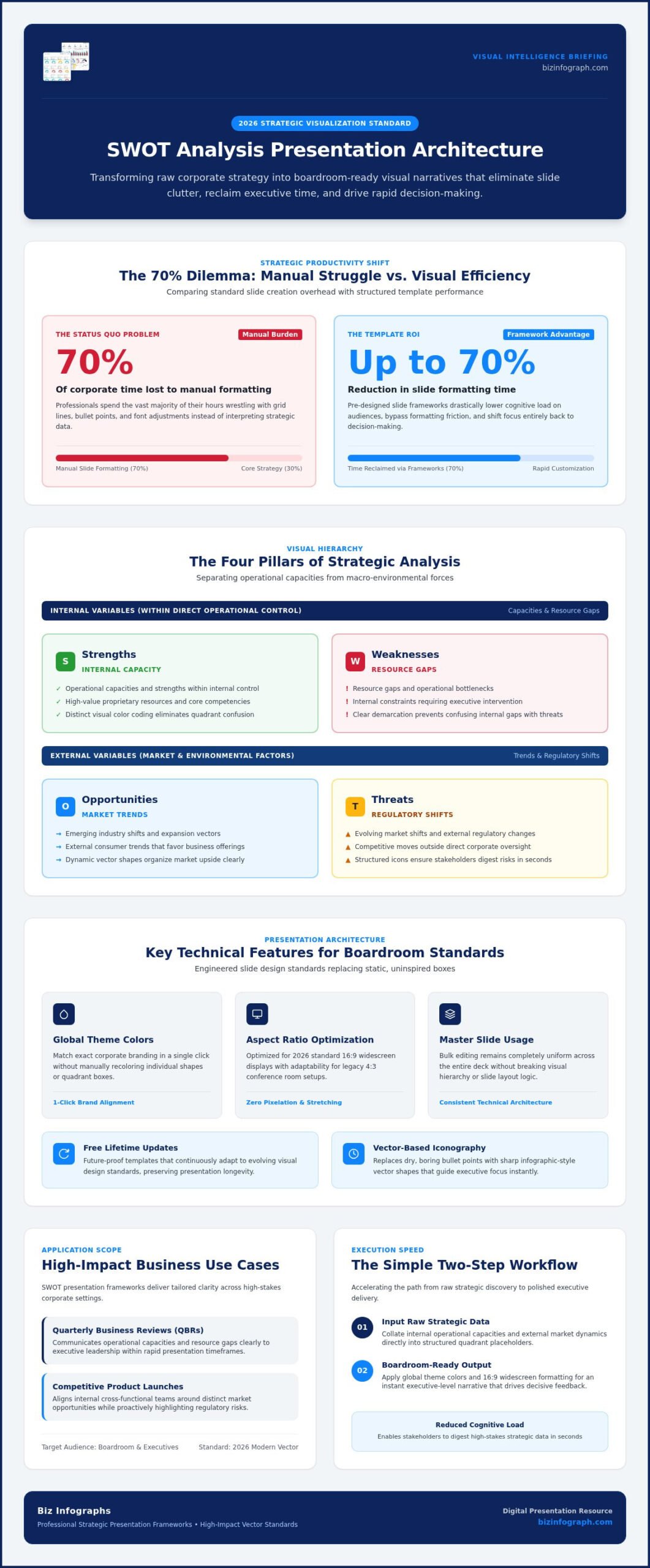
A swot analysis powerpoint template is a professionally engineered slide deck framework designed to help business leaders organize and communicate strategic insights with speed and precision. Rather than staring at a blank screen, you start with a high-performance layout that already respects the principles of data visualization. This ensures that your Strengths, Weaknesses, Opportunities, and Threats are presented with a clear visual hierarchy. In a high-stakes environment, executives need to digest complex information in seconds; a well-structured template directs their attention to what matters most.
As we move through 2026, the standard for strategic presentations has evolved. We’ve moved past static, uninspired boxes. Modern templates now favor dynamic, infographic-style layouts that use vector shapes and clean typography to tell a story. This shift ensures that your data doesn’t just sit on the page; it engages the audience and drives decision-making. By using a pre-designed swot analysis powerpoint template, you ensure that your strategic data is boardroom-ready from the moment you start typing.
The Four Pillars of Strategic Analysis
At its core, a professional template serves to visualize the SWOT analysis framework by separating internal and external variables. Internal factors, your Strengths and Weaknesses, focus on operational capacities and resource gaps within your control. External factors, the Opportunities and Threats, address market trends and regulatory shifts. A high-impact template uses distinct color coding and iconography to illustrate the relationship between these quadrants, making it impossible for stakeholders to confuse a market threat with an internal weakness.
Why Professional Design Matters for ROI
Investing in a premium template is a strategic move for your own productivity. Research indicates that using pre-made slide frameworks can reduce presentation design and formatting time by up to 70%. This efficiency allows you to focus on interpreting data rather than pixel-pushing. Beyond time savings, professional design significantly reduces the cognitive load on your audience. When your visuals are polished and logically aligned, you establish immediate credibility as a productivity partner.
Premium layouts outperform standard “blank slide” approaches because they’re optimized for modern 16:9 widescreen displays. They provide a “best-in-class” standard that mirrors the high-end nature of your business logic. Instead of presenting an amateurish, cluttered report, you deliver a high-impact visual that earns positive feedback and fosters executive confidence. This transition from manual struggle to professional pride is what sets elite presenters apart.
Key Features of a High-Impact SWOT Analysis Template
A swot analysis powerpoint template isn’t just a collection of boxes; it’s a precision-engineered tool designed to elevate your strategic communication. One of the most critical features is full customizability. You shouldn’t have to spend hours recoloring shapes individually. Instead, elite templates use global theme colors that allow you to match your corporate branding in a single click. This technical reliability extends to master slide usage, which ensures that any bulk editing you perform remains consistent across the entire deck without breaking the layout logic.
Technical versatility is another hallmark of professional design. While 16:9 widescreen is the modern display standard for 2026, legacy 4:3 layouts still appear in certain conference environments. A premium template offers aspect ratio optimization to ensure your visuals never look stretched or pixelated on any screen. By moving away from boring bullet points and integrating vector-based icons, you transform a dry report into a compelling narrative. If you’re looking for a foundation that supports these advanced features, you can explore the collection at bizinfograph.com.
Customization Without the Complexity
Mastering your visual identity shouldn’t require a degree in graphic design. By using theme colors, you can instantly align your SWOT slides with your broader business presentation templates. This creates a cohesive look across your entire deck, which is vital for maintaining executive attention. Drag-and-drop functionality for icons and images allows you to swap elements instantly.
Professional teams prioritize vector graphics because they maintain perfect clarity on high-resolution boardroom screens. Unlike standard images, vectors can be resized infinitely without losing crispness. This level of detail is essential when discussing the various business applications of SWOT analysis, where every quadrant represents a critical strategic pillar that stakeholders must see clearly.
Professional Infographic Elements
Why settle for a standard 2×2 grid when you can use circular, horizontal, or even puzzle-style layouts? These modern designs help stakeholders visualize how internal strengths connect to external opportunities. Utilizing specialized PowerPoint infographic templates allows you to tell a story rather than just listing facts.
Don’t underestimate the power of white space. A cluttered slide suggests a cluttered strategy. High-impact templates are designed with strategic breathing room, ensuring that your core findings are the star of the show. This data-driven approach allows for easy expansion as your analysis grows, giving you a flexible framework that evolves with your business needs.
Top Business Use Cases for SWOT PowerPoint Slides
How do you turn a static analysis into a catalyst for decisive action? Using a high-quality swot analysis powerpoint template allows you to tailor your strategic narrative to specific business scenarios with ease. Whether you’re presenting to a board of directors or a small project team, the right visual framework ensures your message lands with impact. It’s about moving from raw data to a compelling story that drives results.
During Quarterly Business Reviews (QBRs), departments must justify their performance to leadership. A professional SWOT slide helps you highlight “Strengths” like record-breaking retention rates while being transparent about “Weaknesses” such as operational bottlenecks. This same level of preparation is vital for internal audits. By identifying growth opportunities before they’re lost to inefficiency, you demonstrate the proactive mindset of a true leader.
Effective conducting a collaborative SWOT analysis often involves cross-departmental marketing teams working to outmaneuver rivals. You can visualize your brand’s strengths against specific market competitors to identify gaps in their digital strategy. To make this analysis even more persuasive, consider integrating your SWOT findings with a sales dashboard template. This allows you to show the direct financial correlation between identified market opportunities and projected revenue growth.
Strategic Project Planning
Assessing project feasibility is a critical step during any kickoff phase. Clear “Threat” visualizations help you communicate project risks to stakeholders without causing unnecessary alarm, providing a balanced view of the path ahead. By connecting these qualitative SWOT findings to data-driven Excel dashboard templates, you provide a holistic view of project health. This combination of visual storytelling and hard data transforms you from a simple presenter into a valued Productivity Partner who delivers “best-in-class” insights every time.
How to Use Your SWOT Template Effectively
Transforming a raw swot analysis powerpoint template into a finished masterpiece requires a blend of strategic focus and design discipline. The goal isn’t just to fill the boxes; it’s to create a narrative that guides your stakeholders toward a specific conclusion. By following a structured approach, you can move from a blank framework to a high-impact report that commands respect in any boardroom. You want your audience to leave the room feeling informed and confident in your leadership.
Start by selecting a layout that matches your specific data volume. If you have a high-level executive summary, a minimalist design is your best choice. For deep operational dives, choose a more detailed infographic layout that can house additional context without looking cluttered. If your operational deep dive includes optimizing your e-commerce supply chain, click here to see how professional prep and fulfillment services can help. Once you’ve selected your foundation, follow these critical steps:
Editing Best Practices for Professionals
The biggest mistake professionals make is creating a “wall of text.” To avoid this, summarize your complex points into punchy, action-oriented phrases. Before you begin editing, write a single sentence defining your primary objective. This keeps your content focused and relevant. For a truly unified corporate aesthetic, ensure your SWOT slides align with your other Power BI dashboard templates. Consistency across your reporting tools establishes you as a polished Productivity Partner who values excellence.
Presenting Your SWOT Analysis
When you step up to present, you aren’t just reading slides; you’re facilitating a strategic breakthrough. Guide your audience’s eyes across the four quadrants using a logical flow. Many experts recommend using simple animations to reveal one quadrant at a time, which prevents the audience from reading ahead while you’re still explaining your strengths. When stakeholders ask about “Weaknesses” or “Threats”, handle the questions with confidence by pivoting immediately to your proposed solutions. You can find the perfect starting point for your next big meeting by exploring the premium options at bizinfograph.com.
Why Choose Biz Infographs for Your Presentation Needs?
Why settle for generic, uninspired boxes when you can command the room with a best-in-class visual framework? Choosing the right swot analysis powerpoint template is about more than just aesthetics; it’s about reclaiming your time and establishing your authority as a strategic leader. At Biz Infographs, we don’t just provide files. We act as your Expert Facilitator, ensuring that every insight you uncover is presented with the professional polish that executive leadership expects.
Our commitment to your success goes beyond the initial purchase. We provide free lifetime updates for our templates, ensuring your decks always reflect the latest design standards and technical requirements of 2026. This focus on long-term value is why over 10,000 professionals and enterprises worldwide trust our frameworks for their high-stakes storytelling. Whether you’re working in PowerPoint, pulling data from Excel, or visualizing trends in Power BI, our templates integrate seamlessly across your entire reporting ecosystem.
The Biz Infographs Advantage
The primary struggle for most busy professionals isn’t the data itself, but the manual effort required to make that data presentable. Research shows that deploying professionally engineered templates can reduce slide-formatting time by up to 70%. This efficiency allows you to transition from a manual struggle to a sense of professional pride. Our global marketplace of business assets ensures you have access to premium aesthetics that make you shine in front of any audience, regardless of your technical skill level. You deserve a tool that works as hard as you do, allowing you to focus on the strategic thinking that actually moves the needle.
Transform Your Presentation Workflow
Think of our templates as a mentor for better design principles. By using a high-impact swot analysis powerpoint template, you naturally learn how to balance white space, utilize visual hierarchy, and prioritize your most critical insights. You move from simply filling slides to delivering with genuine impact. This transformation turns a common professional frustration into a source of personal confidence. It’s time to stop wrestling with grid lines and start focusing on your strategic vision. Are you ready to elevate your next boardroom report?
Browse our premium SWOT analysis PowerPoint templates today!
Elevate Your Strategic Vision for 2026
Strategic success depends on your ability to communicate complex insights with absolute clarity. You’ve learned that a professional swot analysis powerpoint template is more than just a visual aid; it’s a productivity engine that helps you reclaim your time. By prioritizing visual hierarchy and leveraging modern infographic elements, you can transform a standard grid into a compelling narrative that directs stakeholder attention toward your primary objectives. The transition from manual slide formatting to professional design is the key to earning executive trust.
Our assets are designed by data visualization experts and come with free lifetime updates to keep your decks looking modern and sophisticated. This is why our frameworks are trusted by business professionals worldwide who refuse to settle for amateur aesthetics. Don’t let cluttered slides or technical struggles distract from your strategic brilliance. It’s time to step into your role as a high-impact Productivity Partner.
Upgrade Your Strategy Presentation with Premium SWOT Templates
Take the final step toward presenting your vision with the authority it deserves. You have the insights; now give them the best-in-class stage they need to drive real change. We’re excited to help you shine in your next big meeting.
Frequently Asked Questions
What is the best format for a SWOT analysis in PowerPoint?
The 16:9 widescreen aspect ratio is the best format for a modern swot analysis powerpoint template. This layout matches the dimensions of most contemporary monitors and conference room displays; ensuring your data isn’t distorted. While 4:3 is still used in legacy environments; the widescreen format provides more horizontal space for detailed infographic elements and clear typography. This prevents your strategic insights from looking cramped or amateurish during high-stakes executive presentations.
Can I customize the colors of a SWOT analysis template to match my brand?
Yes, you can fully customize the colors to align with your corporate branding using PowerPoint’s native theme settings. Professional templates are built with global theme colors; which means changing the primary palette updates every slide in the deck instantly. This feature eliminates the need for manual recoloring and ensures a cohesive visual identity. You can also adjust font styles and sizes to maintain consistency with your company’s official style guide.
Is it better to use a 2×2 grid or an infographic layout for SWOT?
Choosing between a 2×2 grid and an infographic layout depends on your data volume and audience. A classic 2×2 grid is excellent for quick executive summaries where brevity is key. However; an infographic layout often performs better for complex strategic sessions because it uses visual flow to show relationships between factors. Infographic designs engage stakeholders more effectively; making your swot analysis powerpoint template a powerful tool for storytelling rather than just a list of bullet points.
Do your templates work with Google Slides as well as PowerPoint?
Our templates are designed for native cross-compatibility across Microsoft PowerPoint; Google Slides; and Apple Keynote. This flexibility allows you to collaborate with team members who may use different software ecosystems without losing layout integrity or font formatting. Whether you’re presenting from a local desktop app or a cloud-based web edition; the vector shapes and master slide structures remain stable. This ensures your professional reputation stays intact regardless of the platform you choose.
How many points should I include in each SWOT quadrant?
We recommend including no more than three to five high-impact points per quadrant to maintain visual clarity. Overloading a slide with too much text creates cognitive strain for your audience; which often leads to disengagement. Focus on the most critical strategic factors that drive decision-making. If you have extensive data; consider using a multi-slide approach where each quadrant gets its own dedicated infographic to explain the nuances of your Strengths or Threats in detail.
Are the icons in the SWOT templates editable?
Every icon included in our templates is 100% vector-based and fully editable. This means you can resize; recolor; or modify the shapes without experiencing any pixelation or loss of quality. You can easily swap out standard icons for ones that more specifically represent your industry or data points. Because these elements are native to PowerPoint; you don’t need external graphic design software to make your strategic report look like it was professionally produced.
Why should I use a premium template instead of a free one?
Premium templates offer superior technical reliability; sophisticated design logic; and free lifetime updates that free versions lack. Free templates often feature repetitive; basic designs that can make your presentation look amateur. A premium asset ensures your deck is optimized for modern displays and includes master slides for easy bulk editing. Investing in a high-quality framework reflects your status as a Productivity Partner who values excellence and understands the importance of boardroom-ready aesthetics.
How do I download updates for my purchased templates?
Accessing your free lifetime updates is a simple process through your Biz Infographs account dashboard. Whenever we release a design refresh or technical optimization; the latest version becomes available for download at no additional cost. This policy ensures your strategic assets never become obsolete as software standards evolve. Simply log in to your account to grab the most current files; ensuring your presentations always meet the best-in-class standards of the global business community.