
Introduction to HR Analytics Dashboard and Modern HR Analytics
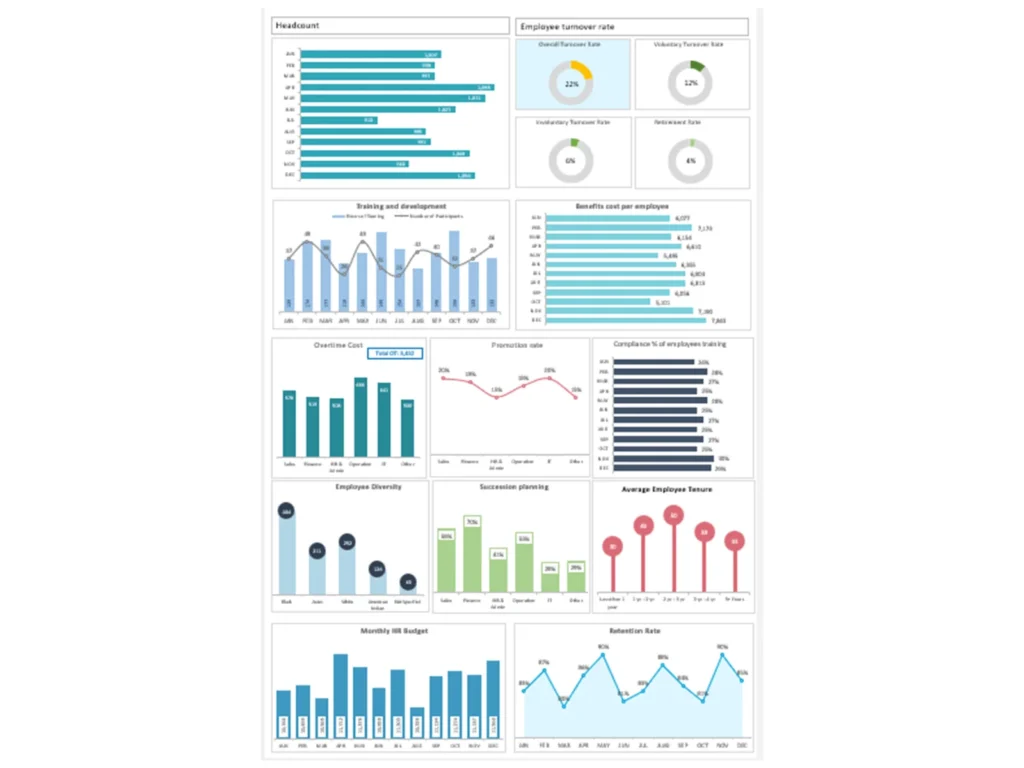
What Is an HR Analytics Dashboard in Modern HR Management
An HR Analytics Dashboard is a centralized HR dashboard designed to collect, analyze, and present HR data in an easy-to-understand visual format. In modern HR environments, organizations rely on analytics solutions and interactive dashboards to transform raw HR data into actionable insights. A well-designed HR analytics dashboard integrates data from HR systems, HR software, and existing HR systems to provide a comprehensive view of workforce performance.
The dashboard shows various HR metrics such as employee turnover, employee tenure, recruitment progress, and workforce productivity. These metrics help HR executives and HR professionals monitor HR operations and evaluate the effectiveness of HR initiatives. Dashboards may include recruitment dashboards, attrition dashboards, and metrics dashboards that help HR teams understand workforce trends.
In modern HR management, dashboards deliver insights into workforce performance and help HR leaders make better decisions. By using an analytics platform and BI tools, organizations can build interactive HR dashboards that provide real-time workforce insights. These dashboards help HR teams and business managers align HR strategy with business outcomes.
Why HR Analytics Dashboard Excel and Templates Are Important for HR Teams
HR Analytics Dashboard Excel tools and templates play a crucial role in simplifying HR reporting and analytics. A well-designed HR Analytics Dashboard template allows HR teams to organize HR data, track HR KPIs, and analyze workforce metrics in a structured format.
Excel dashboards remain popular because they allow HR professionals to customize reports based on specific HR needs. For example, HR managers may use HR dashboard templates to track key HR metrics such as employee turnover, recruitment efficiency, employee tenure, and employee engagement. These metrics dashboards help HR teams monitor workforce trends and evaluate HR strategy.
A dashboard tool built using Excel or built on Microsoft Power BI can integrate data from HR systems and deliver meaningful insights. Dashboards like the ones used in HR analytics solutions allow HR professionals to visualize HR data in one place. The template allows them to deeply analyze HR metrics and develop strategies that support HR initiatives and workforce planning.
Role of HR Dashboard in Transforming HR Data into Actionable Insights
The primary purpose of an HR dashboard is to transform HR data into actionable insights that support data-driven HR decisions. A powerful HR analytics dashboard integrates HR data from multiple sources and presents key HR metrics in an interactive format.
Dashboards deliver valuable insights into workforce performance, employee turnover, and recruitment outcomes. These insights help HR leaders understand workforce challenges and develop strategies that improve HR effectiveness. For example, a recruitment dashboard within the dashboard provides real-time insights into hiring progress and recruitment performance.
Interactive dashboards allow HR teams to explore HR data dynamically and analyze workforce metrics in greater detail. HR professionals can dig deeper into specific metrics to identify trends and opportunities for improvement. By providing centralized HR insights, dashboards help HR leaders make strategic decisions that improve business outcomes.
Key HR Metrics and KPIs in an HR Analytics Dashboard
Understanding HR Metrics and KPIs for Workforce Performance
HR metrics and KPIs are essential indicators used to measure workforce performance and HR effectiveness. An HR analytics dashboard allows HR teams to track these key HR metrics in one centralized location. These metrics dashboards help HR leaders monitor workforce performance and evaluate HR initiatives.
Common HR KPIs include recruitment efficiency, employee engagement, employee turnover rate, employee tenure, and productivity metrics. These metrics help HR teams measure the impact of HR practices on organizational performance. A powerful HR dashboard presents these KPIs through visual charts and performance dashboards that help HR teams and business managers quickly understand workforce trends.
Dashboards may also include predictive analytics that identify potential workforce challenges. For example, predictive models can estimate employee attrition risks or forecast recruitment needs. By tracking Key Performance Indicators in one place, HR leaders can align HR strategy with organizational goals and improve overall HR performance.
Tracking Employee Turnover, Attrition Dashboard, and Employee Tenure
Employee turnover is one of the most critical HR metrics tracked in an HR analytics dashboard. Metrics like employee turnover and employee tenure provide insights into workforce stability and retention challenges. An attrition dashboard within the HR dashboard focuses on analyzing employee departures and identifying the reasons behind them.
HR professionals track various HR metrics such as voluntary turnover, involuntary turnover, and average employee tenure. These metrics provide valuable insights into workforce retention and employee engagement. A well-designed attrition dashboard helps HR leaders identify patterns and develop strategies to reduce employee turnover.
Using HR analytics platforms and BI tools, HR teams can analyze workforce trends and determine how HR initiatives affect retention rates. Dashboards deliver insights that help HR leaders design HR strategies that improve employee satisfaction and reduce attrition. Monitoring these metrics allows HR teams to maintain a stable and engaged workforce.
Workforce Metrics and HR Data for Effective Workforce Planning
Workforce planning is a critical function of HR management, and HR analytics dashboards play an essential role in this process. Workforce metrics provide HR leaders with insights into employee distribution, workforce capacity, and talent development.
An HR analytics dashboard integrates your HR data from existing HR systems and HR software to provide a complete view of workforce performance. These dashboards allow HR teams to analyze key HR metrics such as workforce demographics, employee tenure, and recruitment trends.
Workforce planning dashboards help HR leaders anticipate future workforce needs and develop strategies that align with business objectives. Using analytics platforms and BI tools, HR teams can evaluate workforce trends and make informed decisions that improve HR effectiveness.
People Analytics and HR Data in HR Analytics Dashboard
How People Analytics Improves HR Decision Making
People analytics is a powerful approach that uses data analytics to understand employee behavior and workforce trends. An HR analytics dashboard allows HR teams to analyze HR data and generate meaningful HR insights that support strategic decision-making.
By using interactive HR dashboards and analytics platforms, HR professionals can examine key HR metrics related to employee engagement, performance, and retention. These insights help HR leaders design HR strategies that enhance employee satisfaction and productivity.
People analytics also supports predictive analytics, enabling HR teams to anticipate workforce challenges before they occur. For example, predictive analytics can identify employees who may be at risk of leaving the organization. These insights allow HR leaders to implement proactive HR initiatives that improve retention and workforce stability.
Using HR Data and Analytics Solutions for HR Reporting
Analytics solutions play a crucial role in modern HR reporting. HR analytics dashboards provide a centralized platform where HR data from multiple sources can be analyzed and presented visually. This approach improves the accuracy and efficiency of HR reporting.
Dashboards integrate HR data from HR software, HR systems, and other analytics platforms. These dashboards allow HR professionals to analyze workforce metrics, recruitment performance, and employee engagement trends.
HR analytics dashboards also support advanced analytics and reporting features that help HR teams track key HR metrics in real time. By using BI and data analytics tools, organizations can develop dashboards that provide meaningful insights into workforce performance.
Real-Time Insights from Interactive Dashboards and BI Platforms
Interactive dashboards provide HR leaders with real-time insights into workforce performance. A well-designed HR analytics dashboard provides real-time updates that allow HR teams to monitor workforce trends continuously.
BI platforms such as Power BI help organizations build powerful HR dashboards that integrate data from multiple sources. These dashboards deliver real-time insights into recruitment progress, employee turnover, and workforce productivity.
Interactive HR dashboards allow HR professionals to explore HR data dynamically and analyze workforce metrics more effectively. These dashboards help HR teams identify trends, measure HR performance, and support strategic HR decisions.
Types of HR Analytics Dashboards and Dashboard Examples
Operational HR Dashboard for HR Teams and HR Systems Monitoring
An operational HR dashboard focuses on monitoring daily HR operations and workforce activities. This type of dashboard allows HR teams to track recruitment progress, employee attendance, and other operational metrics.
Operational dashboards integrate HR data from existing HR systems and HR software. These dashboards help HR teams monitor HR operations and identify issues that require immediate attention.
By using operational dashboards, HR managers can ensure HR practices are implemented effectively and workforce operations run smoothly.
Strategic HR Analytics Dashboard for Workforce Planning and Business Outcomes
Strategic HR analytics dashboards focus on long-term workforce planning and organizational performance. HR executives use these dashboards to evaluate HR initiatives and measure business outcomes.
These dashboards include metrics related to workforce demographics, leadership development, and talent management. By analyzing these metrics, HR leaders can develop HR strategies that support organizational growth.
Strategic dashboards help HR leaders align HR initiatives with business objectives and improve workforce planning.
Analytical Metrics Dashboard and Attrition Dashboard Examples
Analytical dashboards provide deeper insights into HR data by analyzing workforce trends over time. These dashboards help HR professionals evaluate the effectiveness of HR initiatives and identify areas for improvement.
Attrition dashboard examples demonstrate how organizations track employee turnover and retention trends. These dashboards allow HR leaders to analyze attrition patterns and develop strategies that improve workforce stability.
Analytical dashboards also support predictive analytics, enabling HR teams to anticipate workforce challenges and plan accordingly.
Building an HR Analytics Dashboard Template in Excel
Designing an HR Analytics Dashboard Excel Template for HR Reporting
Designing an HR analytics dashboard Excel template is a practical approach for organizations that want to improve HR reporting. Excel allows HR teams to organize HR data and create visual dashboards that simplify workforce analysis.
An HR dashboard template allows HR professionals to track HR KPIs and analyze workforce trends in a structured format. These templates often include charts and tables that display key HR metrics such as recruitment performance, employee engagement, and retention rates.
Excel dashboards are widely used because they are flexible and easy to customize.
Choosing the Right HR Metrics for Workforce Analytics
Selecting the right HR metrics is essential for building an effective HR analytics dashboard. HR managers must identify the most relevant metrics that reflect workforce performance and HR effectiveness.
Examples of important HR metrics include employee turnover, recruitment efficiency, employee tenure, and employee engagement scores. These metrics help HR teams evaluate HR initiatives and improve workforce management.
Choosing the right metrics ensures the dashboard provides meaningful insights that support strategic HR decisions.
Creating Interactive Dashboards Using HR Analytics Dashboard Templates
Interactive dashboards enhance HR analytics by allowing users to explore HR data dynamically. An interactive HR dashboard provides filters and visualizations that help HR professionals analyze workforce metrics effectively.
Interactive dashboards allow HR leaders to compare performance metrics across departments and identify workforce trends. These dashboards help HR teams analyze HR data and develop strategies that improve HR effectiveness.
Using interactive dashboards ensures HR reporting is clear, engaging, and useful for decision-making.
HR Dashboard Examples and Dashboards in Action
HR Analytics Dashboard Examples Used by HR Leaders
HR analytics dashboard examples demonstrate how organizations use HR data to improve workforce management. These dashboards often include recruitment dashboards, attrition dashboards, and employee engagement dashboards.
Examples help HR teams understand how dashboards deliver insights into workforce performance. These dashboards allow HR leaders to evaluate HR initiatives and identify opportunities for improvement.
By studying dashboard examples, organizations can adopt best practices and build more effective HR dashboards.
Dashboard Example for Monitoring Employee Turnover and Workforce Trends
A dashboard example focused on employee turnover provides HR leaders with insights into workforce stability. This type of dashboard tracks metrics such as employee turnover rate, employee tenure, and retention levels.
HR managers use these dashboards to analyze workforce trends and identify factors that contribute to employee attrition. By monitoring these metrics, organizations can develop strategies that improve retention and employee engagement.
These dashboards provide valuable insights into workforce trends and HR effectiveness.
Best HR Dashboard Practices for Analytics and Reporting
Effective HR dashboards follow several best practices that ensure accurate and meaningful HR reporting. HR professionals should focus on selecting relevant metrics, organizing dashboards logically, and using interactive visualizations.
Best practices also include integrating HR software with analytics platforms and using BI tools to enhance dashboard functionality. These practices ensure dashboards provide accurate insights that support HR strategy.
Following these guidelines helps HR teams create dashboards that improve workforce management.
For ready-to-use Dashboard Templates: